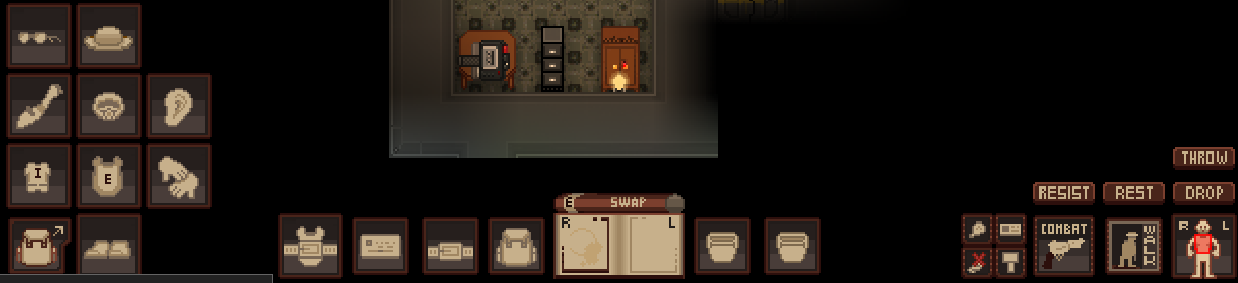
Hello everyone! Today I bring to you all a fancy new HUD for you lot to enjoy: The Trasen-Knox HUD! Lovingly based off of the Common Core lore maintained by EOBGames!

Well, what is it?


Its a HUD with a special theming based on the old 1970's CRT screens that were commonplace at the time, including the iconic neon green and the beige plastic casing!

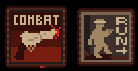
This PR also includes a new behavior so that its possible for each active hand icon to be unique, instead of it being a sole highlighted icon as it was before.
image

And for those wondering, it does indeed account for multiple limbs!
image

Finally, as seen in the first screenshot, this PR adds the behavior to hide the HUD icon when you insert a piece of equipment into the slot. Thank you for adding the behavior, Fikou!

This is all as a step for upgrading and changing how the HUDs we interact with on a daily basis can be upgraded in the future to be more appealing visually! That, and it is simply gorgeous :)

PositiveEntropy, Fikou
add: Adds a new HUD: The Trasen-Knox HUD! With a theming based on classic 1970s CRT screen computers!
code: Added behavior for unique icons for active hands.
code: Added behavior that makes it so when you equip an item, the icon behind it defaults to the blank template type.
About The Pull Request

I noticed a lot of strange and un-intuitive behavior in action buttons, and got stung by the bloat bug. Damn it hug #58027
I'll do my best to explain what I've changed and why, might get a bit long.
If you want a better idea, read the commits. Most of em are pretty solid, if long.

Whelp. Here we go.
How do action buttons currently work

All action buttons are draggable, to any place on the screen. They're held in an actions list on the player's mob.
Their location in this list determines their position on the top of the screen. If one is dragged away from the top, its position in the list is "saved". This looks really bad.
If two buttons are dragged over each other, their positions swap. (inside the actions list too)
If a button is shift clicked, it is brought back to the position it started at.
If the action collapse button that you likely just mentally edit out is alt clicked, it resets the position of all action buttons on the screen.
If an action is ctrl clicked, it is "locked". This prevents any future position changes, and also enables a saving feature. With this saving feature, locked button positions persist between rounds. So your first o2 canister will always start where you saved it, etc.
Actions and buttons are a one to one link. While there is functionality to share action buttons between two players, this means showing the same object to both. So one player can move a button on another's screen. Horrendous.
This also makes code that modifies properties of the screen object itself very clunky.
Why is this bad

A: None knew pretty much any of this information. It is actually documented, just in a horribly formatted screen tip on the collapse button, you know the one we all mentally delete from the hud.
B: None of this is intuitive. Dragging buttons makes the hud look much worse, and you get no feedback that you even can drag them. Depressing
C: We use actions to make new options clear to the player. This means players can have a lot of action buttons on the hud. This gets cluttery
D: The collapse button is useless. It lets you clear your screen if someone like me fucks up and gives you 2000 actions, but outside of that it just hides all information from you. You never want to see none of your action buttons, just a filtered list of them.
E: On a technical level, they're quite messy, and not fully functionally complete. This is depressing.
What I've done

Assuming the above to be true, how do we fix them?
Well first I'm going to go over everything I changed, including links to major commits. I'll then describe the finished product, and why I made the decisions I did.

Oh and I've moved some of the more niche or technical discussion to dropdowns. Hopefully this makes finding the major functional changes easier

Adds helper procs for turning screen_loc strings into more manageable arrays. This doesn't fully support all of the screen_loc spec, but it's enough for what I'm doing. (f54865f)

Uses these helper procs to improve existing code (6273b93)

Fixes an issue with tooltip code itself. If you tried to hold down a mouse button while dragging onto a tooltip enabled object, it would silently fail. The js made assumptions about the order args came in, which broke when buttons were held down (e0e42f6)

Adds a signal linked to /client/Click(). Surprised we didn't have this before honestly (c491a4a)

Makes /client/MouseDrag() return parent. If we don't do this, any overrides of MouseDrag will never actually be called (2190b2a)
Refactors how action buttons work under the hood (53ccce2)
Basically, rather then generating one button per action, we generate one button per viewer

Starts to change button behavior, more cleanup

Changes the mouse cursor when an action button is dragged. Hopefully
this makes moving things feel less like an accident, and makes you doing
it more clear

Removes the moved and locked vars. This will be more relevant later, but
for now:

Moved exists as a sort of budget "We've been dragged" variable. We can
handle this more cleanly, and the movable type doesn't care about it

Locked is a very old variable that is also not something that the
movable type "owns". It's more an action button thing that's been moved
down.
It exists so an action can be locked in place, and in that locking, be
treated as a "saved location"
(21e20fc)

Because I've nuked move, we don't need to directly set our button's
position. We can use the default_button_position var instead. This is
quite handy.

Please ignore position_action, I will explain that later
(83e265e)

Removes the buttons locked pref

It was another obscure part of action buttons, basically do buttons
start "locked" or not. See previous discussion of locked
(b58b1bd)

Major rework starts here

Alright. Sorry for this, this is where me not commiting regularly starts
to suck. I'll do my best though.

Rather then figuring out an action button's position via a combination
of the moved and ordered vars, we use a separate location var to store
one of a few defines. This makes life later much easier.

Adds tooltip support for dragging action buttons. The way the tooltip
just froze in place when dragging really bugged me, and lead to some
nasty visual artifacts.
This is a bit messy because the drag procs are horrible, but it's
workable

Dropping a button on another button will no longer swap their positions
Behavior instead depends on the target button.

If it's a part of a group (A concept I will explain later) the dragged
button is simply inserted before it in the group's list.

If it's floating on the general hud, we instead position the dragged
button to its right. There's extra logic here to ensure buttons will
never overflow the screen, but I'll get into that later.

Alright. That's most of the refactoring. Time for the larger behavior
changes.

Adds a button palette. This is a separate dropdown that renders
underneath buttons.

image

The idea is to allow for a conceptual separation between "important"
buttons and the ones that end up cluttering the screen.

You can click on the dropdown to open it, then any later clicks that
don't involve actions in some way will autoclose it.

My goal is to come up with an alternative for the action button that
just acted as a way to hide all buttons on screen. Not convinced it saw
much use.

As a side effect of removing that, I've moved its tooltip stuff to the
palette. I've properly formatted it, so hopefully it's easier to read
then the jumble that we used to have.

(You can alt click the palette button to reset all button positions)

Oh and the palette can scroll, since as you'll see later it has a
limited size.
image

Moving on from that, I've added what amounts to action landing buttons.
These allow buttons to rejoin groups, or be positioned at the end of a
line of buttons.
image

They've got a 32x32 hitbox, and only show up when dragging. Hopefully
this makes the system more clear just by dragging an action.

Oh and I've changed how button position updating works. The old system
of calling update_action_buttons on mob every time an action button
changes position is gone, mostly because I've setup more robust
grouping. Will discuss when I get to huds

(0d1e93f)
Adds the backbone behind action button position changes (94133bd)

Moves hud defines to the global folder, safer this way (7260117)

Adds color changing to the palette button, giving some heads up for buttons being inserted into the palette automatically
image
image
Ensures a landing button is always shown, even if it needs to break the
max row rule
Makes palettes auto contract if they have no buttons inside them
Prevents palettes from being opened if they have no buttons inside them
(f9417f3)
How it looks
2022-02-26.02-30-10.mp4
Why It's Good For The Game

Players have more control over the clutter on their screen.
Buttons are available, but not in the way,
Since any player move of a button saves it, any lack of clarity in the way buttons work will be forced out by buttons not just resetting when a new game starts.
We don't overlap any existing screen elements, unless the upper button list gets really long.
The code is much less crummy (I think, may have made it worse it's hard for me to judge my own work)

If it ends up not being as usable as I'd like, I'll rip out the existing changes and just implement the qol and backend stuff. I think it's worth doing though.
Changelog

cl
add: Expanded heavily on action buttons
add: Adds an action button dropdown that sits just under the normal list in the top left. You can drag new buttons onto it to insert them. Click on it to show its contents, do what you want to do, then click again anywhere to contract it. Alt click it to reset all button positions
add: Action buttons will now remember their position between rounds. So if you really like your flashlight right next to your player for some reason, we support that now
add: When you start to drag an action button, docking ports will appear in places that it can be inserted into. (Outside of just floating somewhere on your screen of course)
del: Removed action button locking, and the associated preference. I'm reasonably sure literally none uses this, but if you do hit me up
qol: Dragging an action button will now give you an outline of its size around your cursor
fix: You can no longer cause the screen to expand by putting an action button on the edge of widescreen, and then resizing to standard.
refactor: Refactors action and button code significantly. lots of little things.
/cl
* Datumizes all uses of change_view

* Cleanup and helper procs

* tweaks values to match the format, hint hint, (value - 0.5) works just fine

* And there's the rest

* woop, braindamage

* and one more

* fuck you menu file

* woops

* we should apply that

* fixes tooltip drift, thank you goon coders

* you can shake but you can't zoom
* Nanotrasen fires the Wave Motion Gun at the Clock Cult

* Fixes a random changelog appearing from the reebe void.

* Fixes a wrong type reference regarding the bronze sheets in the Lavaland Ruin for it.

* Fixes redundant cells after CC removal in ruin by populating them with varied ore chunks, or destruction clutter.

* why is it /obj/item/stack/sheet/metal but not /obj/item/stack/sheet/iron

* Fixes the lavaland ratvar ruin to have fluff variant structures of deleted shit it referenced instead what I thought was reasonable.
* His Grace is a better item and less globally-announced

* grace

* graceful

* tiny eyes!

* tiny eeeeyes

* less lethal

* You must have His Grace.

* You just need to compile His Grace.

* highly lethal grace

* ding ding ding you're super fucked

* rrr

* His Grace
* Clockcult fixes and tweaks

* die but don't stay dead

* stay dead but never die

* instinct

* unreadable dark magic

* idiocy knows no bounds

* danger close

* like four fucking times faster

* superdynamics
* Servants of Ratvar know the overall cult status at all times

🆑 Joan
rscadd: Added the clockcult "Global Records" alert, which clock cultists can mouse over to check a variety of information on the clockcult's status, including living servants, number of caches, CV, tinkerer's daemons, if there's an unconverted AI, what clockwork generals can be invoked, and what scripture is unlocked.
/🆑

Added a tooltip style for clockcult, for fancy clockcult tooltips.
Assassin holoparasites can go invisible, causing their next attack to do massive damage and ignore armor.
The stealth will be broken by attacking or taking damage.