## About The Pull Request
This PR adds a bunch of sanity checking to the `prefs.chat_toggles` var
accesses.
Prefs can be null when client is creating/deleting and this causes a
runtime where you might not be able to use emotes.

EDIT: as per suggestion I stopped masking the issue and added stack
traces instead. And made them into helper procs to avoid code
duplication.
For some of these procs it is important that we are able to continue
running to get to the end. **A ghost having null prefs should not stop
everyone else from hearing/seeing the emote.**
So now they will put the stack trace and keep on trucking if that issue
occurs. This is the main 'point' of the PR, which has seemingly gotten
bogged down in the creation of the two helper procs--apologies.
See https://github.com/tgstation/tgstation/pull/70404 for essentially
the same issue but applied to chat messages. I have gone back and
replaced the duplicated code from that to use the new helper procs
instead.
## Why It's Good For The Game
Anything chat related is a bad place to runtime. Some messages can take
a while to type out and to have it not display is frustrating at worst,
possibly detrimental if you have to communicate something urgently.
## Changelog
🆑
fix: fixes a bug that can cause emotes to stop working if a client is
being created or deleted
/🆑
## About The Pull Request

Removes all of the duplicate global lists for specific machine types
where the only thing they do is store all machines of that type.
Adds machine tracking to SSmachines in the form of a list for all
machines, and then an associative list for machines by their type.
Previously we have machines in multiple global lists, such as airlocks
being in GLOB.doors, GLOB.airlocks, GLOB.machines.
This makes that not a thing, and also means that iterating through
GLOB.machines looking for a specific type is no longer as expensive.
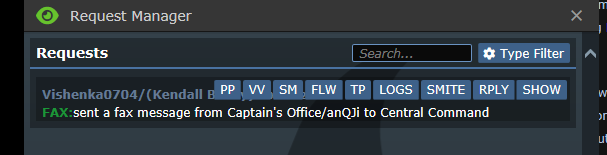
Implements the Requests Manager, a new admin tool used to view all prayers, Centcom/Syndicate requests, and nuke code requests within the span of a round.

The verb can be found under Admin.Game, or alternatively just use the verb directly Requests Manager. The requests can be filtered by type (using the type filter button), or using a text search which searches both the message text as well as the request owner's name.