* Mafia can be played on your PDA (#78576)
## About The Pull Request
Mafia is now friggin playable from the PDA, I also changed other stuff
too
- You can't use abilities on dead people if you're not supposed to (cant
kill the same person over and over)
- Changelings cant kill other Changelings
- Changelings can now only talk to eachother at night, rather than using
:j
- Everyone starts spawned in the center of the map, since people playing
on PDA can't move their characters. This is so everyone can hear PDA
users in person, as I don't want the chat log to be mandatory.
To do this, all messages you are meant to be able to see, is now logged
for you to see in your Mafia panel. This essentially means that people
playing through the PDA get a downgraded version of it, but I don't know
how much larger I want this UI to be.
Playing Mafia through the PDA will not tell you of other players ahead
of time when signing up (as it shows ckeys + pdas), but they can see the
names in-game. Unfortunately this means we'll have to remove your
customization coming with you, to prevent using it to tell who is dead
in round.
Things I am missing
- Program overlays on PDA/Laptop/Computer
- Icon for the app's header while a game is active
I'm not a spriter and can't make either of these
This is the new UI

I also fixed alert calls for PDAs and stuff

and removed the X at the top on computers since they had no battery

Looks a little better now hopefully 👍
## Why It's Good For The Game
- The current Arcade app sucks, and is a solo game. This is much more
entertaining and you can talk to others in it, which is swag as fuck.
- There's a larger potential playerbase for the Minigame making it more
likely to be played.
- Sets groundwork for a better version of
https://github.com/tgstation/tgstation/pull/75879
- Adds more suspense and teamwork in the minigame.
## Changelog
🆑 JohnFulpWillard, sprites by CoiledLamb
add: You can now play Mafia on your PDA.
balance: Mafia changelings can now only talk to eachother during the
night.
fix: Mafia abilities can't be repeatedly used on people.
/🆑
* Mafia can be played on your PDA
---------
Co-authored-by: John Willard <53777086+JohnFulpWillard@users.noreply.github.com>
* Reworks the fishing minigame into a game screen object from a TGUI interface (#78052)

Refactors fishing minigame from tgui window to dm screen objects

* Reworks the fishing minigame into a game screen object from a TGUI interface

---------

Co-authored-by: Ghom <42542238+Ghommie@users.noreply.github.com>
* Multi-tile airlock assemblies/pathing [NO GBP] (#77537)

## About The Pull Request

Small fixes after https://github.com/tgstation/tgstation/pull/76732
- Creates base large subtype for mapping
- Door assembly naming consistent with other airlocks
- Base subtype large airlock no longer spawns in a normal sized airlock
- Renames station2 subtype to public for consistency

## Changelog

🆑 LT3
fix: Base large airlock subtype no longer spawns a normal sized airlock
image: Added mapping icons for large airlocks
code: Repathed all public airlocks to consistent naming
/🆑

* Multi-tile airlock assemblies/pathing [NO GBP]

* maps

* Merge remote-tracking branch 'upstream/master' into upstream-merge-77537

---------

Co-authored-by: lessthanthree <83487515+lessthnthree@users.noreply.github.com>
* [MDB IGNORE] Angled Lights & Lighting Prototyping Tool (#74365)
## About The Pull Request
Hello friends, I've been on a bit of a lighting kick recently, and I
decided I clearly do not have enough things to work on as it is.
This pr adds angle support to static lights, and a concepting/debug tool
for playing with lights on a map.
Let's start from first principles yeah?
### Why Angled Lights?
Mappers, since they can't actually see a light's effect in editor, tend
to go off gut.
That gut is based more off what "makes sense" then how things actually
work
This means they'll overplace light sources, and also they tend to treat
lights, particularly light "bars" (the bigger ones) as directional.
So you'll have two lights on either sides of a pillar, lights inside a
room with lights outside pointing out, etc.

This has annoying side effects. A lot of our map is overlit, to the
point that knocking out a light does.... pretty much nothing.
I find this sad, and would like to work to prevent it. I think dark and
dim, while it does not suit the normal game, is amazing for vibes, and I
want it to be easier to see that.
Angled lights bring how lights work more in line with how mappers expect
lights work, and avoids bleedover into rooms that shouldn't be bled
into, working towards that goal of mine.
### How Angled Lights?
This is more complex then you'd first think so we'll go step by step

Oh before we start, some catchup from the last time I touched lighting
code.
Instead of doing a lighting falloff calculation for each lighting corner
(a block that represents the resolution of our lights) in view we
instead generate cached lightsheets. These precalculate and store all
possible falloffs for x and y distances from a source.
This is very useful for angle work, since it makes it almost totally
free.
Atoms get 2 new values. light_angle and light_dir
Light angle is the angle the light uses, and light_dir is a cardinal
direction it displays in
We take these values, and inside sheetbuilding do some optional angle
work. getting the center angle, the angle of a pair of coords, and then
the delta between them.
This is then multiplied against the standard falloff formula, and job
done.
We do need some extra fenangling to make this all work nicely tho.
We currently use a pixel turf var stored on the light source to do
distance calculations.
This is the turf we pretend the light source is on for visuals, most
often used to make wall lights work nice.
The trouble is it's not very granular, and doesn't always have the
effect you might want.
So, instead of generating and storing a pixel turf to do our distance
calculations against, we store x and y offset variables.
We use them to expand our working range and sheet size to ensure things
visually make sense, and then offset any positions by them.
I've added a way for sources to have opinions on their offsets too, and
am using them for wall lights.
This ensures the angle calculations don't make the wall behind a light
fulldark, which would be silly.
### Debug Tool?
In the interest of helping with that core problem, lights being complex
to display, I've added a prototyping tool to the game.
It's locked behind mapping verbs, and works about like this.
Once the verb is activated, it iterates over all the sources in the
world (except turfs because those are kinda silly), outlining and
"freezing" them, preventing any future changes.
Then, it adds 3 buttons to the owners of a light source.

The first button toggles the light on and off, as desired.
The third allows you to move the source around, with a little targeting
icon replacing your mouse
The second tho, that's more interesting.
The second button opens a debug menu for that light

There's a lot here, let's go through it.
Bit on the left is a list of templates, which allow you to sample
existing light types (No I have no idea why the background is fullwhite,
need to work on that pre merge)
You can choose one by clicking it, and hitting the upload button.
This replaces your existing lighting values with the template's,
alongside replacing its icon and icon state so it looks right.
There are three types as of now, mostly for categorization. Bar, which
are the larger typically stronger lights, Bulb, which are well, bulbs,
and Misc which could be expanded, but currently just contains floor
lights.
Alongside that you can manually edit the power, range, color and angle
of the focused light.
I also have support for changing the direction of the light source,
since anything that uses directional lighting would also tie light dir
to it.
This isn't *always* done tho, so I should maybe find a way to edit light
dir too.
My hope is this tool will allow for better concepting of a room's
lights, and easier changing of individual object's light values to suit
the right visuals.
### Lemon No Why What
Ok so I applied angle lights to bars and bulbs, which means I am
changing the lighting of pretty much every map in the codebase.
I'm gonna uh, go check my work.
Alongside this I intend to give lighting some depth. So if there's room
to make a space warmer, or highlight light colors from other sources, I
will do that.
(Images as examples)

I also want to work on that other goal of mine, making breaking lights
matter. So I'll be doing what I can to ensure you only need to break one
light to make a meaningful change in the scene.
This is semi complicated by one light source not ever actually reaching
fullbright on its own, but we do what we must because we can.

I'm as I hope you know biased towards darker spaces, I think contrast
has vibes.
In particular I do not think strong lights really suit maintenance.
Most of what is used there are bulbs, so I'm planning on replacing most
uses with low power bulbs, to keep light impacts to rooms, alongside
reducing the amount of lights placed in the main tunnels

**If you take issue with this methodology please do so NOW**, I don't
want to have to do another pass over things.
Oh also I'm saving station maps for last since ruins are less likely to
get touched in mapping march and all.
### Misc + Finishing Thoughts
Light templates support mirroring vars off typepaths using a subtype,
which means all the templates added here do not require updating if the
source type changes somehow. I'd like to expand the template list at
some point, perhaps in future.
I've opened this as a draft to make my intentions to make my changes to
lights known, and to serve as motivation for all the map changes I need
to do.
### Farish Future
I'm unhappy with how we currently configure lights. I would like a
system that more directly matches the idea of drawing falloff curves,
along with allowing for different falloffs for different colors,
alongside extending the idea to angle falloff.
This would make out of engine lighting easier, allow for nicer looking
lights (red to pink, blue to purple, etc), and improve accessibility by
artists.
This is slightly far off, because I have other obligations and it's
kinda complicated, but I'd like to mention it cause it's one of my many
pipedreams.
## Changelog
🆑
add: Added angle lighting, applies it to most wall lights!
add: Adds a lighting prototyping tool, mappers go try it out (it's
locked behind the mapping verb)
/🆑
---------
Co-authored-by: MMMiracles <lolaccount1@ hotmail.com>
* [MDB IGNORE] Angled Lights & Lighting Prototyping Tool
* Update north_star.dmm
* Revert "Update north_star.dmm"
This reverts commit bb5b8b5a549f7edc3e23a369a147ed96bab41991.
* Updatepaths
* Update nukie_base.dmm
* Newer version of northstar with the penguins
* Update northstar_cryo.dmm
---------
Co-authored-by: LemonInTheDark <58055496+LemonInTheDark@users.noreply.github.com>
Co-authored-by: MMMiracles <lolaccount1@ hotmail.com>
Co-authored-by: lessthanthree <83487515+lessthnthree@users.noreply.github.com>
Co-authored-by: Giz <13398309+vinylspiders@users.noreply.github.com>
makes the rcd able to make girders (#76515)

## About The Pull Request

rcd can make girders at half the cost of making a wall in 1.3 seconds

## Why It's Good For The Game
more "rapid" than using iron for girders and putting whatever material
on it

## Changelog
🆑
add: rcd can make girders now
/🆑

Co-authored-by: jimmyl <70376633+mc-oofert@users.noreply.github.com>
* Icon folder cleaning wave one

* Fixe a merge conflict

* Fixes some more merge conflicts

* Fixes some modular icon paths

* Fixes even more modular icon paths...

Hopefully that's the last of them

* Fixes some merge discrepencies

* More merge issues

* ok

* not ok

---------

Co-authored-by: YesterdaysPromise <122572637+YesterdaysPromise@users.noreply.github.com>
Co-authored-by: Giz <vinylspiders@gmail.com>
* Air Sensor are Craftable, Removed from RPD UI, Have New Linking System (#75869)
## About The Pull Request
**1. Craftable & Removed from RPD UI**
1. Air sensor's are now craftable
2. You can turn them on/off with hand. Even though turning off the
sensor will change it to a diffrent type[from `obj/machinery/air_sensor`
-> `obj/item/air_sensor`] it's I/O port's are sill preserved when
turning them on although you have to assign it a new name again which is
usefull if you want to change the sensor's purpose in game.
3. They can now only be deconstructed by a welding tool and should be
wrenched in place to turn them on.
4. Turned off air sensor's once unwrenched can be picked up like any
regular item
5. Air sensor's are removed from the RPD UI because they don't go with
pipes so it logically doesn't make sense to group them with pipe related
device's
Removed unused code in the process
https://github.com/tgstation/tgstation/assets/110812394/3439a0f3-9c48-43ac-8f4b-98135435ec13
**2. New ID System**
The problem with air sensor's is that each sensor is assigned a unique
ID which is then stored in `GLOB.objects_by_id_tag` list. Each sensor
name it's assigned based on the gas it's trying to sense(for naming only
even though it can detect other gases) So if 2 sensor's having the same
ID are made they will overwrite each other in this list leaving one
sensor orphaned in the world which cannot be referenced because it's
value was overwritten by a new sensor having the same ID in this list.
The Solution? Rather than having all atmos computer's look up sensor's
from this 1 global list make each computer keep track of all sensor's
it's responsible for in it's own local list[which i called
`connected_sensor's`] this way 2 sensor's can have randomly generated
names in the global `GLOB.objects_by_id_tag` list but the computer will
know what sensor to look up in this list based on the stored sensor ID's
in the `connected_sensor's` list
Basically what i am getting at is now you can make as many air sensor's
as you wish but you will know have to connect that sensor to the
computer using a multitool.
Notice in the video how i made 2 sensor's called `Supermatter Chamber
Sensor's`] and every time you try to connect an sensor which has the
same name[`Supermatter Chamber Sensor's` in this case] they will
ovewrite the old sensor in it's list as shown in the video
https://github.com/tgstation/tgstation/assets/110812394/b5283c3b-c8a1-4b94-a6a8-8ba7a0007615
**Why it's good for the game**

I agree. Also air sensor's taking up a full Tab/Section in the RPD UI
wasted a lot of UI space so that's removed now. Also making the air
sensor's wrenchable and pickable item's was also requested in
https://github.com/tgstation/tgstation/pull/72019#issuecomment-1355499873
so you relate them to device's like meter's
Another huge issue was that the number of air sensor's you can make in
the world was limited because each sensor in the world must have a
unique ID but that's finally fixed now so yeah make as many sensor's as
you want.
## Changelog
🆑
add: air sensor's are craftable
refactor: air sensor's can now be turned off by hand and can only be
deconstructed by a welding tool
refactor: removed `Params()` proc
qol: unwrenched air sensors can be picked up & recycled like regular
item's
del: air sensor are removed from the RPD UI
qol: air sensor's are no longer restricted by their unique ID's which
mean you can craft as many air sensors as you want.
/🆑
---------
Co-authored-by: Time-Green <timkoster1@ hotmail.com>
* Air Sensor are Craftable, Removed from RPD UI, Have New Linking System
---------
Co-authored-by: SyncIt21 <110812394+SyncIt21@users.noreply.github.com>
Co-authored-by: Time-Green <timkoster1@ hotmail.com>
* Condiments resprited (#75715)

## About The Pull Request
Resprited many condiment containers.
And a tray (don't know why, it just was in the dmi)
Replaced the old condiment bottle from Condi Master with the one that
was used in Chem Master before the test tubes.
## Why It's Good For The Game
More in line with other 3/4 stuff
## Changelog
🆑
image: Resprited many condiment containers
image: Added a sprite for cooking oil / corn oil container
image: Replaced old condiment bottles with the newer bottles in Condi
Master
/🆑
* Condiments resprited
---------
Co-authored-by: Andrew <mt.forspam@gmail.com>
* Fix broken icons in the crafting menu (#75649)
## About The Pull Request
**1. Rolling Pin Icon Fix**
The rolling pin icon shows up correctly under the tools section

The problem was with the text
`#define TOOL_ROLLINGPIN "rolling pin"`
`"rolling pin"` has a space in it's name, so when it's sent to the UI
and used as a css class identifier it get's treated as 2 separate
classes
class1 = rolling
class2 = pin
Causing undefined results. So i made sure to remove this space when
inserting this name as a sprite sheet and also remove the space manually
in the Client-Side UI
Fixes#75525
**2. Basketball Hoop Icon Fix**
The basket ball hoop has the correct icon in the crafting menu

This is not an `32 x 32` icon but an `32 x 64 ` icon so we assumed the
icon size wrong hence it got rendered incorrectly. Now in the back end
we query the size of the icon using the datum sprite sheet before
sending it to the UI, so this should also fix a lot of other broken
icon's that are not the standard `32 x 32` that went un noticed
## Changelog
🆑
fix: rolling pin icon show's up correctly under the tools section in the
crafting menu i.e. for those recipes that require it
fix: basketball hoop icon and other sprites that are not the standard
`32 x 32` now show's up correctly in the crafting menu
/🆑
* Fix broken icons in the crafting menu
---------
Co-authored-by: SyncIt21 <110812394+SyncIt21@users.noreply.github.com>
* Allows the surgery body zone selector to use other UI themes (#74957)

## About The Pull Request
Allows uses of the body zone selector for non-base TGUI themes (that
look good, that is), doesn't add any to the asset cache, however, as
this is just groundwork

## Why It's Good For The Game
The potential of things for looking better for other TGUI themes

## Changelog
Nothing player-facing

* Allows the surgery body zone selector to use other UI themes

---------

Co-authored-by: Zonespace <41448081+Zonespace27@users.noreply.github.com>
* Config Flag to Save Generated Spritesheets to Logs (#74884)
## About The Pull Request
I was helping someone debug some weird bug with spritesheets a bit ago,
and I didn't like having to manually comment out all of the `fdel()`
stuff in order to help visualize what the potential issue might have
been with the spritesheets on either their DM-side generation or their
TGUI-level display. I decided to add a compile-time level flag that will
automatically copy over any generated spritesheet assets (css and pngs)
to the round-specific `data/logs` folder for analysis when a developer
should need it.
I also had to switch around some vars and make a few new ones to reduce
how copy-pasta it might get and ensure standardization/readability while
also being 0.001 times faster since we benefit from the string cache
(unprovable fact).
## Why It's Good For The Game
It's incredibly useful to see the actual flattened spritesheet itself
sometimes when you're doing this type of work and you keep getting odd
bugs here and there. Also saves headache from having to clear out the
temp `/data/spritesheets` folder every time you comment shit out, as
well as having an effective paper trail for A/B testing whatever
bullshit you've got going on.

## Changelog
Doesn't affect players.
* Config Flag to Save Generated Spritesheets to Logs
---------
Co-authored-by: san7890 <the@san7890.com>
* Reagent soup / Soup rework / Stoves - A kitchen expansion

* fixes that stuff

* puts the range stove on maps that sohuld have it

* fixes some paths that don't exist anymore

---------

Co-authored-by: MrMelbert <51863163+MrMelbert@users.noreply.github.com>
Co-authored-by: Paxilmaniac <paxilmaniac@gmail.com>
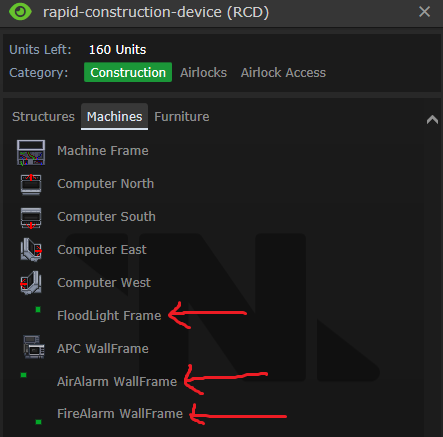
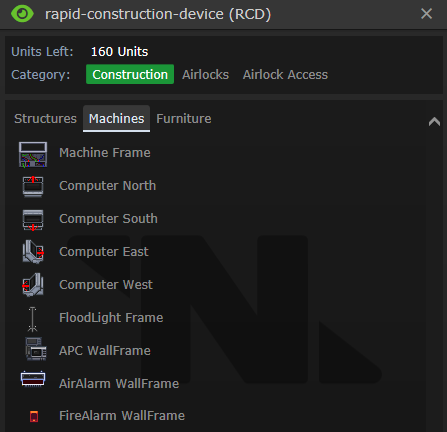
Some more RCD Designs & Patches (#72757)
Adds some more stuff you can build with the RCD
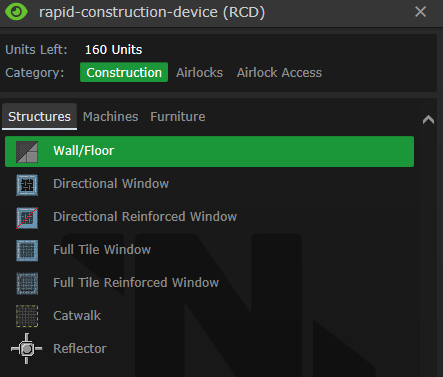
1. Under structures you can now build/deconstruct catwalks & construct
Reflector Frames. Destorying a catwalk will cut any cable on it leaving
pieces of it behind
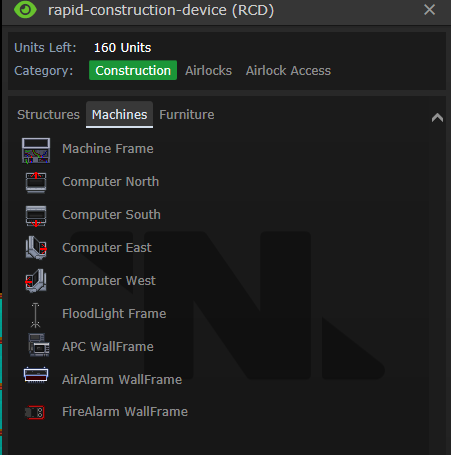
2. If you have the frames upgrade you can construct APC, Air Alarm &
Fire Alarm frames on walls & Flood light fixtures[fully wired]. It only
creates the wall mount and sticks it on the wall. Wiring, Circuits and
finishing the frame is still your job
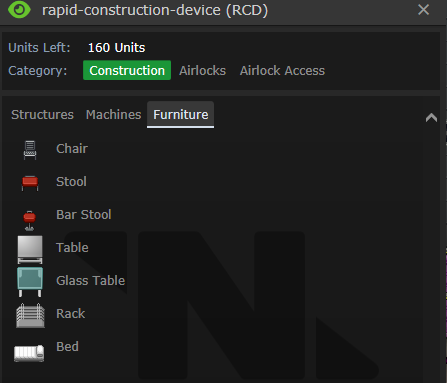
3. If you have the furnishing upgrade you can create racks & beds &
additional bar stool
**Important Code Refractors**
1. `/turf/closed/wall/proc/try_wallmount()` will return true only after
you have successfully mounted the wallframe or stuck an poster on it &
not simply check if you are trying to mount a valid thing on it
2. `apc_tool_act/rcd_act()` was incorrectly checking passed_mode for the
simple circuit upgrade and not the `the_rcd.upgrade `flag. Thats fixed
now to
3. newly created APC's weren't assigning themselves to their areas
allowing multiple to be created in one area. Thats fixed now
4. Walls, Airlocks & other stuff could be built on tiles having
something dense that would block it. For example a wall could be build
on top of a machine frame!!. Thats also fixed now
More stuff you can build rapidly with the RCD
🆑
add: more designs for the rcd
refactor:` try_wallmount()` to return true only after successful mount
fix: `apc_tool_act/rcd_act()` incorrecly checking for simple circuits
upgrade in the wrong variable
fix: newly created APC's not assigning themselves to their areas.
fix: rcd building structures [walls, airlocks etc] on turf's that
already have structures on them
/🆑
Co-authored-by: SyncIt21 <110812394+SyncIt21@users.noreply.github.com>
RnD design spritesheet ignores designs with an 'ignored' ID (#72227)

## About The Pull Request

We have a define to ignore certain designs to be ignored from RND,
except they aren't excluded from the spritesheet, this fixes that,
making it work as it's supposed to.

## Why It's Good For The Game

Currently it's only used for the base design, but if we ever want to
make base subtypes (like biogenerator so we don't have to re-define
build_type and category every single time like we currently do) then
this will let us do it without causing runtime errors for
non-functional/double sprites.

## Changelog

Nothing player-facing.

Co-authored-by: John Willard <53777086+JohnFulpWillard@users.noreply.github.com>
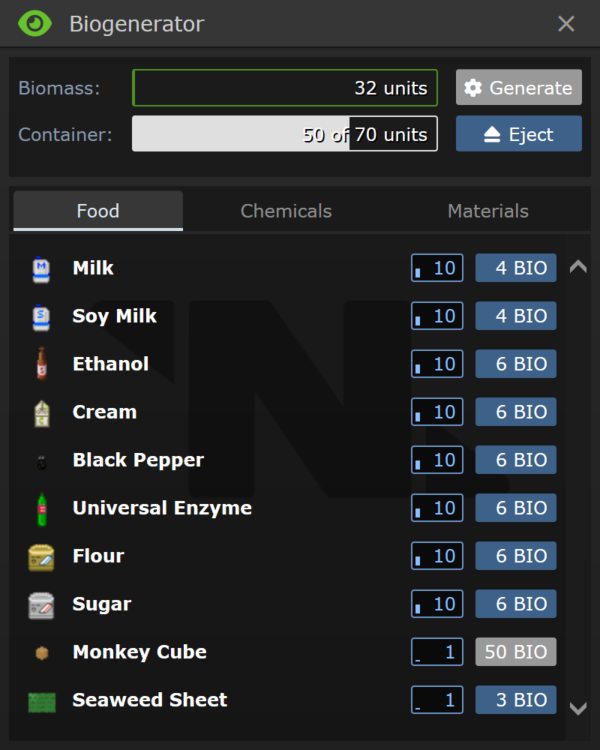
* Biogen shows default reagent container icons instead of beakers (#72247)

## About The Pull Request

With the new crafting menu some reagents now have default container
assigned.
I applied these to visualize reagents in biogen UI too.

<img alt="060ybChTkI"
src="https://user-images.githubusercontent.com/3625094/209483256-e4159a05-46ae-47b8-bc42-9d003cf6c303.png">

## Why It's Good For The Game

Better representation of a reagent.

## Changelog

🆑
qol: Biogenerator shows default reagent containers instead of beakers
/🆑

* Biogen shows default reagent container icons instead of beakers

Co-authored-by: Andrew <mt.forspam@gmail.com>
Co-authored-by: Zonespace <41448081+Zonespace27@users.noreply.github.com>
* Crafting/Cooking menu update

* Yeeted away all of the merge conflicts, time to fix the code

* Okay, now it compiles, and after testing, it seems to work just fine

* Actually, early addition of an upstream fix, so those that don't have hunger can still open the cooking menu

* Fixes the units tests by removing the extra comma in the Stuffed Muli Pod recipe

Co-authored-by: Andrew <mt.forspam@gmail.com>
Co-authored-by: GoldenAlpharex <jerego1234@hotmail.com>
Co-authored-by: GoldenAlpharex <58045821+GoldenAlpharex@users.noreply.github.com>
* Fixes vendor showing weird glass icons (#71929)

## About The Pull Request
Fixes vendor showing weird glass icons
## Why It's Good For The Game
bug fix good
## Changelog
🆑
fix: vendor no longer shows glass icons in a specific condition
/🆑

* Fixes vendor showing weird glass icons

* removes GLOB.vending_products

* removes glob

* changes asset file

* Nothing like using CI to test for asset runtimes

Co-authored-by: EvilDragonfiend <87972842+EvilDragonfiend@users.noreply.github.com>
Co-authored-by: Funce <funce.973@gmail.com>
* refreshes syndi-kits and syndicate surplus crates, introduces shared limited stock

* merge conflict

* Surplus balance, Consolidated our surplus crate and the new tg one to just use our stats

* use upstream surplus loot crates

* syndicrate

Co-authored-by: Sol N <116288367+flowercuco@users.noreply.github.com>
Co-authored-by: tastyfish <crazychris32@gmail.com>
* Build your own atmos chambers (#72019)
## About The Pull Request
https://user-images.githubusercontent.com/110812394/208232089-a183fb95-9326-4514-986a-a2b1e21be40c.mp4
**Notes**
- You can print atmos control circuit boards at the circuit printer
after research
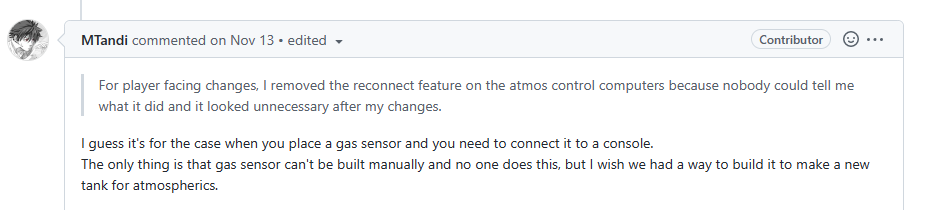
- You can only build one sensor for each gas type for in the whole map.
This is because each sensor is assigned a unique chamber id from a fixed
set of constants. Once all those values are used up there will be
duplicates so yeah only sensor per gas type for that round
- Un wrenching or destroying the injector/vent will automatically
disconnect them from the sensor. I forgot to show that in the video
- Destroying the sensor via right click with RPD will also automatically
disconnect everything. It should be obvious but i made it even more
obvious now
## Why It's Good For The Game
From #71232
That and also i heard somewhere in the forum that this was highly
requested
## Changelog
🆑
add: Gas sensors recipe to RPD
code: linking all the stuff via multitool
qol: make your own tank instead of moving around canisters
/🆑
Co-authored-by: Mothblocks <35135081+Mothblocks@ users.noreply.github.com>
* Build your own atmos chambers
Co-authored-by: SyncIt21 <110812394+SyncIt21@users.noreply.github.com>
Co-authored-by: Mothblocks <35135081+Mothblocks@ users.noreply.github.com>
* Allows for offloaded tests to be focused (#71719)

Focusing a test through TEST_FOCUS allows you to only run that one test.
It's very useful for developing. However, we have a bunch of offloaded
tests in `#ifdef UNIT_TESTS` that would not be focused. This changes it
so that those tests will now only run if either no test is focused, or
if their specific "focus only" test is focused.

This is done through a `PERFORM_ALL_TESTS` macro that replaces the
`#ifdef UNIT_TESTS`. This is completely free because `if (FALSE)`
constant folds.

Hide whitespace mode recommended.

* Allows for offloaded tests to be focused

Co-authored-by: Mothblocks <35135081+Mothblocks@users.noreply.github.com>
* TGUI replaces Radial menu for Plumbing RCD (#71569)

**About the pull request**
Radial menu's replaced with TGUI window for all plumbing RCD's

https://user-images.githubusercontent.com/110812394/204481973-8f6d62c0-9288-4165-bce7-ee8bfec95bee.mp4

**Why it's good for the game**

**1. Faster Navigation**
- Old System: It had 3 radial menus'
   ->To select type of device to build
   ->To select the colour of fluid ducts
   ->To select the layer of devices
3 menus for one system makes navigation between them annoying for e.g.:
to create a red fluid duct of layer 5 you have to open all these 3 menus
& cycling through the radial menu by clicking the next button is time
consuming when you have a large number of items
- New System: with just one window open it's as simple as 3 clicks and
your done just like the RPD

**2. Always available**
- Old System: When you select an option inside a radial menu the menu
closes so you have to reopen it again to change a setting
- New System: open the window drag it to the side and it will always be
there for you

**3. Just easier for our eyes**
- Old System: Moving my eyes in a circle across the menu only to find
out i have to click Next and circle my eyes again honestly makes my head
spin
- New System: The menu options are small enough to be viewed all at once
& helps me see what I need more easily

**4. Consistency**
Both the RPD & plumbing all have similar concepts i.e., pipes, devices,
layers & colours it only makes sense they should have similar
interfaces. Also categorizing the items into tabs can help with
explaining what each item does

**Conclusion**
Just because the radial menu looks attractive shouldn't mean it must be
used everywhere, it only makes sense to use it when the number of
options of an item is small enough to be displayed on the screen all at
once for e.g., modules in a Mod suit. If the user has to click the next
button to cycle through the item's, it defeats the purpose of the radial
menu and makes the user work more to find his settings

**Side Note :** removed unused code in RapidPipeDispenser.js

**ChangeLog**

🆑
add: plumbing constructor TGUI, just like Rapid Pipe Dispensers
del: plumbing constructor radials
code: categories for each item
/🆑

Co-authored-by: Mothblocks <35135081+Mothblocks@ users.noreply.github.com>
Co-authored-by: Jeremiah <42397676+jlsnow301@ users.noreply.github.com>
Co-authored-by: Time-Green <timkoster1@ hotmail.com>

* TGUI replaces Radial menu for Plumbing RCD

Co-authored-by: SyncIt21 <110812394+SyncIt21@users.noreply.github.com>
Co-authored-by: Mothblocks <35135081+Mothblocks@ users.noreply.github.com>
Co-authored-by: Jeremiah <42397676+jlsnow301@ users.noreply.github.com>
Co-authored-by: Time-Green <timkoster1@ hotmail.com>
* Fix roundstart seed and fish asset runtimes (#71452)

## About The Pull Request

Fixes annoying roundstart runtimes coming from a wrong deduplication
method. `sprites[id]` was empty at the time of the check and only got
filled when it started actually building the spritesheet. Now it's
tracked in a local variable.

No changelog update since it's not visible on the player side.

* Fix roundstart seed and fish asset runtimes

Co-authored-by: disappointedButNotSuprised <57324037+disappointedButNotSuprised@users.noreply.github.com>
* Particle editor (#71110)

## About The Pull Request
Demo: https://streamable.com/wnj3mf

Features:
- Full support for most gradients/vectors/numbers/generators/transforms
( I might have forgotten some of the more esoteric ones)
- A "tutorial" section that explains the different rand/generation types
and how physics works with pictures
- Button for viewing what each var does
- Selecting a particle type to set immediately
- The generator types use defines now

Not included:
Color matrix support for color generators (I'm sorry but hell no)

Special thanks to @ jlsnow301 for explaining js things to me

## Why It's Good For The Game

Making cool stuf

## Changelog
🆑
refactor: Added a particle editor to VV dropdown which can be used by
coders and admins to edit particle values on the fly easily.
/🆑

Co-authored-by: TiviPlus <572233640+TiviPlus@ users.noreply.com>

* Particle editor

Co-authored-by: TiviPlus <57223640+TiviPlus@users.noreply.github.com>
Co-authored-by: TiviPlus <572233640+TiviPlus@ users.noreply.com>
* NtOS Emojipedia - PDA Emoji Messaging For All (#70829)

An Emojipedia app has been added to tablets, given to Mimes and Curators by default, allowing anyone to know all emojis. Additionally, emojis can be used in tablets by every job now.

* NtOS Emojipedia - PDA Emoji Messaging For All

* update emoji list to be valid

* animated emojis

Co-authored-by: san7890 <the@san7890.com>
Co-authored-by: tastyfish <crazychris32@gmail.com>
* Ensures early assets init when expected during unit tests,  (#70753)

Co-authored-by: Mothblocks <35135081+Mothblocks@ users.noreply.github.com>

* Ensures early assets init when expected during unit tests,

Co-authored-by: LemonInTheDark <58055496+LemonInTheDark@users.noreply.github.com>
Co-authored-by: Mothblocks <35135081+Mothblocks@ users.noreply.github.com>
* Misc PDA code improvements (#70555)

* How to conflict with PRs: A guide

* Removes unnecessary support for the now-removed job disks from Tablet's TGUI menu, and tablet's ui_act.
* Adds autodoc comments to computer files
* Removes the unused 'unsendable' var on computer files
* Generally improves code on tablets, now process isn't looping through every idle thread twice!
* Moves the check for program in idle_threads above checking if supported by hardware, because it's already running, so there's no need to check.

* eh

* revert a scipaper change

* Misc PDA code improvements

* updated contract_uplink

Co-authored-by: John Willard <53777086+JohnFulpWillard@users.noreply.github.com>
Co-authored-by: Tastyfish <crazychris32@gmail.com>