 4b4e9dff1d
## What's going on here Kept you waitin huh! This pr resprites most all walls, windows and other "wall adjacent" things to a 3/4th perspective, technical term is "tall" walls (we are very smart). If you're trying to understand the technical details here, much of the "rendering tech" is built off the idea of split-vis. Basically, split a sprite up and render it on adjacent turfs, to prevent seeing "through" walls/doors, and to support seeing "edges" without actually seeing the atom itself. Most of the rest of it is pipelining done to accommodate how icons are cut. ## Path To Merge Almost* all sprites and code is done at this point. There are some things missing both on and off the bounty list, but that will be the case forever unless we force upstream (you guys) to stop adding new shit that doesn't fit the style. I plan on accepting and integrating prs to the current working repo <https://github.com/wall-nerds/wallening> up until a merge, to make contribution simpler and allow things like bounties to close out more easily This pr is quite bulky, even stripping away map changes it's maybe 7000 LOC (We have a few maps that were modified with UpdatePaths, I am also tentatively pring our test map, for future use.) This may inhibit proper review, although that is part of why I am willing to make it despite my perfectionism. Apologies in advance. Due to the perspective shift, a lot of mapping work is going to need to be done at some point. This comes in varying levels of priority. Many wallmounts are offset by hand, some are stuck in the wall/basically cannot be placed on the east/west/north edges of walls (posters), some just don't look great good in their current position. Tests are currently a minor bit yorked, I thought it was more important to get this up then to clean them fully. ## What does it look like?       ## Credits <details> <summary>Historical Mumbojumbo</summary> I am gonna do my best to document how this project came to be. I am operating off third party info and half remembered details, so if I'm wrong please yell at me. This project started sometime in late 2020, as a product of Rohesie trying to integrate and make easier work from Mojave Sun (A recently defunct fallout server) with /tg/. Mojave Sun (Apparently this was LITERALLY JUST infrared baron, that man is insane) was working with tall walls, IE walls that are 48px tall instead of the normal 32. This was I THINK done based off a technical prototype from aao7 proving A it was possible and B it didn't look like dogwater. This alongside oranges begging the art team for 3/4th walls (he meant TGMC style) lead to Rohesie bringing on contributors from general /tg/, including actionninja who would eventually take over as technical lead and Kryson, who would define /tg/'s version of the artstyle. Much of the formative aspects of this project are their work. The project was coming along pretty well for a few months, but ran into serious technical issues with `SIDE_MAP`, a byond map_format that allows for simpler 3/4th rendering. Due to BULLSHIT I will not detail here, the map format caused issues both at random with flickering and heavily with multiz. Concurrent with this, action stepped down after hacking out the rendering tech and starting work on an icon cutter that would allow for simpler icon generation, leaving ninjanomnom to manage the project. Some time passed, and the project stalled out due to the technical issues. Eventually I built a test case for the issues we had with `SIDE_MAP` and convinced lummox jr (byond's developer) to explain how the fuckin thing actually worked. This understanding made the project theoretically possible, but did not resolve the problems with multi-z. Resolving those required a full rework of how rendering like, worked. I (alongside tattle) took over project development from ninjanomnom at this time, and started work on Plane Cube (#69115), which when finished would finally make the project technically feasible. The time between then and now has been slow, progressive work. Many many artists and technical folks have dumped their time into this (as you can see from the credits). I will get into this more below but I would like to explicitly thank (in no particular order) tattle, draco, arcanemusic, actionninja, imaginos, viro and kylerace for keeping the project alive in this time period. I would have curled up into a ball and died if I had to do this all myself, your help has been indispensable. </details> <details> <summary>Detailed Credits</summary> Deep apologies if I have forgotten someone (I am sure I have, if someone is you please contact me). I've done my best to collate from the git log/my memory. Thanks to (In no particular order): Raccoff: Being funny to bully, creating threshold decals for airlocks aa07: (I think) inspiring the project ActionNinja: Laying the technical rock we build off, supporting me despite byond trying to kill him, building the icon cutter that makes this possible ArcaneMusic: Artistic and technical work spanning from the project's start to literally today, being a constant of motivation and positivity. I can't list all the stuff he's done Armhulen: Key rendering work (he's the reason thindows render right), an upbeat personality and a kick in the ass. Love you arm Azlan: Damn cool sprites, consistently Ben10Omintrix: You know ben showed up just to make basic mobs work, he's just fuckin like that man BigBimmer: A large amount of bounty work, alongside just like, throwing shit around. An absolute joy to work with Capsandi: Plaques, blastdoors, artistic work early on CapybaraExtravagante: Rendering work on wall frames Draco: SO MUCH STUFF. Much of the spritework done over the past two years is his, constantly engaged and will take on anything. I would have given up if not for you Floyd: Early rendering work, so early I don't even know the details. Enjoy freedom brother Imaginos16: A guiding hand through the middle years, handled much of the sprite review and contribution for a good bit there Iamgoofball: A dedication to detail and aesthetic goals, spends a lot of effort dissecting feedback with a focus on making things as good as they can be at the jump Infrared: Part of the impetus for the project, made all the xenomorph stuff in the MS style Jacquerel: A bunch of little upkeep/technical things, has done so much sprite gruntwork (WHY ARE THERE SO MANY PAINTING TYPES) Justice12354: Solved a bunch of error sprites (and worked out how to actually make prs to the project) Thanks bro! Kryson: Built the artstyle of the project, carrying on for years even when it was technically dying, only stopping to casually beat cancer. So much of our style and art is Kryson KylerAce: Handled annoying technical stuff for me, built window frame logic and fully got rid of grilles. LemonInTheDark: Rendering dirtywork, project management and just so much fucking time in dreammaker editing sprites Meyhazah: Table buttons, brass windows and alll the old style doors Mothblocks: Has provided constant support, gave me a deadline and motivation, erased worries about "it not being done", gave just SO much money to fill in the critical holes in sprites. Thanks moth MTandi: Contributed art despite his own blackjack and hookers club opening right down the road, I'm sorry I rolled over some of your sprites man I wish we had finished earlier Ninjanomnomnom: Consulted on gags issues, kept things alive through some truly shit times oranges: This is his fault Rohesie: Organized the effort, did much of the initial like, proof of concept stuff. I hope you're doin well whatever you're up to. san7890: Consulting on mapper UX/design problems, being my pet mapper Senefi: Offsetting items with a focus on detail/the more unused canidates SimplyLogan: Detailed map work and mapper feedback, personally very kind even if we end up talking past each other sometimes. Thank you! SpaceSmithers: Just like, random mapping support out of nowhere, and bein a straight up cool dude Tattle: A bunch of misc project management stuff, organizing the discord, managing the test server, dealing with all the mapping bullshit for me, being my backup in case of bus. I know you think you didn't do much but your presence and work have been a great help Thunder12345: Came out of nowhere and just so much of the random bounties, I'm kind of upset about how much we paid him Time-Green: I hooked him in by fucking with stuff he made and now he's just doin shit, thanks for helping out man! Twaticus: Provided artistic feedback and authority for my poor feeble coder brain, believed in the project for YEARS, was a constant source of ❤️ and affirmation unit0016: I have no god damn idea who she is, popped out of nowhere on the github one day and dealt with a bunch of annoying rendering/refactoring. Godspeed random furry thank you for all your effort and issue reports Viro: A bunch of detailed spriting moving towards 3/4ths, both on and off the wallening fork. If anyone believed this project would be done, it was viro Wallem: Artistic review and consultation, was my go-to guy for a long time when the other two spritetainers were inactive Waltermeldon: Cracked out a bunch of rendering work, he's the reason windows look like not dogwater. Alongside floyd and action spent a TON of time speaking to lummox/unearthing how byond rendering worked trying to make this thing happen ZephyrTFA: Added directional airlock helpers, dealt with a big fuckin bugaboo that was living in my brain like it was nothing. Love you brother And finally: The Mojave Sun development team. They provided a testbed for the idea, committed hundreds and hundreds of hours to the artstyle, and were a large reason we caught issues early enough to meaningfully deal with them. Your work is a testament to what longterm effort and deep detailed care produce. I hope you're doing well whatever you're up to. Go out with a bang! </details> ## Changelog 🆑 Raccoff, aa07, ActionNinja, ArcaneMusic, Armhulen, Azlan, Ben10Omintrix, BigBimmer, Capsandi, CapybaraExtravagante, Draco, Floyd, Iamgoofball, Imaginos16, Infrared, Jacquerel, Justice12354, Kryson, KylerAce, LemonInTheDark, Meyhazah, Mothblocks, MTandi, Ninjanomnom, oranges, Rohesie, Runi-c, san7890, Senefi, SimplyLogan, SomeAngryMiner, SpaceSmithers, Tattle, Thunder12345, Time-Green, Twaticus, unit0016, Viro, Waltermeldon, ZephyrTFA with thanks to the Mojave Sun team! add: Resprites or offsets almost all "tall" objects in the game to match a 3/4ths perspective add: Bunch of rendering mumbo jumbo to make said 3/4ths perspective work /🆑 --------- Co-authored-by: Jacquerel <hnevard@gmail.com> Co-authored-by: san7890 <the@san7890.com> Co-authored-by: = <stewartareid@outlook.com> Co-authored-by: Capsandi <dansullycc@gmail.com> Co-authored-by: ArcaneMusic <hero12290@aol.com> Co-authored-by: tattle <66640614+dragomagol@users.noreply.github.com> Co-authored-by: SomeAngryMiner <53237389+SomeAngryMiner@users.noreply.github.com> Co-authored-by: KylerAce <kylerlumpkin1@gmail.com> Co-authored-by: ArcaneMusic <41715314+ArcaneMusic@users.noreply.github.com> Co-authored-by: Time-Green <7501474+Time-Green@users.noreply.github.com> Co-authored-by: lessthanthree <83487515+lessthnthree@users.noreply.github.com> Co-authored-by: Ben10Omintrix <138636438+Ben10Omintrix@users.noreply.github.com> Co-authored-by: Runi-c <5150427+Runi-c@users.noreply.github.com> Co-authored-by: Roryl-c <5150427+Roryl-c@users.noreply.github.com> Co-authored-by: tattle <article.disaster@gmail.com> Co-authored-by: Senefi <20830349+Peliex@users.noreply.github.com> Co-authored-by: Justice <42555530+Justice12354@users.noreply.github.com> Co-authored-by: BluBerry016 <50649185+unit0016@users.noreply.github.com> Co-authored-by: SmArtKar <44720187+SmArtKar@users.noreply.github.com> Co-authored-by: MrMelbert <51863163+MrMelbert@users.noreply.github.com> Co-authored-by: SimplyLogan <47579821+loganuk@users.noreply.github.com> Co-authored-by: Emmett Gaines <ninjanomnom@gmail.com> Co-authored-by: Rob Bailey <github@criticalaction.net> Co-authored-by: MMMiracles <lolaccount1@hotmail.com>
Preferences (by Mothblocks)
This does not contain all the information on specific values--you can find those as doc-comments in relevant paths, such as /datum/preference. Rather, this gives you an overview for creating most preferences, and getting your foot in the door to create more advanced ones.
Anatomy of a preference (A.K.A. how do I make one?)
Most preferences consist of two parts:
- A
/datum/preferencetype. - A tgui representation in a TypeScript file.
Every /datum/preference requires these three values be set:
category- See Categories.savefile_key- The value which will be saved in the savefile. This will also be the identifier for tgui.savefile_identifier- Whether or not this is a character specific preference (PREFERENCE_CHARACTER) or one that affects the player (PREFERENCE_PLAYER). As an example: hair color isPREFERENCE_CHARACTERwhile your UI settings arePREFERENCE_PLAYER, since they do not change between characters.
For the tgui representation, most preferences will create a .tsx file in tgui/packages/tgui/interfaces/PreferencesMenu/preferences/features/. If your preference is a character preference, make a new file in character_preferences. Otherwise, put it in game_preferences. The filename does not matter, and this file can hold multiple relevant preferences if you would like.
From here, you will want to write code resembling:
import { Feature } from "../base";

export const savefile_key_here: Feature<T> = {
  name: "Preference Name Here",
  component: Component,

  // Necessary for game preferences, unused for others
  category: "CATEGORY",

  // Optional, shown as a tooltip
  description: "This preference will blow your mind!",
}
T and Component depend on the type of preference you're making. Here are all common examples...
Numeric preferences
Examples include age and FPS.
A numeric preference derives from /datum/preference/numeric.
/datum/preference/numeric/legs
	category = PREFERENCE_CATEGORY_NON_CONTEXTUAL
	savefile_identifier = PREFERENCE_CHARACTER
	savefile_key = "legs"

	minimum = 1
	maximum = 8
You can optionally provide a step field. This value is 1 by default, meaning only integers are accepted.
Your .tsx file would look like:
import { Feature, FeatureNumberInput } from "../base";

export const legs: Feature<number> = {
  name: "Legs",
  component: FeatureNumberInput,
}
Toggle preferences
Examples include enabling tooltips.
/datum/preference/toggle/enable_breathing
	category = PREFERENCE_CATEGORY_NON_CONTEXTUAL
	savefile_identifier = PREFERENCE_CHARACTER
	savefile_key = "enable_breathing"

	// Optional, TRUE by default
	default_value = FALSE
Your .tsx file would look like:
import { CheckboxInput, FeatureToggle } from "../base";

export const enable_breathing: FeatureToggle = {
  name: "Enable breathing",
  component: CheckboxInput,
}
Choiced preferences
A choiced preference is one where the only options are in a distinct few amount of choices. Examples include skin tone, shirt, and UI style.
To create one, derive from /datum/preference/choiced.
/datum/preference/choiced/favorite_drink
	category = PREFERENCE_CATEGORY_NON_CONTEXTUAL
	savefile_identifier = PREFERENCE_CHARACTER
	savefile_key = "favorite_drink"
Now we need to tell the game what the choices are. We do this by overriding init_possible_values(). This will return a list of possible options.
/datum/preference/choiced/favorite_drink/init_possible_values()
	return list(
		"Milk",
		"Cola",
		"Water",
	)
Your .tsx file would then look like:
import { FeatureChoiced, FeatureDropdownInput } from "../base";

export const favorite_drink: FeatureChoiced = {
  name: "Favorite drink",
  component: FeatureDropdownInput,
};
This will create a dropdown input for your preference.
Choiced preferences - Icons
Choiced preferences can generate icons. This is how the clothing/species preferences work, for instance. However, if we just want a basic dropdown input with icons, it would look like this:
/datum/preference/choiced/favorite_drink
	category = PREFERENCE_CATEGORY_NON_CONTEXTUAL
	savefile_identifier = PREFERENCE_CHARACTER
	savefile_key = "favorite_drink"
	should_generate_icons = TRUE // NEW! This is necessary.

/datum/preference/choiced/favorite_drink/init_possible_values()
	return list("Milk", "Cola", "Water")

// New! This proc will get called for every value.
/datum/preference/choiced/favorite_drink/icon_for(value)
	switch (value)
		if ("Milk")
			return icon('drinks.dmi', "milk")
		if ("Cola")
			return icon('drinks.dmi', "cola")
		if ("Water")
			return icon('drinks.dmi', "water")
Then, change your .tsx file to look like:
import { FeatureChoiced, FeatureIconnedDropdownInput } from "../base";

export const favorite_drink: FeatureChoiced = {
  name: "Favorite drink",
  component: FeatureIconnedDropdownInput,
};
Choiced preferences - Display names
Sometimes the values you want to save in code aren't the same as the ones you want to display. You can specify display names to change this.
The only thing you will add is "compiled data".
/datum/preference/choiced/favorite_drink/compile_constant_data()
	var/list/data = ..()

	// An assoc list of values to display names
	data[CHOICED_PREFERENCE_DISPLAY_NAMES] = list(
		"Milk" = "Delicious Milk",
		"Cola" = "Crisp Cola",
		"Water" = "Plain Ol' Water",
	)

	return data
Your .tsx file does not change. The UI will figure it out for you!
Color preferences
These refer to colors, such as your OOC color. When read, these values will be given as 6 hex digits, without the pound sign.
/datum/preference/color/eyeliner_color
	category = PREFERENCE_CATEGORY_NON_CONTEXTUAL
	savefile_identifier = PREFERENCE_CHARACTER
	savefile_key = "eyeliner_color"
Your .tsx file would look like:
import { FeatureColorInput, Feature } from "../base";

export const eyeliner_color: Feature<string> = {
  name: "Eyeliner color",
  component: FeatureColorInput,
};
Name preferences
These refer to an alternative name. Examples include AI names and backup human names.
These exist in code/modules/client/preferences/names.dm.
These do not need a .ts file, and will be created in the UI automatically.
/datum/preference/name/doctor
	savefile_key = "doctor_name"

	// The name on the UI
	explanation = "Doctor name"

	// This groups together with anything else with the same group
	group = "medicine"

	// Optional, if specified the UI will show this name actively
	// when the player is a medical doctor.
	relevant_job = /datum/job/medical_doctor
Making your preference do stuff
There are a handful of procs preferences can use to act on their own:
/// Apply this preference onto the given client.
/// Called when the savefile_identifier == PREFERENCE_PLAYER.
/datum/preference/proc/apply_to_client(client/client, value)

/// Fired when the preference is updated.
/// Calls apply_to_client by default, but can be overridden.
/datum/preference/proc/apply_to_client_updated(client/client, value)

/// Apply this preference onto the given human.
/// Must be overriden by subtypes.
/// Called when the savefile_identifier == PREFERENCE_CHARACTER.
/datum/preference/proc/apply_to_human(mob/living/carbon/human/target, value)
For example, /datum/preference/numeric/age contains:
/datum/preference/numeric/age/apply_to_human(mob/living/carbon/human/target, value)
	target.age = value
If your preference is PREFERENCE_CHARACTER, it MUST override apply_to_human, even if just to immediately return.
You can also read preferences directly with prefs.read_preference(/datum/preference/type/here), which will return the stored value.
Categories
Every preference needs to be in a category. These can be found in code/__DEFINES/preferences.dm.
/// These will be shown in the character sidebar, but at the bottom.
#define PREFERENCE_CATEGORY_FEATURES "features"

/// Any preferences that will show to the sides of the character in the setup menu.
#define PREFERENCE_CATEGORY_CLOTHING "clothing"

/// Preferences that will be put into the 3rd list, and are not contextual.
#define PREFERENCE_CATEGORY_NON_CONTEXTUAL "non_contextual"

/// Will be put under the game preferences window.
#define PREFERENCE_CATEGORY_GAME_PREFERENCES "game_preferences"

/// These will show in the list to the right of the character preview.
#define PREFERENCE_CATEGORY_SECONDARY_FEATURES "secondary_features"

/// These are preferences that are supplementary for main features,
/// such as hair color being affixed to hair.
#define PREFERENCE_CATEGORY_SUPPLEMENTAL_FEATURES "supplemental_features"
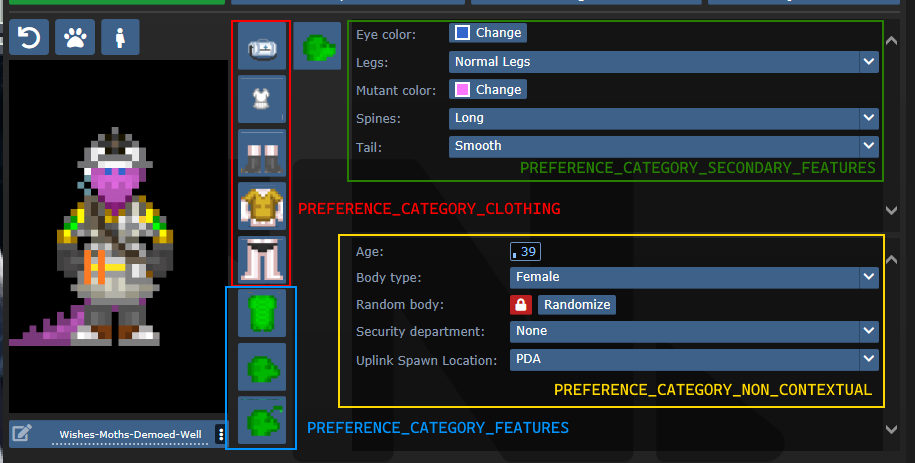
SECONDARY_FEATURES or NON_CONTEXTUAL?
Secondary features tend to be species specific. Non contextual features shouldn't change much from character to character.
Default values and randomization
There are three procs to be aware of in regards to this topic:
create_default_value(). This is used when a value deserializes improperly or when a new character is created.create_informed_default_value(datum/preferences/preferences)- Used for more complicated default values, like how names require the gender. Will callcreate_default_value()by default.create_random_value(datum/preferences/preferences)- Explicitly used for random values, such as when a character is being randomized.
create_default_value() in most preferences will create a random value. If this is a problem (like how default characters should always be human), you can override create_default_value(). By default (without overriding create_random_value), random values are just default values.
Advanced - Server data
As previewed in the display names implementation, there exists a compile_constant_data() proc you can override.
Compiled data is used wherever the server needs to give the client some value it can't figure out on its own. Skin tones use this to tell the client what colors they represent, for example.
Compiled data is sent to the serverData field in the FeatureValueProps.
Advanced - Creating your own tgui component
If you have good knowledge with tgui (especially TypeScript), you'll be able to create your own component to represent preferences.
The component field in a feature accepts any component that accepts FeatureValueProps<TReceiving, TSending = TReceiving, TServerData = undefined>.
This will give you the fields:
act: typeof sendAct,
featureId: string,
handleSetValue: (newValue: TSending) => void,
serverData: TServerData | undefined,
shrink?: boolean,
value: TReceiving,
act is the same as the one you get from useBackend.
featureId is the savefile_key of the feature.
handleSetValue is a function that, when called, will tell the server the new value, as well as changing the value immediately locally.
serverData is the server data, if it has been fetched yet (and exists).
shrink is whether or not the UI should appear smaller. This is only used for supplementary features.
value is the current value, could be predicted (meaning that the value was changed locally, but has not yet reached the server).
For a basic example of how this can look, observe CheckboxInput:
export const CheckboxInput = (
  props: FeatureValueProps<BooleanLike, boolean>
) => {
  return (<Button.Checkbox
    checked={!!props.value}
    onClick={() => {
      props.handleSetValue(!props.value);
    }}
  />);
};
Advanced - Middleware
A /datum/preference_middleware is a way to inject your own data at specific points, as well as hijack actions.
Middleware can hijack actions by specifying action_delegations:
/datum/preference_middleware/congratulations
	action_delegations = list(
		"congratulate_me" = PROC_REF(congratulate_me),
	)

/datum/preference_middleware/congratulations/proc/congratulate_me(list/params, mob/user)
	to_chat(user, span_notice("Wow, you did a great job learning about middleware!"))

	return TRUE
Middleware can inject its own data at several points, such as providing new UI assets, compiled data (used by middleware such as quirks to tell the client what quirks exist), etc. Look at code/modules/client/preferences/middleware/_middleware.dm for full information.
Antagonists
In order to make an antagonist selectable, you must do a few things:
- Your antagonist needs an icon.
- Your antagonist must be in a Dynamic ruleset. The ruleset must specify the antagonist as its
antag_flag. - Your antagonist needs a file in
tgui/packages/tgui/interfaces/PreferencesMenu/antagonists/antagonists/filename.ts. This file name MUST be theantag_flagof your ruleset, with nothing but letters remaining (e.g. "Nuclear Operative" ->nuclearoperative). - Add it to
special_roles.
Creating icons
If you are satisfied with your icon just being a dude with some clothes, then you can specify preview_outfit in your /datum/antagonist.
Space Ninja, for example, looks like:
/datum/antagonist/ninja
	preview_outift = /datum/outfit/ninja
However, if you want to get creative, you can override /get_preview_icon(). This proc should return an icon of size ANTAGONIST_PREVIEW_ICON_SIZExANTAGONIST_PREVIEW_ICON_SIZE.
There are some helper procs you can use as well. render_preview_outfit(outfit_type) will take an outfit and give you an icon of someone wearing those clothes. finish_preview_outfit will, given an icon, resize it appropriately and zoom in on the head. Note that this will look bad on anything that isn't a human, so if you have a non-human antagonist (such as sentient disease), just run icon.Scale(ANTAGONIST_PREVIEW_ICON_SIZE, ANTAGONIST_PREVIEW_ICON_SIZE).
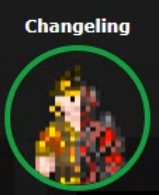
For inspiration, here is changeling's:
/datum/antagonist/changeling/get_preview_icon()
	var/icon/final_icon = render_preview_outfit(/datum/outfit/changeling)
	var/icon/split_icon = render_preview_outfit(/datum/outfit/job/engineer)

	final_icon.Shift(WEST, world.icon_size / 2)
	final_icon.Shift(EAST, world.icon_size / 2)

	split_icon.Shift(EAST, world.icon_size / 2)
	split_icon.Shift(WEST, world.icon_size / 2)

	final_icon.Blend(split_icon, ICON_OVERLAY)

	return finish_preview_icon(final_icon)
...which creates:
Creating the tgui representation
In the .ts file you created earlier, you must now give the information of your antagonist. For reference, this is the changeling's:
import { Antagonist, Category } from "../base";
import { multiline } from "common/string";

const Changeling: Antagonist = {
  key: "changeling", // This must be the same as your filename
  name: "Changeling",
  description: [
    multiline`
      A highly intelligent alien predator that is capable of altering their
      shape to flawlessly resemble a human.
    `,

    multiline`
      Transform yourself or others into different identities, and buy from an
      arsenal of biological weaponry with the DNA you collect.
    `,
  ],
  category: Category.Roundstart, // Category.Roundstart, Category.Midround, or Category.Latejoin
};

export default Changeling;
Readying the Dynamic ruleset
You already need to create a Dynamic ruleset, so in order to get your antagonist recognized, you just need to specify antag_flag. This must be unique per ruleset.
Two other values to note are antag_flag_override and antag_preference.
antag_flag_override exists for cases where you want the banned antagonist to be separate from antag_flag. As an example: roundstart, midround, and latejoin traitors have separate antag_flag, but all have antag_flag_override = ROLE_TRAITOR. This is because admins want to ban a player from Traitor altogether, not specific rulesets.
If antag_preference is set, it will refer to that preference instead of antag_flag. This is used for clown operatives, which we want to be on the same preference as standard nuke ops, but must specify a unique antag_flag for.
Updating special_roles
In code/__DEFINES/role_preferences.dm (the same place you'll need to make your ROLE_* defined), simply add your antagonist to the special_roles assoc list. The key is your ROLE, the value is the number of days since your first game in order to play as that antagonist.