mirror of
https://github.com/Bubberstation/Bubberstation.git
synced 2026-01-21 06:25:59 +00:00
 d8350d7a87
## About The Pull Request For an unknown period of time, `/obj/item/gun/ballistic` used the wrong type of sprite for it's `bolt_type`, so anyone trying to make a new gun and using it as an example wouldn't be able to make it work. Being an abstract item, it used `BOLT_TYPE_STANDARD` when it had a `BOLT_TYPE_LOCKING` icon state. If you spawn it in and look at it, it looks like this. 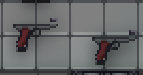 But if you VV `bolt_bolt` type to `4` ( `BOLT_TYPE_LOCKING`), it looks correct.  Same with the Mosin, which now has a visible bolt, so you can tell if it's open or not now! 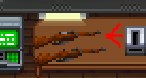 So basically: - Changes the Mosin to use the correct bolt type, `BOLT_TYPE_LOCKING`. - Makes the abstract `/obj/item/gun/ballistic` use the correct type of sprite. It comes in designer _Debug Purple checkerboard_. 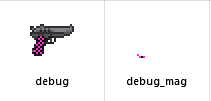 - Adds `bolt_types_explained.md`. As the name implies, this explains in detail what all the bolt types do, and what you should name the iconstates for them when you're trying to make a new gun. - Various comment changes in `ballistic.dm`, and the `combat.dm` defines. - De-souls the `boolets` variable name to `bullets` in the ammo counter proc - Adds a new parameter `handle_modifications = TRUE` to `sawoff()` When set to false, it allows you to still use the sawing logic, but bypasses all the snowflake code for variable changes, and only sets `sawn_off` to true. This is helpful if you want to allow a weapon to be sawed off, but don't want your icon forcibly set to `lefthand_file = 'icons/mob/inhands/weapons/guns_lefthand.dmi` or the weight class set to normal. ## Why It's Good For The Game Documentation is always good I hear. Also if you're trying to make a new gun or fix a sprite issue, now you can look at the base type to understand how it works! ## Changelog 🆑 fix: Mosin Nagant bolt sprites are now visible. It's like 5 pixels so not a surprise nobody noticed for years. /🆑



