
#Map Merger# Before any change to a map, it is good to use the Map Merger tools. In a nutshell, it rewrites the map to minimize differences between different versions of the map (DreamMakers map editor rewrites a lot of the tile keys). This makes the git diff between different map changes much smaller. More recently a new way of laying out the map was invented by Remie, called TGM, this helps to further reduce conflicts in the map files.
This is good for a few reasons
-
Maintainers can actually verify the changes you are making are what you say they are by simply viewing the diff (For small changes at least)
-
The less changes there are in any given map diff, the easier it is for git to merge it without running into unexpected conflicts, which in most cases you have to either manually resolve or require you to remap your changes
However - to do all this is going to require you to put some elbow grease into understanding the map merger tool.
If you have difficulty using these tools, ask for help in #coderbus
#Using the tools#
##1. Install Python 3.5 or greater## If you don't have Python already installed it can be downloaded from: https://www.python.org/downloads/ - make sure you grab the latest python 3, again, it must be 3.5 or greater ##2. PATH Python## This step is mostly applicable to windows users, you must make sure you ask the windows installer to add python to your path, like shown in this example screenshot
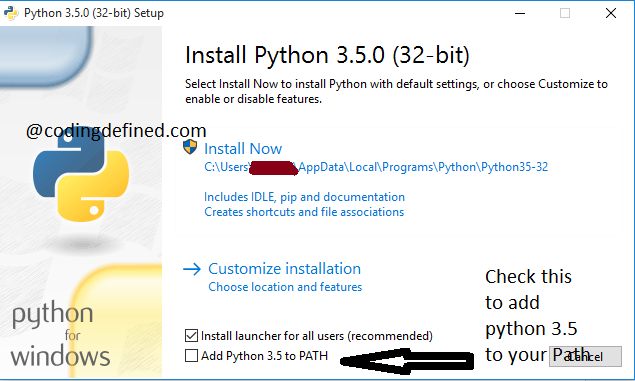
If you have already installed python you may need to manually add it to your path as indicated in this guide ##3. Prepare Maps## Run "Prepare Maps.bat" in the tools/mapmerge/ directory. ##4. Edit your map## Make your changes to the map here. Remember to save them! ##5. Clean map## Run "Run Map Merge - TGM.bat" in the tools/mapmerge/ directory. ##7. Check differences## Use your git application of choice to look at the differences between revisions of your code and commit the result. ##8. Commit## Your map is now ready to be committed, rejoice and wait for conflicts.
#Common pitfalls# Open the map in dreameditor before committing the results of the mapmerger - this can cause dreameditor to resave the map back to dmm, if you're having issues with your map getting stuck in dmm mode, try comitting and pushing the mapmerger changes before reopening in dreameditor.