mirror of
https://github.com/Bubberstation/Bubberstation.git
synced 2025-12-30 11:32:20 +00:00
 d26bcb56f9
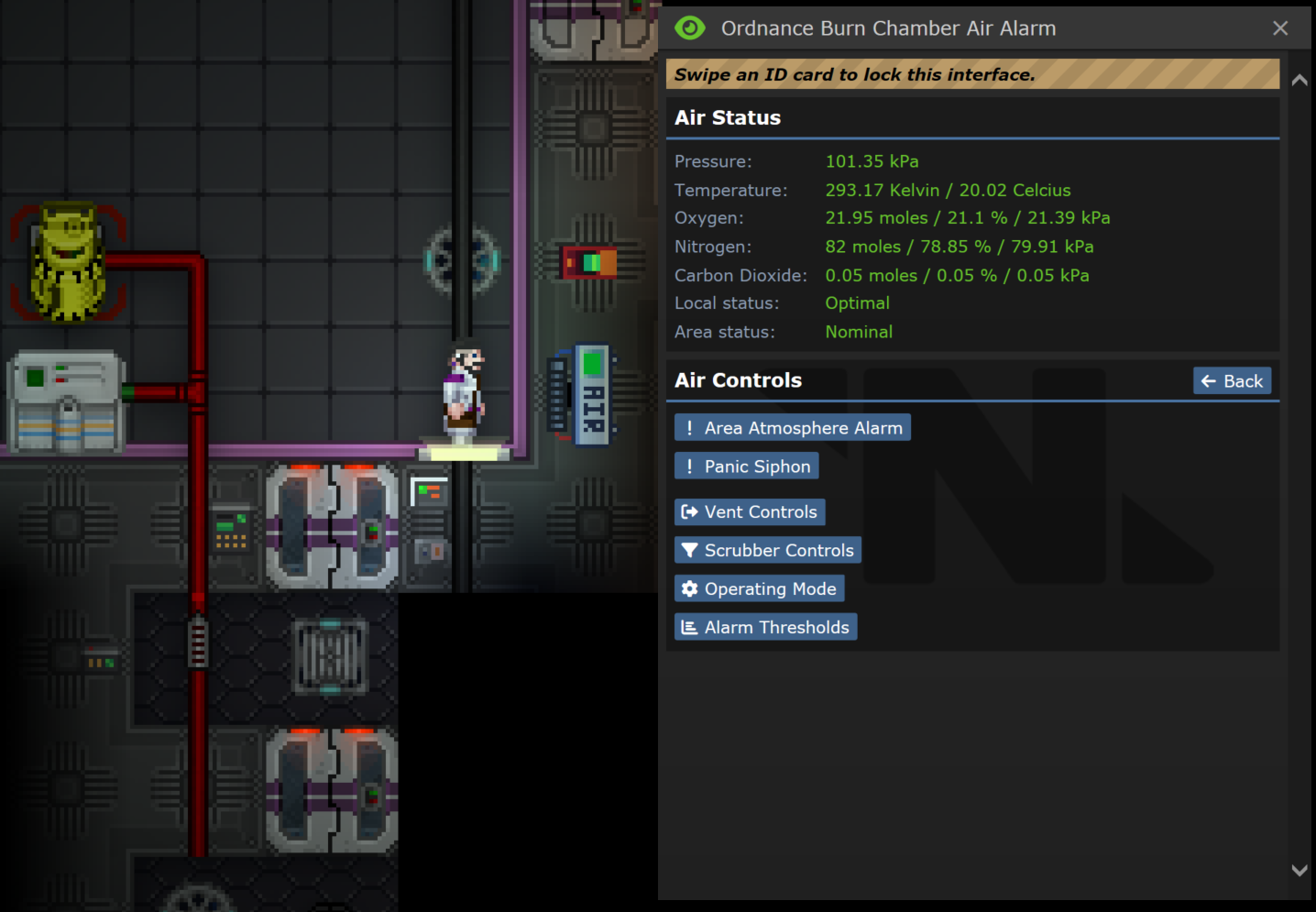
* Connect air alarm to air sensor (#75187) ## About The Pull Request To control vents and scrubbers in ordinance, burn and engine chambers, mappers extend the area outside of the walls towards a tile where they place the air alarm. With this PR, they can now assign `chamber_id` to an air alarm and connect to the chamber with an air sensor. There is a new map helper for this. Also, this connection can be done manually. You need to click on a sensor with a multi-tool, then unlock certain air alarm, and click with a multi-tool on it. This action will link sensor to an air alarm, reporting gas mixture from the sensor tile and giving control over the vents and scrubbers of the sensor's area. ### TLDR Before: <img width="718" alt="ordnance_before" src="https://user-images.githubusercontent.com/3625094/236577769-5d79871f-2dce-43be-a20a-e6669bfbc1c6.PNG"> After: <img width="638" alt="ordnance_after" src="https://user-images.githubusercontent.com/3625094/236577786-3c7e9c9f-1501-4747-bbe1-292fc4947b0d.PNG"> This is how the area is setup on meta station right now vs if it was setup with a link 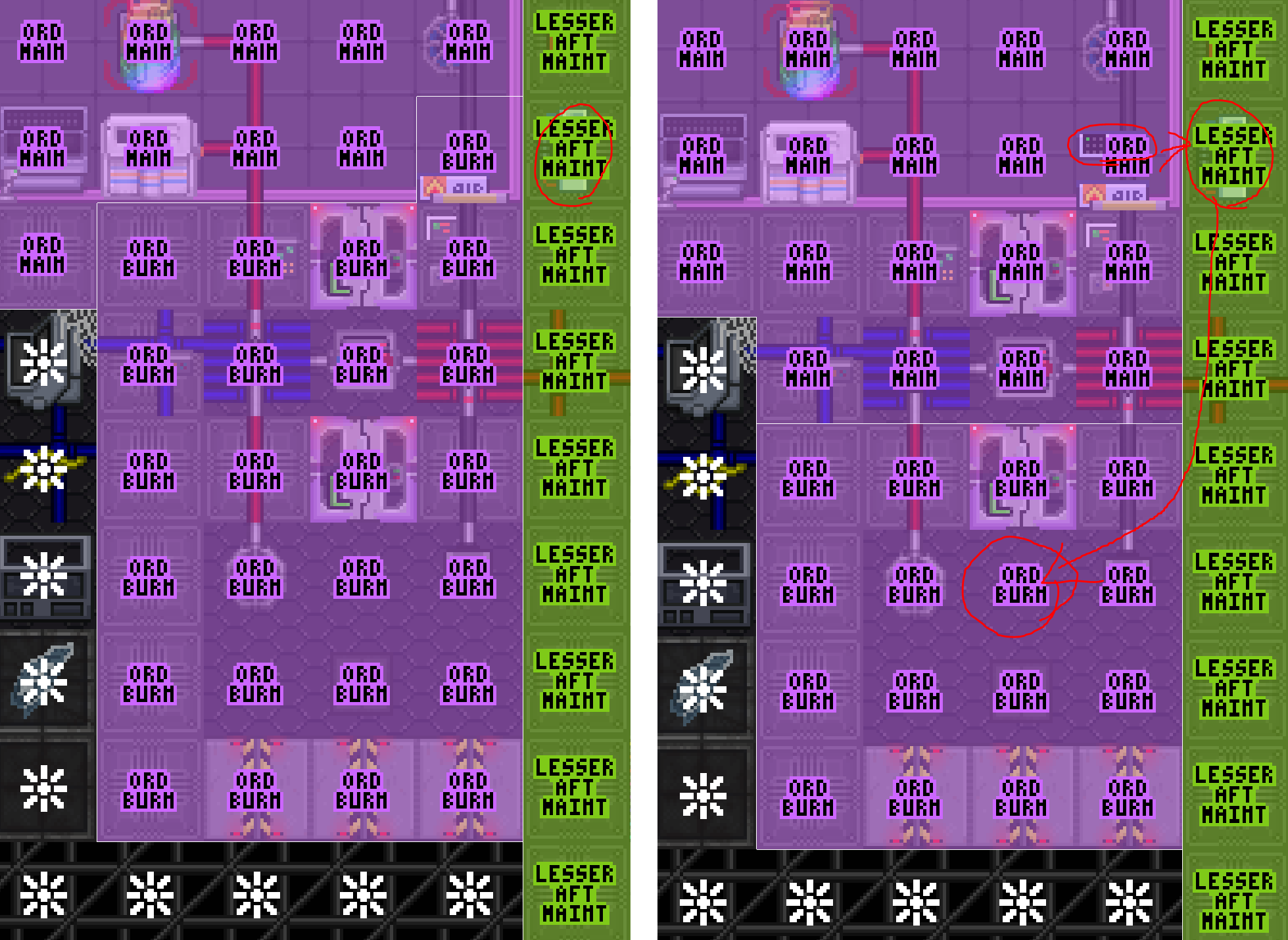 This is also true for the supermatter chamber - you can make the air alarm display the gas mix in the actual chamber and avoid using mapping area hack there too. <img width="954" alt="supermatter_after" src="https://user-images.githubusercontent.com/3625094/236578528-4650b426-6bf0-4634-a5b0-cad7a50d5b01.PNG"> ## Why It's Good For The Game The area hack is no longer needed and you can place air alarm to control certain remote area wherever you want when you design a map. Even 3 air alarms next to each other controlling 3 different burn chambers. The air alarm will also report the gas mix on the actual tile of a sensor, instead of the gas mix before the air alarm, which is usually a normal habitable environment. Also, now you can build such chambers manually because there are no precise area editing tools available in-game to repeat the area hack. ## Changelog 🆑 add: Air alarms can be connected to an area remotely via air sensor with multi-tool and corresponding access qol: Mapping: Added air alarm helper to link air alarm with certain chamber_id on map load /🆑 * Connect air alarm to air sensor --------- Co-authored-by: Andrew <mt.forspam@gmail.com> Co-authored-by: Tom <8881105+tf-4@users.noreply.github.com>



The code in this module originally evolved from dmm_suite and has since been
specialized for SS13 and otherwise tweaked to fit /tg/station's needs.

dmm_suite version 1.0
	Released January 30th, 2011.

NOTE: Map saving functionality removed

defines the object /dmm_suite
	- Provides the proc load_map()
		- Loads the specified map file onto the specified z-level.
	- provides the proc write_map()
		- Returns a text string of the map in dmm format
			ready for output to a file.
	- provides the proc save_map()
		- Returns a .dmm file if map is saved
		- Returns FALSE if map fails to save

The dmm_suite provides saving and loading of map files in BYOND's native DMM map
format. It approximates the map saving and loading processes of the Dream Maker
and Dream Seeker programs so as to allow editing, saving, and loading of maps at
runtime.

------------------------

To save a map at runtime, create an instance of /dmm_suite, and then call
write_map(), which accepts three arguments:
	- A turf representing one corner of a three dimensional grid (Required).
	- Another turf representing the other corner of the same grid (Required).
	- Any, or a combination, of several bit flags (Optional, see documentation).

The order in which the turfs are supplied does not matter, the /dmm_writer will
determine the grid containing both, in much the same way as DM's block() function.
write_map() will then return a string representing the saved map in dmm format;
this string can then be saved to a file, or used for any other purose.

------------------------

To load a map at runtime, create an instance of /dmm_suite, and then call load_map(),
which accepts two arguments:
	- A .dmm file to load (Required).
	- A number representing the z-level on which to start loading the map (Optional).

The /dmm_suite will load the map file starting on the specified z-level. If no
z-level	was specified, world.maxz will be increased so as to fit the map. Note
that if you wish to load a map onto a z-level that already has objects on it,
you will have to handle the removal of those objects. Otherwise the new map will
simply load the new objects on top of the old ones.

Also note that all type paths specified in the .dmm file must exist in the world's
code, and that the /dmm_reader trusts that files to be loaded are in fact valid
.dmm files. Errors in the .dmm format will cause runtime errors.