mirror of
https://github.com/Bubberstation/Bubberstation.git
synced 2026-06-04 21:56:01 +01:00
 Zonespace
0d4ec59197
Zonespace
0d4ec59197
## About The Pull Request A re-open of https://github.com/tgstation/tgstation/pull/66326 with Fikou's permission Adds the style meter, it can be bought from the mining vendor for 1500 points, it is an attachment to your glasses. The style meter creates a display on your hud, with your recent actions, like attacking enemies, killing them, mining ore etc. Actions like spinning or flipping increase your score multiplier, making you get more points. Your style meter affects how much ore you get from mining rocks. By default with the meter, you get 20% less ore, but at the highest, you can get 1.2x the ore from mining. In addition, on B-tier or above, you can "hotswap" items, by attacking an item in your backpack with one in your hand (should it fit and all that). Also features a leaderboard for highest style point count! New streamable: https://streamable.com/eewi6l The following are sources of points: - Killing things - Killing big things - Killing small things - Punching things - Melee'ing things - Mining rocks and ores - Having matrix traps detonate - Hit, defuse, and detonate gibtonite - Detonate crusher marks - Scan geysers - Parry projectiles (others or your own) Oh, right. While wearing the style meter, you're able to parry any lavaland-based projectile by clicking on it or the tile it is on, which reflects it back in a 7 degree arc, making it 20% faster and 15% more damaging. Usually not very easy. Maybe-plan in the future for some syndicate variant of this (with bullet parrying and appropriate style sources, etc.), but not for this PR Thanks to Arcane, multitooling the style meter will make it play some sounds on rank-up. 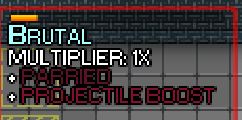 https://streamable.com/nheaky Parrying in action ## Why It's Good For The Game Makes miners bring more ore in a fun way. ## Changelog 🆑 Fikou, Zonespace, Arcane for voicing add: The mining vendor now has a style meter. This meter gauges your style points and uses them to improve your ore yield. /🆑 --------- Co-authored-by: Fikou <23585223+Fikou@users.noreply.github.com>

302 lines
10 KiB
Plaintext
302 lines
10 KiB
Plaintext
//Defines for atom layers and planes
|
|
//KEEP THESE IN A NICE ACSCENDING ORDER, PLEASE
|
|
|
|
//NEVER HAVE ANYTHING BELOW THIS PLANE ADJUST IF YOU NEED MORE SPACE
|
|
#define LOWEST_EVER_PLANE -100
|
|
|
|
#define FIELD_OF_VISION_BLOCKER_PLANE -90
|
|
#define FIELD_OF_VISION_BLOCKER_RENDER_TARGET "*FIELD_OF_VISION_BLOCKER_RENDER_TARGET"
|
|
|
|
#define CLICKCATCHER_PLANE -80
|
|
|
|
#define PLANE_SPACE -25
|
|
#define PLANE_SPACE_PARALLAX -20
|
|
|
|
#define GRAVITY_PULSE_PLANE -13
|
|
#define GRAVITY_PULSE_RENDER_TARGET "*GRAVPULSE_RENDER_TARGET"
|
|
|
|
#define RENDER_PLANE_TRANSPARENT -12 //Transparent plane that shows openspace underneath the floor
|
|
|
|
#define TRANSPARENT_FLOOR_PLANE -11
|
|
|
|
#define FLOOR_PLANE -10
|
|
|
|
#define WALL_PLANE -9
|
|
#define GAME_PLANE -8
|
|
#define GAME_PLANE_FOV_HIDDEN -7
|
|
#define GAME_PLANE_UPPER -6
|
|
#define WALL_PLANE_UPPER -5
|
|
#define GAME_PLANE_UPPER_FOV_HIDDEN -4
|
|
|
|
///Slightly above the game plane but does not catch mouse clicks. Useful for certain visuals that should be clicked through, like seethrough trees
|
|
#define SEETHROUGH_PLANE -3
|
|
#define ABOVE_GAME_PLANE -2
|
|
|
|
#define RENDER_PLANE_GAME_WORLD -1
|
|
|
|
#define DEFAULT_PLANE 0 //Marks out the default plane, even if we don't use it
|
|
|
|
#define AREA_PLANE 2
|
|
#define MASSIVE_OBJ_PLANE 3
|
|
#define GHOST_PLANE 4
|
|
#define POINT_PLANE 5
|
|
|
|
//---------- LIGHTING -------------
|
|
///Normal 1 per turf dynamic lighting underlays
|
|
#define LIGHTING_PLANE 10
|
|
|
|
///Lighting objects that are "free floating"
|
|
#define O_LIGHTING_VISUAL_PLANE 11
|
|
#define O_LIGHTING_VISUAL_RENDER_TARGET "O_LIGHT_VISUAL_PLANE"
|
|
|
|
#define EMISSIVE_PLANE 13
|
|
/// This plane masks out lighting to create an "emissive" effect, ie for glowing lights in otherwise dark areas.
|
|
#define EMISSIVE_RENDER_PLATE 14
|
|
#define EMISSIVE_RENDER_TARGET "*EMISSIVE_PLANE"
|
|
// Ensures all the render targets that point at the emissive plate layer correctly
|
|
#define EMISSIVE_Z_BELOW_LAYER 1
|
|
#define EMISSIVE_FLOOR_LAYER 2
|
|
#define EMISSIVE_SPACE_LAYER 3
|
|
#define EMISSIVE_WALL_LAYER 4
|
|
|
|
#define RENDER_PLANE_LIGHTING 15
|
|
|
|
/// Masks the lighting plane with turfs, so we never light up the void
|
|
/// Failing that, masks emissives and the overlay lighting plane
|
|
#define LIGHT_MASK_PLANE 16
|
|
#define LIGHT_MASK_RENDER_TARGET "*LIGHT_MASK_PLANE"
|
|
|
|
///Things that should render ignoring lighting
|
|
#define ABOVE_LIGHTING_PLANE 17
|
|
|
|
///---------------- MISC -----------------------
|
|
|
|
///Pipecrawling images
|
|
#define PIPECRAWL_IMAGES_PLANE 20
|
|
|
|
///AI Camera Static
|
|
#define CAMERA_STATIC_PLANE 21
|
|
|
|
///Anything that wants to be part of the game plane, but also wants to draw above literally everything else
|
|
#define HIGH_GAME_PLANE 22
|
|
|
|
#define FULLSCREEN_PLANE 23
|
|
|
|
///--------------- FULLSCREEN RUNECHAT BUBBLES ------------
|
|
|
|
///Popup Chat Messages
|
|
#define RUNECHAT_PLANE 30
|
|
/// Plane for balloon text (text that fades up)
|
|
#define BALLOON_CHAT_PLANE 31
|
|
|
|
//-------------------- HUD ---------------------
|
|
//HUD layer defines
|
|
#define HUD_PLANE 40
|
|
#define ABOVE_HUD_PLANE 41
|
|
|
|
///Plane of the "splash" icon used that shows on the lobby screen
|
|
#define SPLASHSCREEN_PLANE 50
|
|
|
|
// The largest plane here must still be less than RENDER_PLANE_GAME
|
|
|
|
//-------------------- Rendering ---------------------
|
|
#define RENDER_PLANE_GAME 100
|
|
#define RENDER_PLANE_NON_GAME 101
|
|
|
|
// Only VERY special planes should be here, as they are above not just the game, but the UI planes as well.
|
|
|
|
/// Plane related to the menu when pressing Escape.
|
|
/// Needed so that we can apply a blur effect to EVERYTHING, and guarantee we are above all UI.
|
|
#define ESCAPE_MENU_PLANE 105
|
|
|
|
#define RENDER_PLANE_MASTER 110
|
|
|
|
// Lummox I swear to god I will find you
|
|
// NOTE! You can only ever have planes greater then -10000, if you add too many with large offsets you will brick multiz
|
|
// Same can be said for large multiz maps. Tread carefully mappers
|
|
#define HIGHEST_EVER_PLANE RENDER_PLANE_MASTER
|
|
/// The range unique planes can be in
|
|
#define PLANE_RANGE (HIGHEST_EVER_PLANE - LOWEST_EVER_PLANE)
|
|
|
|
// PLANE_SPACE layer(s)
|
|
#define SPACE_LAYER 1.8
|
|
|
|
//#define TURF_LAYER 2 //For easy recordkeeping; this is a byond define. Most floors (FLOOR_PLANE) and walls (WALL_PLANE) use this.
|
|
|
|
//FLOOR_PLANE layers
|
|
#define TURF_PLATING_DECAL_LAYER 2.001
|
|
#define TURF_DECAL_LAYER 2.009 //Makes turf decals appear in DM how they will look inworld.
|
|
#define CULT_OVERLAY_LAYER 2.01
|
|
#define MID_TURF_LAYER 2.02
|
|
#define HIGH_TURF_LAYER 2.03
|
|
#define LATTICE_LAYER 2.04
|
|
#define DISPOSAL_PIPE_LAYER 2.042
|
|
#define WIRE_LAYER 2.044
|
|
#define GLASS_FLOOR_LAYER 2.046
|
|
#define TRAM_RAIL_LAYER 2.047
|
|
#define TRAM_FLOOR_LAYER 2.048
|
|
#define ABOVE_OPEN_TURF_LAYER 2.049
|
|
|
|
//WALL_PLANE layers
|
|
#define CLOSED_TURF_LAYER 2.05
|
|
|
|
// GAME_PLANE layers
|
|
#define BULLET_HOLE_LAYER 2.06
|
|
#define ABOVE_NORMAL_TURF_LAYER 2.08
|
|
#define GAS_PIPE_HIDDEN_LAYER 2.35 //layer = initial(layer) + piping_layer / 1000 in atmospherics/update_icon() to determine order of pipe overlap
|
|
#define WIRE_BRIDGE_LAYER 2.44
|
|
#define WIRE_TERMINAL_LAYER 2.45
|
|
#define GAS_SCRUBBER_LAYER 2.46
|
|
#define GAS_PIPE_VISIBLE_LAYER 2.47 //layer = initial(layer) + piping_layer / 1000 in atmospherics/update_icon() to determine order of pipe overlap
|
|
#define GAS_FILTER_LAYER 2.48
|
|
#define GAS_PUMP_LAYER 2.49
|
|
#define PLUMBING_PIPE_VISIBILE_LAYER 2.495//layer = initial(layer) + ducting_layer / 3333 in atmospherics/handle_layer() to determine order of duct overlap
|
|
#define BOT_PATH_LAYER 2.497
|
|
#define LOW_OBJ_LAYER 2.5
|
|
///catwalk overlay of /turf/open/floor/plating/catwalk_floor
|
|
#define CATWALK_LAYER 2.51
|
|
#define LOW_SIGIL_LAYER 2.52
|
|
#define SIGIL_LAYER 2.53
|
|
#define HIGH_PIPE_LAYER 2.54
|
|
// Anything above this layer is not "on" a turf for the purposes of washing
|
|
// I hate this life of ours
|
|
#define FLOOR_CLEAN_LAYER 2.55
|
|
|
|
#define BELOW_OPEN_DOOR_LAYER 2.6
|
|
#define BLASTDOOR_LAYER 2.65
|
|
#define OPEN_DOOR_LAYER 2.7
|
|
#define DOOR_ACCESS_HELPER_LAYER 2.71 //keep this above OPEN_DOOR_LAYER, special layer used for /obj/effect/mapping_helpers/airlock/access
|
|
#define DOOR_HELPER_LAYER 2.72 //keep this above DOOR_ACCESS_HELPER_LAYER and OPEN_DOOR_LAYER since the others tend to have tiny sprites that tend to be covered up.
|
|
#define PROJECTILE_HIT_THRESHHOLD_LAYER 2.75 //projectiles won't hit objects at or below this layer if possible
|
|
#define TABLE_LAYER 2.8
|
|
#define GATEWAY_UNDERLAY_LAYER 2.85
|
|
#define BELOW_OBJ_LAYER 2.9
|
|
#define LOW_ITEM_LAYER 2.95
|
|
//#define OBJ_LAYER 3 //For easy recordkeeping; this is a byond define
|
|
#define CLOSED_DOOR_LAYER 3.1
|
|
#define CLOSED_FIREDOOR_LAYER 3.11
|
|
#define ABOVE_OBJ_LAYER 3.2
|
|
#define CLOSED_BLASTDOOR_LAYER 3.3 // ABOVE WINDOWS AND DOORS
|
|
#define SHUTTER_LAYER 3.3 // HERE BE DRAGONS
|
|
#define ABOVE_WINDOW_LAYER 3.3
|
|
#define SIGN_LAYER 3.4
|
|
#define CORGI_ASS_PIN_LAYER 3.41
|
|
#define NOT_HIGH_OBJ_LAYER 3.5
|
|
#define HIGH_OBJ_LAYER 3.6
|
|
#define BELOW_MOB_LAYER 3.7
|
|
|
|
// GAME_PLANE_FOV_HIDDEN layers
|
|
#define LOW_MOB_LAYER 3.75
|
|
#define LYING_MOB_LAYER 3.8
|
|
#define VEHICLE_LAYER 3.9
|
|
#define MOB_BELOW_PIGGYBACK_LAYER 3.94
|
|
//#define MOB_LAYER 4 //For easy recordkeeping; this is a byond define
|
|
#define MOB_SHIELD_LAYER 4.01
|
|
#define MOB_ABOVE_PIGGYBACK_LAYER 4.06
|
|
#define MOB_UPPER_LAYER 4.07
|
|
#define HITSCAN_PROJECTILE_LAYER 4.09 //above all mob but still hidden by FoV
|
|
|
|
// GAME_PLANE_UPPER layers
|
|
#define ABOVE_MOB_LAYER 4.1
|
|
#define WALL_OBJ_LAYER 4.25
|
|
// WALL_PLANE_UPPER layers
|
|
#define EDGED_TURF_LAYER 4.3
|
|
#define ON_EDGED_TURF_LAYER 4.35
|
|
|
|
// GAME_PLANE_UPPER_FOV_HIDDEN layers
|
|
#define SPACEVINE_LAYER 4.4
|
|
#define LARGE_MOB_LAYER 4.5
|
|
#define SPACEVINE_MOB_LAYER 4.6
|
|
|
|
// Intermediate layer used by both GAME_PLANE_FOV_HIDDEN and ABOVE_GAME_PLANE
|
|
#define ABOVE_ALL_MOB_LAYER 4.7
|
|
|
|
// ABOVE_GAME_PLANE layers
|
|
#define NAVIGATION_EYE_LAYER 4.9
|
|
//#define FLY_LAYER 5 //For easy recordkeeping; this is a byond define
|
|
#define GASFIRE_LAYER 5.05
|
|
#define RIPPLE_LAYER 5.1
|
|
|
|
//---------- LIGHTING -------------
|
|
|
|
// LIGHTING_PLANE layers
|
|
// The layer of turf underlays starts at 0.01 and goes up by 0.01
|
|
// Based off the z level. No I do not remember why, should check that
|
|
/// Typically overlays, that "hide" portions of the turf underlay layer
|
|
/// I'm allotting 100 z levels before this breaks. That'll never happen
|
|
/// --Lemon
|
|
#define LIGHTING_MASK_LAYER 10
|
|
/// Misc things that draw on the turf lighting plane
|
|
/// Space, solar beams, etc
|
|
#define LIGHTING_PRIMARY_LAYER 15
|
|
/// Stuff that needs to draw above everything else on this plane
|
|
#define LIGHTING_ABOVE_ALL 20
|
|
|
|
|
|
//---------- EMISSIVES -------------
|
|
//Layering order of these is not particularly meaningful.
|
|
//Important part is the seperation of the planes for control via plane_master
|
|
|
|
/// The layer you should use if you _really_ don't want an emissive overlay to be blocked.
|
|
#define EMISSIVE_LAYER_UNBLOCKABLE 9999
|
|
|
|
///--------------- FULLSCREEN IMAGES ------------
|
|
|
|
#define FLASH_LAYER 1
|
|
#define FULLSCREEN_LAYER 2
|
|
#define UI_DAMAGE_LAYER 3
|
|
#define BLIND_LAYER 4
|
|
#define CRIT_LAYER 5
|
|
#define CURSE_LAYER 6
|
|
#define ECHO_LAYER 7
|
|
#define PARRY_LAYER 8
|
|
|
|
#define FOV_EFFECT_LAYER 100
|
|
|
|
///--------------- FULLSCREEN RUNECHAT BUBBLES ------------
|
|
/// Bubble for typing indicators
|
|
#define TYPING_LAYER 500
|
|
|
|
#define RADIAL_BACKGROUND_LAYER 0
|
|
///1000 is an unimportant number, it's just to normalize copied layers
|
|
#define RADIAL_CONTENT_LAYER 1000
|
|
|
|
#define ADMIN_POPUP_LAYER 1
|
|
|
|
///Layer for screentips
|
|
#define SCREENTIP_LAYER 4
|
|
|
|
/// Layer for tutorial instructions
|
|
#define TUTORIAL_INSTRUCTIONS_LAYER 5
|
|
|
|
|
|
#define LOBBY_BACKGROUND_LAYER 3
|
|
#define LOBBY_BUTTON_LAYER 4
|
|
|
|
///cinematics are "below" the splash screen
|
|
#define CINEMATIC_LAYER -1
|
|
|
|
///Plane master controller keys
|
|
#define PLANE_MASTERS_GAME "plane_masters_game"
|
|
#define PLANE_MASTERS_NON_MASTER "plane_masters_non_master"
|
|
#define PLANE_MASTERS_COLORBLIND "plane_masters_colorblind"
|
|
|
|
//Plane master critical flags
|
|
//Describes how different plane masters behave when they are being culled for performance reasons
|
|
/// This plane master will not go away if its layer is culled. useful for preserving effects
|
|
#define PLANE_CRITICAL_DISPLAY (1<<0)
|
|
/// This plane master will temporarially remove relays to all other planes
|
|
/// Allows us to retain the effects of a plane while cutting off the changes it makes
|
|
#define PLANE_CRITICAL_NO_RELAY (1<<1)
|
|
/// We assume this plane master has a render target starting with *, it'll be removed, forcing it to render in place
|
|
#define PLANE_CRITICAL_CUT_RENDER (1<<2)
|
|
|
|
#define PLANE_CRITICAL_FUCKO_PARALLAX (PLANE_CRITICAL_DISPLAY|PLANE_CRITICAL_NO_RELAY|PLANE_CRITICAL_CUT_RENDER)
|
|
|
|
/// A value of /datum/preference/numeric/multiz_performance that disables the option
|
|
#define MULTIZ_PERFORMANCE_DISABLE -1
|
|
/// We expect at most 3 layers of multiz
|
|
/// Increment this define if you make a huge map. We unit test for it too just to make it easy for you
|
|
/// If you modify this, you'll need to modify the tsx file too
|
|
#define MAX_EXPECTED_Z_DEPTH 3
|