 58992f3c26
Bumps [golangci/golangci-lint-action](https://github.com/golangci/golangci-lint-action) from 8 to 9.
- [Release notes](https://github.com/golangci/golangci-lint-action/releases)
- [Commits](https://github.com/golangci/golangci-lint-action/compare/v8...v9)

---
updated-dependencies:
- dependency-name: golangci/golangci-lint-action
  dependency-version: '9'
  dependency-type: direct:production
  update-type: version-update:semver-major
...

Signed-off-by: dependabot[bot] <support@github.com>
Co-authored-by: dependabot[bot] <49699333+dependabot[bot]@users.noreply.github.com>
Strong Dream Map Maker · 


Download StrongDMM



StrongDMM is an alternative yet robust map editor for BYOND.
It was built with the idea of creating a more flexible, fast, and extensible tool than the BYOND built-in map editor. The editor has the same features as DM, but provides much more and improves the general map editing experience.
Features
The editor offers a range of new features:
- TGM support with built-in map merger (no need to use external scripts and pre-commit hooks);
- Almost instant environment open;
- Custom layers filter;
- Built-in screenshot tool;
- Smooth zoom-in/zoom-out;
- Robust "Search";
- Improved shortcuts;
- Robust variables editor and variables preview;
- Optional sanitization of variables;
- Open with CLI.
...and a lot more...
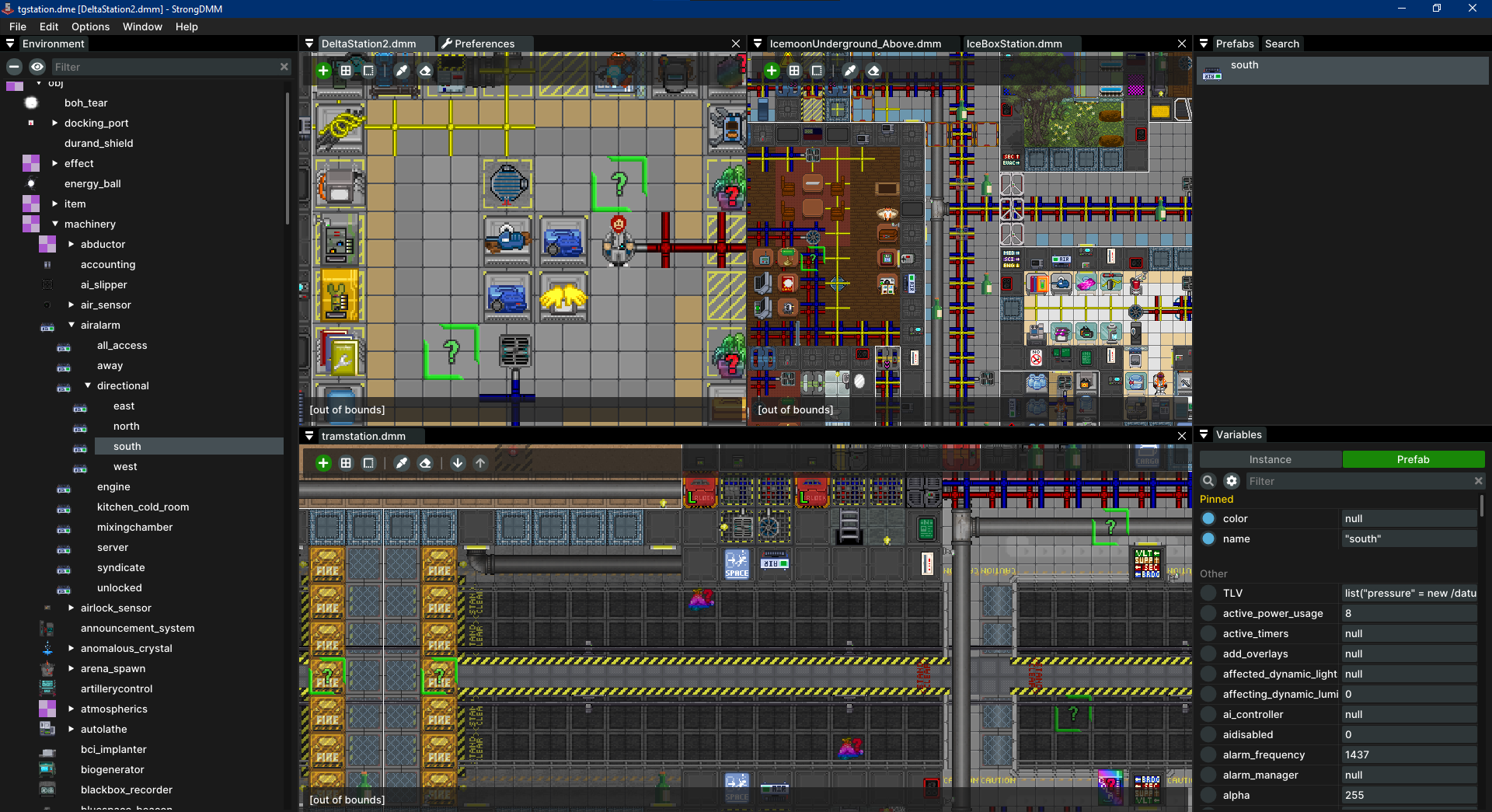
How to Use
StrongDMM is a single executable, which doesn't require any installation. You can download it from any of the provided links and start it right away.
Download Links:
Release page contains all distributed files. It also has sha256 hashes info for every executable for validation purposes.
CLI Usage
StrongDMM do support CLI to quickly open maps. Provide .dme or .dmm files as program arguments:
With DME
strongdmm.exe path/to/environment.dme ./map1.dmm ../path/map2.dmm
Without DME
strongdmm.exe ./map1.dmm ../path/map2.dmm
When providing .dmm files without .dme, a proper environment file will be found automatically.
Support

StrongDMM was developed without any monetization in mind. The main motivation is the enthusiasm for creating cool stuff.
Your support can demonstrate your appreciation and will motivate further development of the project.
Additionally, if you have specific features in mind that you'd like implemented in the editor, we can focus on your needs.
Feel free to reach out to me through my public contact to discuss details: E-Mail
FAQ
Q. My antivirus software detects something suspicious in the editor binaries. Is it ok?
A. Yes, it's a false positive reaction to the way Golang, the development language, creates binaries. Read more: Golang FAQ
Q. How do I verify my executables?
A. Verify them using sha256 hashes, available on the releases page.
Q. But how can I trust executables on the release page?
A. Executables are built with the CI pipeline. You can verify the process yourself or build the executables manually from the source code.
Q. How to uninstall the editor?
A. StrongDMM doesn't require installation, so no specific uninstallation process is needed. Simply delete the executable and, if desired, its directory on your OS to remove editor data.
Q. Where do I find editor data?
A. For Windows: C:\Users\USER\AppData\Roaming\StrongDMM, for Linux/macOS: ~/.strongdmm.
Q. How to move the map?
A. Drag the map using the middle mouse button, or by holding the space key. Alternatively, you can use the arrow keys.
Q. How to zoom?
A. Zoom using your mouse scroll wheel or the +/- keys on the keyboard.
Q. How to change the save format?
A. Go to File -> Preferences... in the menu bar and select the desired format.
Q. The editor crashed. Where can I find logs?
A. Access logs via the menu: Help -> Open Logs Folder.
How to Build
Building the application involves two steps:
- Build the sdmmparser library;
- Build the editor.
sdmmparser is a Rust library based on the SpacemanDMM parser and is compiled to a staticlib.
It can be found at /third_party/sdmmparser/src.
Prerequisites
- Go: version 1.23 or higher.
- Rust: version 1.82.0 or higher.
- Task: for running build scripts. (Optional, but recommended)
For Windows
How to install
MinGW can be installed through package managers like choco (Chocolatey) or downloaded and installed directly from the MinGW website. After installation, make sure the bin directory of MinGW (which contains gcc.exe) is in your system's PATH.
Why to use MinGW
MinGW, short for Minimalist GNU for Windows, is a lightweight development environment providing essential tools like a C compiler for Windows.
It is required as the application uses cgo to integrate C libraries, enabling the build and compilation of cgo code and ensuring all dependencies are handled properly.
Unlike MSVC (Microsoft Visual C++), which uses different conventions and linkers incompatible with cgo,
MinGW is designed to work seamlessly with Go's build system, making it the preferred choice for compiling cgo code on Windows.
Alternatively, you can use WSL (Windows Subsystem for Linux) to provide a Linux-like environment that supports cgo and C compilers compatible with Go. In that case look for linux dependencies.
For Linux
You may need to install dependencies for building GUI apps:
apt(Debian, Ubuntu):sudo apt install xorg-dev libgtk-3-devyum(Red Hat, CentOS, Fedora):sudo yum install xorg-x11-server-devel gtk3-develdnf(Fedora, newer Red Hat and CentOS):sudo dnf install xorg-x11-server-devel gtk3-develpacman(Arch Linux):sudo pacman -S xorg-server-devel gtk3zypper(openSUSE):sudo zypper install xorg-x11-server-devel gtk3-develdnforyum(Amazon Linux):sudo dnf install xorg-x11-server-devel gtk3-develapk(Alpine Linux):sudo apk add xorg-server-dev gtk+3.0-dev
Steps
Using Task (Recommended)
Task is a cross-platform Make alternative with scripts in Taskfile.yml.
With Task installed:
task build: Builds sdmmparser and the editor (output indstdirectory).task run: Runs the editor (compiles first if needed).
Manually
- Build the sdmmparser library:
- Navigate to
third_party/sdmmparser/src - Run command:
- Windows:
set RUSTUP_TOOLCHAIN=stable-x86_64-pc-windows-gnu && cargo build --release - Linux / macOS:
cargo build --release
- Windows:
- Navigate to
- In the root directory:
go build .: Builds the editor (executable namedsdmm.exe/sdmmin the root).go run .: Runs the editor.
Step #1 is required only when the sdmmparser is modified.
Why Use a Custom RUSTUP_TOOLCHAIN
The sdmmparser library is compiled into a staticlib that is linked into the final Go binary.
The MSVC toolchain is not compatible with Go, as Go relies on the GNU toolchain for CGO (the mechanism that compiles C code natively within Go).
Using a custom RUSTUP_TOOLCHAIN ensures that the Rust library is compiled in a way that aligns with Go's requirements,
avoiding compatibility issues and ensuring smooth integration.
Credits
StrongDMM uses SpacemanDMM parser made
by SpaceManiac.
The application icon is designed by Clément "Topy".
License
See the LICENSE file for license rights and limitations (GPL-3.0).