 d7600edaa7
* Removes the sec record computer from the icemoons agent (#88545) ## About The Pull Request it is gone, no more record deletion. ## Why It's Good For The Game i made this map but i'm pretty sure i didn't add this computer there, having the opwer to delete records just completely fucks over sec and isn't fun to go against ## Changelog 🆑 map: removed the sec record computer from the Icemoon Listening Post. /🆑 * Automatic changelog for PR #88545 [ci skip] * Pet Commands QOL . makes pet commands easier to use (#88495) ## About The Pull Request this PR improves the UX of pet commands a bit. i decided to expand on their radial menu. You can now hold shift and hover over your pet to display a menu of commands which you can choose from. alternatively, you can still type out commands in chat https://github.com/user-attachments/assets/9da7f7ea-58a3-4fd6-b040-45cc05cda51d ## Why It's Good For The Game makes pet commands easier to give out when you're managing more than 1 pet. also fixes the fishing command not working. ## Changelog 🆑 qol: holding shift and hovering over your pet will display a list of commands you can click from fix: fixes the fishing pet command not working /🆑 * Automatic changelog for PR #88495 [ci skip] * Removes an extra proc override in digitigrade pref logic (#88525) ## About The Pull Request they're doing the same thing and this one does a bitfield check when the value it's checking is a number, technically it works as intended right now but if we ever added more - it would break. ## Changelog 🆑 grungussuss code: removed an extra proc override in digitigrade legs preference logic code /🆑 * Automatic changelog for PR #88525 [ci skip] * Obliterates the survivors of sound/voice from orbit (#88429) ## About The Pull Request merge skew from a pr before the sound file reorganization ## Changelog no player facing changes * Add reboot countdown to stat panel (#88438) ## About The Pull Request Rewrite ticker `Reboot` proc slightly to use a timer and callback for the delay before the reboot, tracks this timer in the stat panel for players to see. Also adds a verb to cancel a pending reboot independent of the delay round end verb. ## Why It's Good For The Game It's nice to be able to see exactly how much time is left until the server restarts, and it's even nicer to see that the round end has been delayed when the "admin has delayed round end" message gets buried in a fast moving chat. ## Changelog 🆑 qol: The time until the server reboots is now visible in the status tab. admin: Added a cancel reboot verb to the server tab. /🆑 * Automatic changelog for PR #88438 [ci skip] * Nuclear Operatives can buy a vintage pinpointer from the Badassery shop section (#88621) * Automatic changelog for PR #88621 [ci skip] * Turtles (#87493) ## About The Pull Request adds turtles to the game! but these aren't your typical turtles.  these are flora-turtles, with giant trees growing on their shells. These trees can emit fields which affects nearby hydroponic plants. Initially, the trees start out as young buds, from there the tree can evolve into different types depending on what you feed the turtle. Feeding them pesticides causes the tree to blossom to be purple. this tree's fields will help kill some pests and weeds in nearby plants. Feeding them nutrients gives you the green tree, the fields will heal nearby plants Feeding them mutators like uranium or left 4 zed gives you the yellow tree. the fields increase instability of plants The turtle will emit these fields every once in a while, ONLY when its feeling happy. therefore you'll have to pet it, clean it and feed it every once in a while to keep it satisfied. You can view the turtle's happiness by shift clicking it. https://github.com/user-attachments/assets/a47136a1-06a1-419e-acc2-2f6f4468e296 The turtle only eats seeds. after eating a seed, itll process it and spit out its corresponding fruit! (for example, feeding it an apple seed gives you an apple). itll also sometimes playfully headbutt your legs and it loves going around smelling the scent from nearby plants you can get these turtles by fishing the hydroponics tray or by ordering them through cargo. ## Why It's Good For The Game adds a new fun way for botanists to take care of their plants. While these turtles alone arent enough to fully replace plant dedicated nutrients, they add small extra support. ## Changelog 🆑 add: adds flora-turtles. obtainable through cargo or by fishing from the hydroponics tray /🆑 * Automatic changelog for PR #87493 [ci skip] * Rolling tables can be rolled up again (#88628) * Automatic changelog compile [ci skip] * Automatic changelog for PR #88628 [ci skip] * Admins can now return the shuttle back to the station without ending the round (#88521) ## About The Pull Request Per DarkenedEarth's request on discord, adds a new Fun menu secret which makes the shuttle go back to the station after a configurable delay with an announcement (also configurable). After docking at the station it behaves like BYOS (still requiring to wait for it's arrival despite it being docked). ## Why It's Good For The Game Admins want it to hunt early EORGers or make events or something like that. ## Changelog 🆑 admin: Admins can now return the shuttle back to the station without ending the round /🆑 * Automatic changelog for PR #88521 [ci skip] * Fixes showers not passively washing objects (#88666) ## About The Pull Request Closes #88643 ## Changelog 🆑 fix: Fixed showers not passively washing objects /🆑 * Automatic changelog for PR #88666 [ci skip] * Kissing while you have the ink infusion ability off cooldown gives you an ink kiss (#88556) ## About The Pull Request Kissing while you have the ink infusion ability off cooldown gives you an ink kiss. This ink kiss behaves identically to a normal kiss but also creates a ink spit projectile and calls on_hit(target) on its own on_hit (not on_harmless_hit) ## Why It's Good For The Game I think it's funny to kiss people and splat them with ink. I did not test this because apparently worktrees dont work with pressing f5 ## Changelog 🆑 add: Kissing while you have the ink infusion ability off cooldown gives you an ink kiss /🆑 --------- Co-authored-by: Ghom <42542238+Ghommie@users.noreply.github.com> * Automatic changelog for PR #88556 [ci skip] * [NO GBP] Fixes moth wing stabilization working in zero-g as long as you keep moving (#88552) ## About The Pull Request Didn't run the check in stabilization code, also fixed a forgotten comsig unreg ## Changelog 🆑 fix: Fixed moth wing stabilization working in zero-g as long as you keep moving /🆑 * Automatic changelog for PR #88552 [ci skip] * Automatic changelog compile [ci skip] * plumbing catalyst storag (#88404) ## About The Pull Request see title also see video https://github.com/user-attachments/assets/23e2d128-1175-4779-87cf-74a4d4e6e1c1 ## Why It's Good For The Game doing in 1 machine what was once done by 3-4 is nicer for the chemist. less materials wasted and more space available to play around in. also has the side effect of making the output slightly higher since time spent transferring catalysts can now be spent on transferring reagents that are consumed instead ## Changelog 🆑 add: catalyst function for plumbing reaction chambers /🆑 --------- Co-authored-by: SyncIt21 <VLord3D@gmail.com> * Automatic changelog for PR #88404 [ci skip] * [NO GBP] Fixed aquariums auto-feeding (#88660) Co-authored-by: SmArtKar <44720187+SmArtKar@users.noreply.github.com> * Automatic changelog for PR #88660 [ci skip] * Computers can act like cover and will no longer never allow projectiles to pass over them (much l like barricades) (#88646) Co-authored-by: SmArtKar <44720187+SmArtKar@users.noreply.github.com> * Automatic changelog for PR #88646 [ci skip] * Lowers cooldown on hotkey spell selection (#88503) * Automatic changelog for PR #88503 [ci skip] * Navigate verb now indicates areas above or below you (#88505) * Renames UpdatePath script name for consistency (#88520) * Automatic changelog for PR #88505 [ci skip] * Lava ignores thrown mobs (#88640) * Automatic changelog for PR #88640 [ci skip] * Add circuit component for slime processor (#88463) Co-authored-by: Arae <230020345@stu.vtc.edu.hk> * Automatic changelog for PR #88463 [ci skip] * Fixes big manipulator manipulating laws of physics (#88677) * Automatic changelog for PR #88677 [ci skip] * Fix tgui chat panel z-fighting on BYOND 516 (#88663) ## About The Pull Request Port of https://github.com/ParadiseSS13/Paradise/pull/27676 and https://github.com/VOREStation/VOREStation/pull/16734 > Instead of relying on `is-disabled` and `is-visible`, which BYOND happily will automatically change for you whenever you send a client text, we now use a Child element to swap between the legacy output and browser output in separate preset panes. > > TL;DR: chat would flash white under 516, now doesn't I cleared cache before each test video below, just to be 100% sure <details> <summary>Testing Evidence: BYOND 515</summary> https://github.com/user-attachments/assets/8d661cc3-585e-4f8e-9399-76df8bc0a281 </details> <details> <summary>Testing Evidence: BYOND 516</summary> https://github.com/user-attachments/assets/c0d31fb4-6ef5-4d49-81a8-c767c5e24cc2 </details> ## Why It's Good For The Game flickering chat hurts my eyes ## Changelog 🆑 Absolucy, ShadowLarkens, S34N fix: Fixed chat rapidly flickering in BYOND 516. /🆑 * Improve and extend `fieldset_block` and `examine_block` (#88678) ## About The Pull Request Maked `fieldset_block` and `examine_block` more stylish and neat, also `fieldset_block` no longer has a centred title. Renamed `examine_block` to `boxed_message` and adds `custom_boxed_message` which can be colored. - AdminPMs, admin tickets and vote results has been wrapped into `fieldset_block` for comfort and visibility - Health Analyzer results painted to blue - Vote notice and tips of the round wrapped to purple `custom_boxed_message` - Tooltip text border color, now uses text color, not just white ## Why It's Good For The Game Demonstration in both themes <details><summary>Dark</summary>    </details> <details><summary>Light</summary>    </details> ## Changelog 🆑 qol: AdminPMs, admin tickets, vote results and started vote notification are now much more visible in the chat. qol: Boxed messages in chat (like examine), has been restyled. /🆑 * Automatic changelog for PR #88663 [ci skip] * Implement Edge DevTools (#88679) ## About The Pull Request Implements Edge DevTools for 516 users (coders) Thanks to [S34N](https://github.com/ParadiseSS13/Paradise/pull/25363) <details><summary>Images</summary>   </details> --------- Co-authored-by: AnturK <4047233+anturk@users.noreply.github.com> * Automatic changelog for PR #88678 [ci skip] * Updates href uses for 516 (#88699) ## About The Pull Request Was just scrolling through the Paradise github since they seem to have more work done for 516 to see if there's anything I can port over, found this and thought why not. Ports parts of https://github.com/ParadiseSS13/Paradise/pull/25105 Specifically, updaing all hrefs to use the internal ``byond://``, and adding it to grep. ## Why It's Good For The Game More work towards 516. ## Changelog Nothing player-facing. * Fixes hugging away your own terror (#88688) * Automatic changelog for PR #88688 [ci skip] * this is fine * normal; * Revert "this is fine" This reverts commit7c33557b02. * Fixes .357 Heartseeker not homing in on people (#88696) Co-authored-by: Hatterhat <Hatterhat@users.noreply.github.com> * Automatic changelog for PR #88696 [ci skip] * First batch of fixes * Automatic changelog compile [ci skip] * Fixes skull cookies being invisible (#88597) ## About The Pull Request - Fixes #88594 same fix as #80179 ## Changelog 🆑 fix: skull cookies are visible again /🆑 --------- Co-authored-by: Ghom <42542238+Ghommie@users.noreply.github.com> * Automatic changelog for PR #88597 [ci skip] * Gives Assistants a thematic radio. (#88578) * Automatic changelog for PR #88578 [ci skip] * Fix holodeck computer using wrong power settings (#88568) ## About The Pull Request The holodeck computer has a complex power formula since it calculates the power requirements based on the choosen simulation and items inside. One apparent problem that I discovered through testing is that when the holodeck computer is idle or using the offline program it is drawing power as if it was active... This is not supposed to happen. Let's see what the code documentation says for reference: ``` //Power use /// dont use power #define NO_POWER_USE 0 /// use idle_power_usage i.e. the power needed just to keep the machine on #define IDLE_POWER_USE 1 /// use active_power_usage i.e. the power the machine consumes to perform a specific task #define ACTIVE_POWER_USE 2 ///Base global power consumption for idling machines #define BASE_MACHINE_IDLE_CONSUMPTION (100 WATTS) ///Base global power consumption for active machines. The unit is ambiguous (joules or watts) depending on the use case for dynamic users. #define BASE_MACHINE_ACTIVE_CONSUMPTION (BASE_MACHINE_IDLE_CONSUMPTION * 10) ///see code/__DEFINES/machines.dm var/use_power = IDLE_POWER_USE ///the amount of static power load this machine adds to its area's power_usage list when use_power = IDLE_POWER_USE var/idle_power_usage = BASE_MACHINE_IDLE_CONSUMPTION ///the amount of static power load this machine adds to its area's power_usage list when use_power = ACTIVE_POWER_USE var/active_power_usage = BASE_MACHINE_ACTIVE_CONSUMPTION ///the current amount of static power usage this machine is taking from its area var/static_power_usage = 0 ``` If the machine isn't in use it should be using `IDLE_POWER_USE` when it is not active. So in our case, we have it offline but it is still using `ACTIVE_POWER_USE` draining more power than it should. There was also some misc edge case where if you are near the computer and you change the simulation, it wouldn't update the power correctly since having the UI of a computer active did not allow the power to properly reset to the simulation or offline mode. Anyway here is how it looks fixed. If you are ever checking power vars, the ones you need to pay attention to are here:  CC @SmArtKar Hopefully this is a sufficient enough explanation. If you really need me to I can record a video of the before and after effects. ## Why It's Good For The Game Holodeck computer does not drain power when it is offline mode. Instead it uses the correct idle amount which is significantly reduced. This is how all machines behave. Due to holodeck having unique power calculations it was bugged. ## Changelog 🆑 fix: Fix holodeck computer using wrong power settings and not updating properly /🆑 * Automatic changelog for PR #88568 [ci skip] * Revert "Merge pull request #1 from FernandoJ8/grung-tgu" This reverts commit53f554a38d, reversing changes made to4bf084cc96. * Reapply "Merge pull request #1 from FernandoJ8/grung-tgu" This reverts commitb88a200571. * skull emoji * more includes * greyscale and approaching fulpstation sound * readme change to fuolp * Update routes.tsx * Update build.js * fix some merge skew * this is fucked up * it doesn't see a diff * Create tgstation.dme * Update tgstation.dme * fixes the dme * Update _greyscale_config.dm * Fixes people changing alert level when Delta+ (#88711) ## About The Pull Request Title. People can change alert level during the middle of a nuclear emergency from Delta to Green while the nuke is still ticking. This PR fixes that. Alert level still capable of changing once the nuke is disarmed ## Why It's Good For The Game Bugfix good  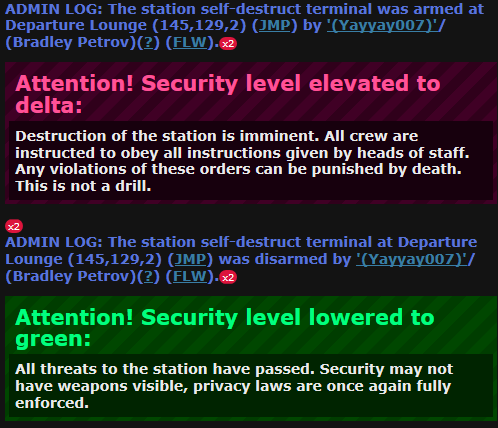 ## Changelog 🆑 fix: Fixes alert level changing during a Delta+ scenario /🆑 * Automatic changelog for PR #88711 [ci skip] * Update mob.dm * this too * okay this is scuffed * even more conflicts * Update human.dm * ok I can see the light at the end of the tunnel * picking up items will now respect the sound vary settings of the item (#88704) ## About The Pull Request I missed this when adding sound_vary ## Why It's Good For The Game intended to be this way + there's a reason this var exists ## Changelog 🆑 grungussuss fix: picking stuff up actually respects the vary settings of an item /🆑 * ok lemme test this one thing * yarn updated * Automatic changelog for PR #88704 [ci skip] * makes girders smooth (#88631) * Returns plasmafire and clockwork UI's transparency, slightly adjusts active hand slot overlays (#88673) * Automatic changelog for PR #88631 [ci skip] * Automatic changelog for PR #88673 [ci skip] * Fix Syndicate Spacesuit Names (#88697) ## About The Pull Request Fixes the names of the engineering and medical syndicate space helmets referring to them as a generic 'black space helmet', despite being separate items, and fixes the medical syndicate space suit inexplicably being called a 'green space suit' despite objectively not being green. Naming schemes follow the only-correctly-named Black Engineering Space Suit's naming pattern. ## Why It's Good For The Game Accurate labels and consistent naming schemes are good and prevent confusion among players. Also, I'm making a downstream PR that involves these, and if I see a black and white spacesuit called 'green spacesuit' one more time, I'm going to commit a felony. ## Changelog 🆑 fix: The Syndicate Medical Space Suit is no longer labelled a 'green space suit' despite being a noticeably non-green color. fix: Syndicate Medical and Engineering space helmets now display themselves as such. /🆑 * Automatic changelog for PR #88697 [ci skip] * Update mentorwho.dm * Automatic changelog compile [ci skip] * Fix holoparasite using gas ability while not summoned (#88719) ## About The Pull Request - Fixes #88686 Holoparasites were able to use the gas ability while not directly summoned. This fixes that so they need to be summoned to use the ability properly. ## Why It's Good For The Game No more cheap exploits. ## Changelog 🆑 fix: Fix holoparasite using gas ability while not summoned /🆑 * Automatic changelog for PR #88719 [ci skip] * Fix some grammar, clarify wording, change text color for examining computers. (#88709) ## About The Pull Request Fixes 2 usages of "its" across files, clarifies wording for examining the syndie medbot, changes span_warning to span_notice for the computers' build and repair. ## Why It's Good For The Game Fixes and clarifies some wording, and changes the color of the computer's examining. ## Changelog 🆑 spellcheck: Fixes some usages of its, clarifies wording on the syndie medbot, changes span_warning to notice. /🆑 * Automatic changelog for PR #88709 [ci skip] * Fix custom map loading ignoring JSON values (#88720) ## About The Pull Request The map loading function was ignoring JSON values when a map's config file was custom loaded. (things like - minetype, planetary, etc.) To resolve this I just made the loadConfig return a json and then use that json. ## Why It's Good For The Game Better custom map support! ## Changelog 🆑 fix: Fix custom map loading ignoring JSON values that were ignored previously. (minetype, planetary, etc.) /🆑 * Automatic changelog for PR #88720 [ci skip] * Resprites the base Coffeemaker, resprites coffeepots, adds bs pot overlay to both coffeemakers (#88698) ## About The Pull Request  The basic cartridge coffeemaker was pretty... crusty.  There was a [downstream resprite](https://github.com/Skyrat-SS13/Skyrat-tg/pull/20776) over a year ago that I suggested go upstream that was just never attempted. This isn't exactly the same as that though. I've modified the coffeemaker heavily from that and reshaped the pots a bit, and didn't include the cartridges. **I did not change the one on the right.** That is unmodified. It is here for Comparison and to show the Bluespace Pot overlay. Also two minor things: - Lets you use the machine unpowered. It still can't brew without power, but now you can actually take the pot and cups off still. - The BS Coffeepot set a list to list(0) but the variable said to set it to null when not in use. It wasn't in use, so setting it to null hopefully prevents any weirdness with overlays trying to be made in the future. ## Why It's Good For The Game I believe the sprites here are improvements. At least the coffeemaker and the pot lids are more legible. ## Changelog 🆑 image: updated the cartridge coffeemaker + coffeepot sprites, and added bluespace pot overlays to coffeemakers qol: the coffeemakers can now be interacted with while unpowered! No longer will your coffeepot be stuck inside the machine because it's unplugged! (Still need power to brew) /🆑 --------- Co-authored-by: SyncIt21 <110812394+SyncIt21@users.noreply.github.com> * closet lock/unlock sounds (#88702) ## About The Pull Request https://github.com/user-attachments/assets/e3de442b-51ca-4afb-971a-7d3294dce65e ## Why It's Good For The Game immershun ## Changelog 🆑 grungussuss sound: added sounds for locking/unlocking closets /🆑 * Automatic changelog for PR #88698 [ci skip] * Automatic changelog for PR #88702 [ci skip] * fixes smartvend on item tile mode (#88691) ## About The Pull Request Fixes tile mode for vending machines not spitting items out properly, they now use number input as the list mode does and spits out whatever is set to it when you click on the icon, which will be 1 by default even if you just swap list mode or close/reopen instantly. https://github.com/user-attachments/assets/e08461fa-ca18-442e-9863-8c963fbc7883 ## Why It's Good For The Game Fixes https://github.com/tgstation/tgstation/issues/88672 ## Changelog 🆑 fix: Smartfridges on grid mode (like botany's) will no longer instantly spit out all the items it has when you try to set how many it should spit out. /🆑 * Automatic changelog for PR #88691 [ci skip] * TG edits and Plumbing tick * Removes unused `reagent_state` var from reagents (#88616) ## About The Pull Request As it says on the tin. No where in code was this var read or used in any way, it was only assigned a value & then forgotten so it counts as unused ## Changelog 🆑 code: removes unused var from reagent code /🆑 * Allow to hide `Initialized` mesages (#88681) ## About The Pull Request Adds `Debug` group to initialization messages ## Why It's Good For The Game You can finally hide those annoying messages, and leave it on special Logs/Debug tabs <details><summary>Video</summary> https://github.com/user-attachments/assets/0b0d5219-d420-4d49-aa90-069961dcdaeb </details> ## Changelog 🆑 qol: Now you can hide `Initialized some shit within 0s` messages, by unchecking `Debug Log` checkbox into the chat tabs settings /🆑 * Fixes produce/bitrunning/mining order console icon and stretching jank (#88570) ## About The Pull Request While adding some new orderable bitrunning items I noticed the icons would be entirely wrong when swapping into any new tab. Melbert determined this to likely be an issue with keys and caching, and so proposed the included solution of using the `item.ref` as the key, which fixes our primary issue. In the process, however, I noticed there was a secondary issue with the orderables with especially long item names causing the information tooltip button and item order buttons to get all scrunched together. We solve this by simply just making the stack item with the text grow instead of the tooltip button, having the tooltip button sit nice and statically next to the order buttons. <details> <summary>Images</summary>    </details> ## Why It's Good For The Game Nice when icons don't look like this:  Or the buttons like this:  ## Changelog 🆑 fix: Produce, bitrunning, and mining order consoles no longer have broken icons when swapping tabs. fix: Items in produce, bitrunning, and mining order consoles with especially long names no longer make the information tooltip and item order buttons wonky. qol: The information tooltip button for items in produce, bitrunning, and mining order consoles no longer moves with the item name, and instead sits next to the item order buttons. /🆑 * var-edited icons... madness * Buffs the proto-kinetic crusher and cleans up the code a little bit (#88171) ## About The Pull Request Buffs the crusher: - Mining with the crusher gives mining XP - If you mine with the crusher, your mining level will reduce the charge time (more skilled miners can mine faster) - Shooting the kinetic blast (crusher right click) no longer puts your click on cooldown For the mark, it now has a delay of 0.8 seconds. So even though the click delay from shooting the mark is gone, you'll still have to wait for it to be ready to detonate it. Adds code support for the crusher projectile to have effects on hitting a mob/mineral - Buffs the bileworm trophy to give it AOE mining radius Reorganizes all the crusher code + trophies to be in its own folder + documents it somewhat ## Why It's Good For The Game Crusher code is a bit outdated so I wanted to clean it up a bit while I gave it the buffs I wanted. I feel like it can afford to be better as a mining tool so I gave it access to mining XP. I also gave it AOE mining from the bileworm trophy so it can keep up with the other mining tools (pka/pc) ## Changelog 🆑 add: Bileworm crusher trophy now gives you AOE mining balance: The pk crusher no longer has click delay after shooting the projectile balance: The pk crusher gives mining XP when it mines rocks balance: the pk crusher charges faster when you mine rocks based on your skill as a miner code: cleaned up some of the kinetic crusher code /🆑 * thud only thuds on carbons (#88506) ## About The Pull Request soft revert: thud only thuds on carbons @lemon's dumbasss username ## Why It's Good For The Game fixes roaches thudding on death & similar bugs. non carbons dont support handle_fall() yet ## Changelog none --------- Co-authored-by: MrMelbert <51863163+MrMelbert@users.noreply.github.com> * Remote camera eyes (such as shuttle docking computers) no longer act like they're always on Jacob's Ladder (#88689) ## About The Pull Request The `relaymove` proc for remote camera eyes used `get_step` where `get_step_multiz` would be more appropriate. This PR changes that. ## Why It's Good For The Game Fixes #83655 ## Changelog 🆑 fix: The "Move Up" and "Move Down" verbs properly respect multi-z connectivity when operating a remote camera. /🆑 * Automatic changelog for PR #88616 [ci skip] * Automatic changelog for PR #88681 [ci skip] * Beret hat masking (#88656) ## About The Pull Request https://github.com/user-attachments/assets/f54acfe0-107b-44ad-b5f1-bfd8f16387e6 ## Why It's Good For The Game looks nice ## Changelog 🆑 grungussuss image: added hat masking for berets /🆑 * Automatic changelog for PR #88570 [ci skip] * Automatic changelog for PR #88171 [ci skip] * Crowbars can be recycled in lathes (#88659) ## About The Pull Request - Fixes #88654 Only when the panel is closed else it deconstructs it as normal ## Changelog 🆑 fix: crowbars can be recycled in lathes only when the panel is closed /🆑 * Automatic changelog for PR #88689 [ci skip] * Fix kidnapping pod going to unsafe location (#88652) ## About The Pull Request - Fixes #76813 When a mob was returned from the kidnap objective they would sometimes be sent to a turf that was unsafe. In the bug report it was the pressurized atmos chambers rooms that can crush a person. ## Why It's Good For The Game Dying is bad. ## Changelog 🆑 fix: Fix kidnapping pod returning a player to unsafe location where air is bad /🆑 * Automatic changelog for PR #88656 [ci skip] * Automatic changelog for PR #88659 [ci skip] * Automatic changelog for PR #88652 [ci skip] * Buffs turbine max rpm & output, more maintainence (#88279) ## About The Pull Request Increases max rpm for all turbine parts from 35000 -> 50000 & power rectifier from 0.25 -> 0.3. Below is the comparasion 1. Current Values - **Tier 1**: max rpm = 35000, power_rectifier = 0.25, max output = 131 KW - **Tier 4**: max rpm = 550000, power_rectifier = 0.25, max output = 2 MW 2. New Values - **Tier 1**: max rpm = 50000, power_rectifier = 0.3, max output = 225 KW - **Tier 4**: max rpm = 781250, power_rectifier = 0.3, max output = 3.51 MW Depends on https://github.com/tgstation/tgstation/pull/88254 as it adds more general maintenance on top of it ## Why It's Good For The Game https://github.com/tgstation/tgstation/issues/88231#issuecomment-2501796675 made me sad cause it is. How is it that a solar panel which requires 0 operation cost is able to generate the same amount of power as a tier 1 turbine which requires tons of gas & power(to pump gases from atmos into the incinerator, room requires power etc). We need more returns on our hard work. Also with the recent power refactor changes, APC's & SMES now has batteries with 10x higher capacity so charging them takes a while & this turbine buff slightly helps in alleviating that ## Changelog 🆑 balance: turbine now has higher max rpm & increased power output code: further improved code for turbine /🆑 * Fix vent clog event triggering on non-station areas (#88724) ## About The Pull Request - Fixes #88723 This fixes the vent clog event triggering on non-station areas. ## Why It's Good For The Game Station events should only trigger on station areas. ## Changelog 🆑 fix: Fix vent clog event triggering on non-station areas /🆑 * Automatic changelog for PR #88279 [ci skip] * Automatic changelog for PR #88724 [ci skip] * Fixes an 8 year old bug which colored your HUDs with you (#88667) ## About The Pull Request Partially a port of https://github.com/DaedalusDock/daedalusdock/pull/1163 which is a port of my own code from bitbus Closes #88579 Instead of manually setting hud images and positioning we now can use set_hud_image_state which also updates their position to ensure that they scale with the owner atom. HUDs had RESET_COLOR and RESET_TRANSFORM but no KEEP_APART, so they were stuck with mobs all this time. I replaced RESET_TRANSFORM with PIXEL_SCALE (shouldn't be reserved to mob huds only to be honest) and added KEEP_APART, so that HUDs still scale/rotate with their owner but don't inherit their color. Also fixed the dragon issue, that's where this PR actually started. Closes https://github.com/tgstation/tgstation/issues/45411 ## Why It's Good For The Game I don't want my HUDs to be pretty pink when I make a barbie Clarke. ## Changelog 🆑 refactor: Rewrote some of HUD code so they're no longer colored in their owner's color fix: Space dragons no longer turn invisible when toggling seethrough mode /🆑 * Automatic changelog for PR #88667 [ci skip] * Public mining shuttle * empty commit to restart checks * The Chairening: Chairs can break when used to block. Alters how chairs stun when smashed over someones head. (#88480) Co-authored-by: SmArtKar <44720187+SmArtKar@users.noreply.github.com> * Automatic changelog for PR #88480 [ci skip] * squash merge * Fish mounts for trophy fish. (#88373) * Automatic changelog for PR #88373 [ci skip] * empty commit to restart flaky results * surgery tray toolbox thingie for fulp maps * update paths for c357 to a357 * this update paths scrpt sucks * nt br rifle and eye poster * more bullshit * Revert "more bullshit" This reverts commit12dfb60182. * ok here we go * Entertainment chat filter toggle (#88712) ## About The Pull Request Allow filtering for entertainment radio and newscaster in the text log ## Why It's Good For The Game Sometimes you want a tab that lets you focus without the TV on in the background ## Changelog 🆑 LT3 qol: Entertainment and newscaster broadcasts can be toggled in chat tabs /🆑 * Automatic changelog for PR #88712 [ci skip] * soothe-my-soul-with-an-empty-commit * squash-merge-staging-branch-into-main * fixes attack chain heck with rped and tables (#88708) ## About The Pull Request I noticed rped was hitting tables instead of being placed on them so this fixes that, I tested it ## Changelog 🆑 grungussuss fix: fixed being unable to place rpeds on tables /🆑 --------- Co-authored-by: SyncIt21 <110812394+SyncIt21@users.noreply.github.com> * Automatic changelog for PR #88708 [ci skip] * Automatic changelog compile [ci skip] * 516 Compile Compatibility (#88611) Renames all uses of caller, as they (currently) shadow the new byond var and will in future error Ups our "wan if compiled after" experiement compile version to 516 Adds an alternate 516 unit test * Mail sorter/flatpack naming fix (#88687) ## About The Pull Request - Fixes subtype flatpacks missing a name when in vending machines - Adds default price for vending flatpacks - Moves flatpacks into their own .dm file - Groups the mail related items together in the CargoDrobe ## Why It's Good For The Game All vending machine flatpacks having identical names despite the contents of the flatpack is less than ideal ## Changelog 🆑 LT3 fix: Premade/vending machine flatpacks now display what board is inside /🆑 * Automatic changelog for PR #88687 [ci skip] * Rift Fishing (#88619) ## About The Pull Request Adds rift fishing to the game.  Drained and undrained influences can be fished in, the latter only by heretics. Fishing in an undrained influence shows a bobber floating over nothing to other people, so don't be stupid! The loot pool includes the following: - Knowledge. Great for heretics, bad for crew. Only actually gives knowledge if fished up in an unopened rift, opening it. One of each heretic potion type. - A wild Fire Shark, hostile to all. - One of each heretic potion, and two flasks of eldritch essence. - Several new fish:  In order: 1. Chrystarfish Cosmostarfishe that snuck into the bluespace compartment of a shuttle engine. Teleports around when eaten. Can be cut into bluespace crystals. Very pointy. 2. Flumpulus Probably not an actual fish. Contains flumpuline, which is in many ways an upgrade to oculine. Except for it occasionally popping your eyes out and replacing them with fungus. It also gets flattened if you land on it, cushioning your fall.  3. Gullion This fish can be cut into two diamonds, and needs no mate to reproduce, making it an excellent way to replenish the station's diamond supply! However, it needs silicon in the fish tank to survive. 4. Walro-Dolphish Weird, amphibious creature. Amazing weapon - high damage, strong piercing wounds, decent block chances. However, it will bite you if you hold it for too long, so be careful! More fish are planned to be added. The PR was split in two to reduce review complexity as the latter half of the fish were increasingly convoluted. Any fishing rod will do for fishing, but heretics are now able to infuse their fishing rod with a grasp:  Infusing the rod will temporarily improve its fishing modifier and give it a unique trait that lets heretics gather 2 influence, rather than 1, from a fished-up rift. If crew fish up a glimpse of the Mansus, they will recieve the same effects as if they examined the rift, and a curse hand will shoot out at them. influences cannot be bombed for fish. ## Why It's Good For The Game Rifts are _extremely_ close to basically just being eldritch pools of liquid that some heretic spilled over the station. It's always stuck out like a sore thumb that we can't fish in them, but now we _can_. (Also, someone needs to PR fishing in a bucket for clowns and mimes.) Fishing in a rift is just one of those things you see some random, innocent assistant do while doing an errand, passively enhancing the round with the sheer ridiculousness of it. Coming back, it's likely you'll see them running from a wild Fire Shark they unwisely dug up from messing with eldritch influences. For Heretics, this is for the most part actively a worse alternative than just doing things normally. But sometimes you don't want to be optimal. Infusing their fishing rod is almost entirely an amusing twist on the blade infusion that blade path has, and they can even infuse other people's rods - make fish not war. Ghommie gave me the fish sprites, and I interpreted them the silliest and most interesting ways I could think of. > Chrystarfish Bluespace's technobabble has finally reached fish. Much like the Gullion, the intention here was primarily some additional, risky way to procure some amount of bluespace crystals and dust that doesn't depend on Mining to do their job, either for the station or for your own stupid plans. (Obviously mining is still the best way to get it, but it's not healthy for the game for them to be the ONLY way to do so!) >Flumpulus 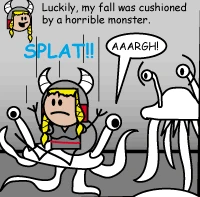 Imagine taking a pill of 'Super oculine!' and suddenly your eyes pop out and are replaced with fungeyes. 10/10 >Gullion Diamonds are extremely scarce on the station and the only way to get more is by mining. I thought adding some rare, restricted way of getting more would be fun for the game, and encourage fish breeding. Parthenogenesis may be a bit much admittedly, but let's just see what happens > Walro-Dolphish The name for this thing kinda sucks. I like the idea of an amphibious fish-weapon like the pikes that actually kinda just hates being wielded around like a stick. It's also piercing to differentiate.  ## Changelog 🆑 Carlarc, Ghommie add: Adds rift fishing to the game. Includes new wacky fish! add: Drained and undrained influences can be fished in, the latter only by heretics. Fishing in an undrained influence shows a bobber floating over nothing to other people, so don't be stupid! add: influences cannot be bombed for fish. add: Heretics can now infuse their fishing rod, and fish for knowledge. /🆑 --------- Co-authored-by: Ghom <42542238+Ghommie@users.noreply.github.com> * Automatic changelog for PR #88619 [ci skip] * removed some unused sound files and added an unused song to default lobby songs (#88642) <!-- Write **BELOW** The Headers and **ABOVE** The comments else it may not be viewable. --> <!-- You can view Contributing.MD for a detailed description of the pull request process. --> ## About The Pull Request - added title0.ogg to default lobby songs (it was completely unused) partially handles https://github.com/tgstation/tgstation/issues/86856 these files are removed, transfers the files to the asset repo: https://github.com/tgstation/SS13-assets/pull/41 - compressed_air1.ogg - compressed_air2.ogg - door_lock.ogg <!-- Describe The Pull Request. Please be sure every change is documented or this can delay review and even discourage maintainers from merging your PR! --> ## Why It's Good For The Game file organization by moving unused stuff to the unused asset repo and unused lobby song <!-- Argue for the merits of your changes and how they benefit the game, especially if they are controversial and/or far reaching. If you can't actually explain WHY what you are doing will improve the game, then it probably isn't good for the game in the first place. --> ## Changelog <!-- If your PR modifies aspects of the game that can be concretely observed by players or admins you should add a changelog. If your change does NOT meet this description, remove this section. Be sure to properly mark your PRs to prevent unnecessary GBP loss. You can read up on GBP and its effects on PRs in the tgstation guides for contributors. Please note that maintainers freely reserve the right to remove and add tags should they deem it appropriate. You can attempt to finagle the system all you want, but it's best to shoot for clear communication right off the bat. --> nothing player facing <!-- Both 🆑's are required for the changelog to work! You can put your name to the right of the first 🆑 if you want to overwrite your GitHub username as author ingame. --> <!-- You can use multiple of the same prefix (they're only used for the icon ingame) and delete the unneeded ones. Despite some of the tags, changelogs should generally represent how a player might be affected by the changes rather than a summary of the PR's contents. --> * Fix quiver max_slots var not actually setting storage max_slots (#88731) * Automatic changelog for PR #88731 [ci skip] * Optimization for plumbing reaction chamber & catalysts (#88722) ## About The Pull Request Plumbing components waste extra ticks in requesting reagents if those requested reagents are stored in a reaction chamber & they are catalysts which cannot be sent out. That is because the reaction chamber lies & tells the pipeline it can give them inside it's `/datum/component/plumbing/reaction_chamber/can_give()` proc but won't actually transfer them if it has no excess to spare. This doesn't cause errors because those components will eventually get their requested values from other supplies but it takes extra ticks to do so This ensures the reaction chamber won't volunteer itself as a supplier if it can't give out those catalysts thus enabling the pipeline to request more accurate values by excluding that reaction chamber from its list suppliers ## Changelog 🆑 code: plumbing reaction chamber won't waste extra ticks for the pipeline when sending out catalysts /🆑 --------- Co-authored-by: Time-Green <7501474+Time-Green@users.noreply.github.com> * Automatic changelog for PR #88722 [ci skip] * Destructive scanner no longer attempts to destroy itself (#88576) * Gets rid of spamming during closet breakout (#88682) ## About The Pull Request - Fixes #88657 When you begin resisting you can't resist again till either the breakout was successful or failed. This also lead to the shake animation being reapplied multiple times causing additional shaking on top of it already shaking ## Changelog 🆑 fix: breaking out of a closet won't spam chat or shake like it's having a seizure /🆑 * Automatic changelog for PR #88682 [ci skip] * Prevents vibechecking budget insuls via examine tags (#88665) ## About The Pull Request Closes #88634 You can no longer vibecheck budget insuls, as they'll always show up as fully insulated. ## Why It's Good For The Game Kinda ruins the point of random insulation on these. ## Changelog 🆑 balance: You can no longer check if budget insuls work via examine tags /🆑 * Automatic changelog for PR #88665 [ci skip] * [NO GBP] Fixes forcing open airlocks only working once and then never again (#88662) ## About The Pull Request Closes #88661 ## Changelog 🆑 fix: Fixed forcing open airlocks only working once and then never again /🆑 * Automatic changelog for PR #88662 [ci skip] * Iron material tiles can now be used to tile lattice to make plating (same for other similar interactions) (#88674) ## About The Pull Request Added a helper to check if something is a tile made out of iron, and changed all plating placement code to use it. ## Why It's Good For The Game Its very easy to misclick or get confused and make the wrong type of tile in the crafting menu, and since material tiles made from iron aren't a subtype of ***iron*** tiles, you won't be able to use them to make plating. Space already accounts for this, but lattice, chasms, openspace and foam plating do not. ## Changelog 🆑 qol: Iron material tiles can now be used to tile lattice to make plating /🆑 * Automatic changelog compile [ci skip] * Automatic changelog for PR #88674 [ci skip] * Removes "Prefer multiplication over division" Standard (#88748) ## About The Pull Request I haven't profiled this and I don't need to. It doesn't matter to me if it's slower to divide or multiply (it likely is to some extent because byond). Any cost associated is going to be on the scale of micro-ops, a level of optimization I think we should deliberately avoid documenting. Micro-ops are so minor and potentially variable that writing them down poisons the well that is our greater contributor base's practices. `*` and `/` imply different things. As an example the move from `/ 2` to `* 0.5` obfuscates intent slightly. That intention is more important then the optimization I think. Hence, yeet @tgstation/commit-access requesting input * Sound Optimizations and Debug Tools (#88517) ## About The Pull Request I was digging through sound code trying to add a few misc `.ogg`'s when I noticed a horrifying revelation. Sound calculations are broken as fuck. At first I didn't think it was a big deal until I remembered this comment in another PR:  I asked for the profile logs: ``` Profile results (total time) Proc Name Self CPU Total CPU Real Time Overtime Calls ---------------------------------------------------------------------------------------------- --------- --------- --------- --------- --------- /proc/playsound 4.771 26.841 26.902 0.347 153938 /mob/proc/playsound_local 9.511 15.689 15.891 0.724 429391 /mob/living/say 0.125 19.064 19.945 0.000 2550 /mob/living/carbon/updatehealth 0.878 8.305 8.341 0.013 49847 /mob/living/carbon/proc/handle_organs 1.486 9.263 9.300 0.000 70977 /obj/item/organ/internal/on_life 0.415 0.455 0.561 0.000 340312 /mob/living/carbon/Life 0.758 30.085 30.123 0.000 71933 /mob/living/proc/Life 5.509 39.404 39.512 0.000 401951 ``` Yeah, that is _really_ bad. Especially since it is a hot proc that is used half a million times. Optimizing this would help a decent amount. So now you are probably wondering, what exactly is the problem?! Let's take a look. https://www.desmos.com/calculator/sqdfl8ipgf Sounds are being broadcast on a large radius which is typically about ~17 tiles. Since the volume of a sound is reduced by distance, the further away the sound is, the quieter it becomes. You would think, hey that's fine! Sounds become inaudible at the 17 tile distance limit right? Except no, they generally become inaudible about 2/3rds of the way there. (~10 tile range) Sound volume is between 1-100. When the sound volume is lower than 3, it becomes (pretty much) inaudible. This means most of the sounds that are being spammed in game everywhere, you can't even hear!!! To fix this we used two major optimizations: 1. Add a `SOUND_AUDIBLE_VOLUME_MIN` to ignore any sound lower than this volume and calculate an audible distance 2. Use the new audible distance to drastically shorten the tile range of mob listeners using `get_hearers_in_view()` To give you an idea of how much better this is: Sounds that had a range of 17x17 (289 turfs) are now 12x12 (144 turfs). There is also large range machinery like the SM that has a 40x40 (1600 turfs) that is now 30x30 (900 turfs). It's quite an improvement. I also went and added a debugging tool to the admin/debug equipment set that can be found in the debug box. It is a pair of earmuffs that when worn has any sounds sent to the mob via a `to_chat` message displaying the sounds max range, distance from player, volume, and sound name. It is highly recommend to walk while wearing the earmuffs since walking stops your mob from emitting footstep sounds. ## Why It's Good For The Game The speed of sound is now faster than ever. Please don't break the sound barrier. ## Changelog 🆑 refactor: Sound has been heavily optimized and will now ignore low volume sounds from far away. admin: Add debugging sound earmuffs to admin equipment inside the debug box. Wear them to determine a sounds max range, distance, volume, and sound name. Highly recommended to walk otherwise you will get spammed with footstep sounds. /🆑 * Automatic changelog for PR #88517 [ci skip] * Fix welding sparks breaking on z level change (#88626) ## About The Pull Request Welding overlays were being put on the welding tool's update_overlays_on_z, rather than the target's. This fixes that. ## Why It's Good For The Game Fix bug ## Changelog 🆑 fix: welding sparks no longer break on transitioning to a different floor /🆑 * Automatic changelog for PR #88626 [ci skip] * Refactors paper UI (#88627) ## About The Pull Request No exciting new features added, I only broke up this massive file into a folder. ## Why It's Good For The Game Call me react brained but seeing UI files with >500 lines of code just strikes me as wall of text / sensory overload ## Changelog N/A * Changing gather mode on storage's won't drop its items (#88629) ## About The Pull Request - Fixes #88606 ## Changelog 🆑 fix: Changing gather mode on storage items won't drop it's stored items /🆑 * Automatic changelog for PR #88629 [ci skip] * proc/get_up actually uses the get_up_time var to determine getting up speed, a neutral tackling outcome actually lets you get up, as intended (#88630) ## About The Pull Request What it says on the tin. Also cleans up some tackling code ## Why It's Good For The Game Only in my delirium did I actually realize how I fucked up. Thanks flu. ## Changelog 🆑 fix: Tackling resulting in a neutral outcome does not force you to the floor. fix: Getting up is now properly influenced by spinal implants. /🆑 * Automatic changelog for PR #88630 [ci skip] * fixes crafting menu rice dough (#88738) ## About The Pull Request Making rice dough through the crafting menu would make it inherit all the reagents of it's ingredients... which were the ingredients to make rice dough. This means that when you baked the dough in an oven, it would react the reagents and make a new rice dough, while removing all the reagents in the newly made reispan. This made it inedible, and thus impossible to make edible reispan. ## Why It's Good For The Game Infinite inedible bread is probably bad 👍 ## Changelog 🆑 fix: fixes crafting menu-made rice dough being unusable for bread /🆑 * Automatic changelog for PR #88738 [ci skip] * Give alert spelling fix (#88742) ## About The Pull Request Changes `examiante` to `examine` in the give alert description. ## Why It's Good For The Game `examiante` ain't a word and, uh, `examinate` I don't think actually fits here either. ## Changelog 🆑 spellcheck: Give alert 'examiante' > 'examine'. /🆑 * small microoptimization for `SIGNAL_ADDTRAIT` and `SIGNAL_REMOVETRAIT` (#88744) ## About The Pull Request iirc, string + string is const folded at compile-time, while "whatever [string]" is not. ## Why It's Good For The Game extra performance for practically no cost? why not ## Changelog 🆑 code: Very slightly improved the performance of code related to adding and removing traits. /🆑 * Automatic changelog for PR #88742 [ci skip] * Automatic changelog for PR #88744 [ci skip] * Removes Outdated Todo Comment (#88749) * Fix lead acid cell being rated as megacell (#88734) ## About The Pull Request Fixes lead acid battery being overlooked in the split between cell and megacell. It still remains a very good battery fitting of being rare maintenance loot, but it's no longer equivalent to several bluespace cells combined. It is a cell with a maximum charge of 600kJ, more than a bluespace cell, but a lower charge rate and no charge indicator. It spawns with 250kJ to 350kJ in starting charge, between super and hyper. ## Why It's Good For The Game Fixes https://github.com/tgstation/tgstation/issues/88573 ## Changelog 🆑 LT3 fix: Fixed lead acid cell having extremely high max charge /🆑 * Automatic changelog for PR #88734 [ci skip] * [NO GBP] Fixes chair, echair, wheelchair and vehicle overlays on painted objects (#88745) ## About The Pull Request Closes #88644 Insanity ## Changelog 🆑 fix: Fixed chair, echair, wheelchair and vehicle overlays on painted objects /🆑 * Automatic changelog for PR #88745 [ci skip] * Fixes podperson hair not updating (#88664) ## About The Pull Request Closes #88655 ## Changelog 🆑 fix: Fixed podperson hair not updating /🆑 * Automatic changelog for PR #88664 [ci skip] * Fixes shatter element dropping stuff on blocked turfs (#88739) ## About The Pull Request - Fixes #88727 Now when an atom shatters if that turf is blocked by a dense object (e.g. wall, closed airlock, window etc) such that no air can pass through it then we drop stuff on the thrown object's location and not on the hit target location. In laymen's terms if you throw a plate on the wall, window, closed airlock etc then the shattered contents drop on the plate's last location & not on the wall itself ## Changelog 🆑 fix: Fixes shattering element dropping stuff on blocked turfs /🆑 * Automatic changelog for PR #88739 [ci skip] * [no gbp] fixes being able to tell animals to commit atrocious acts (#88754) ## About The Pull Request closes #88743 . the issue is while they'd ignore ur command since its impossible, the emote would still appear, which i now realize was a mistake ## Why It's Good For The Game fixes being able to tell animals to commit atrocious acts ## Changelog 🆑 fix: radial pet commanding emotes will now not appear if the command is impossible to execute /🆑 * Automatic changelog for PR #88754 [ci skip] * Automatic changelog compile [ci skip] * Automatic TGS DMAPI Update (#88639) This pull request updates the TGS DMAPI to the latest version. Please note any changes that may be breaking or unimplemented in your codebase by checking what changes are in the definitions file: code/__DEFINES/tgs.dm before merging. Full changelog can be found [here](https://raw.githubusercontent.com/tgstation/tgstation-server/gh-pages/changelog.yml). - Added compatibility with SpacemanDMM's `redefined_proc` lint. (#2058 Cyberboss) #tgs-dmapi-release Co-authored-by: tgstation-ci[bot] <179393467+tgstation-ci[bot]@users.noreply.github.com> Co-authored-by: LemonInTheDark <58055496+LemonInTheDark@users.noreply.github.com> * you can adjust diagonal walls to be not diagonal walls with a wrench (#88636) ## About The Pull Request you can adjust diagonal walls to not diagonal walls with a wrench https://github.com/user-attachments/assets/0a708b7d-195b-41ad-b7f4-cf9f8142e730 ## Why It's Good For The Game when youre building the shuttle you literally always forget to put tiles under diagonal titanium walls so you just have plating there this is fixed by letting players not make it diagonal ## Changelog 🆑 qol: you can adjust diagonal walls to be not diagonal walls with a wrench /🆑 * Automatic changelog for PR #88636 [ci skip] * airlocks and computers are leanable (#88478) ## About The Pull Request - added a signal - `COMSIG_ATOM_DENSITY_CHANGED`, is sent when set_density is called and doesn't early return - changed all manual assignments of .density to use `set_density` so the signal is sent - airlocks get the leanable component, if the airlock opens while you are leaning on it - you will fall - computers get the leanable component ## Why It's Good For The Game can lean on more stuff, roleplay! Immersion! *John Tider leans on the airlock* ## Changelog 🆑 grungussuss add: computers and airlocks are now leanable refactor: changed how density/collision of some objects is changed, report any oddities! /🆑 --------- Co-authored-by: SyncIt21 <110812394+SyncIt21@users.noreply.github.com> * Automatic changelog for PR #88478 [ci skip] * Fix photocopying removing stamp overlays from the original instead of copying them to the copy (#88764) ## About The Pull Request Photocopiers were trying to copy the stamp overlays from the new blank paper onto the original, and cutting the original's old overlays in the process. This inverts that statement and removes the cutting part. ## Why It's Good For The Game Nice if photocopying doesn't remove the stamp overlays on the original just cause it feels like it. ## Changelog 🆑 fix: Photocopying no longer removes the stamp overlays from the original paper, and actually copies them to the copy. /🆑 * Automatic changelog for PR #88764 [ci skip] * Mech-dominating Malf AIs will have their Doomsday timer stopped when their deactivated core is destroyed (#88528) * Automatic changelog for PR #88528 [ci skip] * Automatic changelog compile [ci skip] * fixes turf/proc/replace_baseturf from having an infinite loop (#88794) * Automatic changelog for PR #88794 [ci skip] * forensics spoofing tool (for traitors) (#88357) ## About The Pull Request adds the forensics spoofing kit for 5tc to the uplink (is it really a kit if its only the item and instructions?)    silent mode: if off the scanner will make sounds and messages like a forensics scanner if used (Elliot Wardle points the forensic scanner at the reinforced wall and performs a forensic scan.) scan mode: scans stuff for NEWLY discovered fibers and fingerprint, stores them the scanner may only hold 5 each of fibers and prints the scanner reads sec records to display names next to fingerprints apply mode: it adds the fiber/fingerprint to whatever you use it on ## Why It's Good For The Game as it is right now forensics scanners are basically a guaranteed "this guy is an antag" if they scan anything syndicate related and find your prints on it (or fibers). that is not ideal because you will spend the next 30 minutes of your time getting trolled in the permabrig by security with this item you (traitor) get the benefit of the doubt which is good and makes detectives legit use their brain beyond CTRL+C CTRL+V on sec records ## Changelog 🆑 add: forensics spoofing kit for traitors/whoever with an uplink /🆑 * Automatic changelog for PR #88357 [ci skip] * Make the xmas period longer (#88581) I dunno headmins are jollymaxxing i guess * [NO GBP] Blood no longer gets colored with the item its attached to (#88806) ## About The Pull Request Closes #88804 ## Changelog 🆑 fix: Blood no longer gets colored with the item its attached to /🆑 * Automatic changelog for PR #88806 [ci skip] * Automatic changelog compile [ci skip] * Adds a new, unique sound for polling (#88256) * Automatic changelog for PR #88256 [ci skip] * Fixes Boulder Desyncing (#88775) * Automatic changelog for PR #88775 [ci skip] * Ensures that mice don't spawn in unsafe atmos from garbage spawners (#88801) ## About The Pull Request Similarly to grime spawners, mice get removed from the "loot" pool when the trash spawner is placed in unsafe conditions. Closes #88769 ## Changelog 🆑 fix: Mice no longer can spawn in unsafe atmos from garbage spawners /🆑 * Automatic changelog for PR #88801 [ci skip] * The Extradimensional Blade no longer infinitely scales damage also the nullblade can be sharpened (#88680) ## About The Pull Request the sword lowers its force by 3 as part of the secondary attack but resets its damage to default values before the 3 is re-added, resulting in +3 force every time a secondary attack is used. also sharpened nullblades didn't increase in damage, now they do. ## Why It's Good For The Game 500 force roundstart weapons are a bad idea ## Changelog 🆑 Namelessfairy and SmArtKar fix: The Extradimensional Blade no longer infinitely scales damage fix: The nullblade correctly does increased damage when sharpened /🆑 * Automatic changelog for PR #88680 [ci skip] * cleans up holodeck map templates + prevents the holodeck from overloading due to lag (#88792) ## About The Pull Request removes unused holodeck template vars prevents the holodeck from overloading if process is fired during loading ## Why It's Good For The Game unused var bad holodeck shouldnt detonate if the server lags ## Changelog 🆑 fix: holodeck no longer explodes if the server lags while its loading a new sim /🆑 * Automatic changelog for PR #88792 [ci skip] * Adds back our sound edits * willard's wish * Revert "merge branch 'master' of https://github.com/tgstation/tgstation into tgu-december2024" This reverts commit6d9480e3c5, reversing changes made toda2ba44f9a. * Reapply "merge branch 'master' of https://github.com/tgstation/tgstation into tgu-december2024" This reverts commit30d2279977. * Revert "Reapply "merge branch 'master' of https://github.com/tgstation/tgstation into tgu-december2024"" This reverts commit4679da00ab. --------- Co-authored-by: DATA <44149906+DATA-xPUNGED@users.noreply.github.com> Co-authored-by: tgstation-ci[bot] <179393467+tgstation-ci[bot]@users.noreply.github.com> Co-authored-by: Ben10Omintrix <138636438+Ben10Omintrix@users.noreply.github.com> Co-authored-by: Roxy <75404941+TealSeer@users.noreply.github.com> Co-authored-by: Rhials <28870487+Rhials@users.noreply.github.com> Co-authored-by: SyncIt21 <110812394+SyncIt21@users.noreply.github.com> Co-authored-by: SmArtKar <44720187+SmArtKar@users.noreply.github.com> Co-authored-by: carlarctg <53100513+carlarctg@users.noreply.github.com> Co-authored-by: Ghom <42542238+Ghommie@users.noreply.github.com> Co-authored-by: lovegreenstuff <59631103+lovegreenstuff@users.noreply.github.com> Co-authored-by: SyncIt21 <VLord3D@gmail.com> Co-authored-by: KazooBard <65713506+KazooBard@users.noreply.github.com> Co-authored-by: MrMelbert <51863163+MrMelbert@users.noreply.github.com> Co-authored-by: larentoun <31931237+larentoun@users.noreply.github.com> Co-authored-by: araeotu <a192020688@gmail.com> Co-authored-by: Arae <230020345@stu.vtc.edu.hk> Co-authored-by: Lucy <lucy@absolucy.moe> Co-authored-by: Aylong <69762909+AyIong@users.noreply.github.com> Co-authored-by: AnturK <4047233+anturk@users.noreply.github.com> Co-authored-by: John Willard <53777086+JohnFulpWillard@users.noreply.github.com> Co-authored-by: LT3 <83487515+lessthnthree@users.noreply.github.com> Co-authored-by: Hatterhat <31829017+Hatterhat@users.noreply.github.com> Co-authored-by: Hatterhat <Hatterhat@users.noreply.github.com> Co-authored-by: FernandoJ8 <fernandojalvarezguillemet@gmail.com> Co-authored-by: Wallem <66052067+Wallemations@users.noreply.github.com> Co-authored-by: Tim <timothymtorres@gmail.com> Co-authored-by: Yayyay007 <145062394+rintherat@users.noreply.github.com> Co-authored-by: jimmyl <70376633+mc-oofert@users.noreply.github.com> Co-authored-by: Hookie <namelyman@gmail.com> Co-authored-by: Sprite <78328959+TheRealSpriteMan1337@users.noreply.github.com> Co-authored-by: OrionTheFox <76465278+OrionTheFox@users.noreply.github.com> Co-authored-by: _0Steven <42909981+00-Steven@users.noreply.github.com> Co-authored-by: Xander3359 <66163761+Xander3359@users.noreply.github.com> Co-authored-by: Y0SH1M4S73R <y0sh1m4s73r@gmail.com> Co-authored-by: necromanceranne <40847847+necromanceranne@users.noreply.github.com> Co-authored-by: LemonInTheDark <58055496+LemonInTheDark@users.noreply.github.com> Co-authored-by: Time-Green <7501474+Time-Green@users.noreply.github.com> Co-authored-by: FlufflesTheDog <piecopresident@gmail.com> Co-authored-by: Jeremiah <42397676+jlsnow301@users.noreply.github.com> Co-authored-by: Paxilmaniac <82386923+Paxilmaniac@users.noreply.github.com> Co-authored-by: Kylerace <kylerlumpkin1@gmail.com> Co-authored-by: oranges <email@oranges.net.nz> Co-authored-by: NamelessFairy <40036527+NamelessFairy@users.noreply.github.com>

38 KiB
Component Reference
Notice: This documentation might be out of date, so always check the source code to see the most up-to-date information.
- General Concepts
tgui/componentsAnimatedNumberBlockQuoteBoxButtonButton.CheckboxButton.ConfirmButton.InputByondUiCollapsibleColorBoxDimmerDividerDropdownFlexFlex.ItemGridGrid.ColumnIconIcon.StackInputKnobLabeledControlsLabeledControls.ItemLabeledListLabeledList.ItemLabeledList.DividerModalNoticeBoxNumberInputProgressBarRoundGaugeSectionSliderStackTableTable.RowTable.CellTabsTabs.TabTooltip
tgui/layouts
General Concepts
These are the components which you can use for interface construction.
If you have trouble finding the exact prop you need on a component,
please note, that most of these components inherit from other basic
components, such as Box. This component in particular provides a lot
of styling options for all components, e.g. color and opacity, thus
it is used a lot in this framework.
Event handlers.
Event handlers are callbacks that you can attack to various element to
listen for browser events. React supports camelcase (onClick) event names.
- Camel case names are what's called synthetic events, and are the preferred way of handling events in React, for efficiency and performance reasons. Please read React Event Handling to understand what this is about.
tgui/components
AnimatedNumber
This component provides animations for numeric values.
Props:
value: number- Value to animate.initial: number- Initial value to use in animation when element first appears. If you set initial to0for example, number will always animate starting from0, and if omitted, it will not play an initial animation.format: value => value- Output formatter.- Example:
value => Math.round(value).
- Example:
children: (formattedValue, rawValue) => any- Pull the animated number to animate more complex things deeper in the DOM tree.- Example:
(_, value) => <Icon rotation={value} />
- Example:
BlockQuote
Just a block quote, just like this example in markdown:
Here's an example of a block quote.
Props:
- See inherited props: Box
Box
The Box component serves as a wrapper component for most of the CSS utility
needs. It creates a new DOM element, a <div> by default that can be changed
with the as property. Let's say you want to use a <span> instead:
<Box as="span" m={1}>
  <Button />
</Box>
This works great when the changes can be isolated to a new DOM element. For instance, you can change the margin this way.
However, sometimes you have to target the underlying DOM element. For instance, you want to change the text color of the button. The Button component defines its own color. CSS inheritance doesn't help.
To workaround this problem, the Box children accept a render props function.
This way, Button can pull out the className generated by the Box.
<Box color="primary">{(props) => <Button {...props} />}</Box>
Box Units
Box units, like width, height and margins can be defined in two ways:
- By plain numbers
- 1 unit equals
1remfor width, height and positioning properties. - 1 unit equals
0.5remfor margins and paddings.
- 1 unit equals
- By strings with proper CSS units
- For example:
100px,2em,1rem,100%, etc.
- For example:
If you need more precision, you can always use fractional numbers.
Default font size (1rem) is equal to 12px.
Props:
as: string- The component used for the root node.color: string- Applies an atomiccolor-<name>class to the element.- See
styles/atomic/color.scss.
- See
width: number- Box width.minWidth: number- Box minimum width.maxWidth: number- Box maximum width.height: number- Box height.minHeight: number- Box minimum height.maxHeight: number- Box maximum height.fontSize: number- Font size.fontFamily: string- Font family.lineHeight: number- Directly affects the height of text lines. Useful for adjusting button height.inline: boolean- Forces theBoxto appear as aninline-block, or in other words, makes theBoxflow with the text instead of taking all available horizontal space.m: number- Margin on all sides.mx: number- Horizontal margin.my: number- Vertical margin.mt: number- Top margin.mb: number- Bottom margin.ml: number- Left margin.mr: number- Right margin.p: number- Padding on all sides.px: number- Horizontal padding.py: number- Vertical padding.pt: number- Top padding.pb: number- Bottom padding.pl: number- Left padding.pr: number- Right padding.opacity: number- Opacity, from 0 to 1.bold: boolean- Make text bold.italic: boolean- Make text italic.nowrap: boolean- Stops text from wrapping.preserveWhitespace: boolean- Preserves line-breaks and spacing in text.textAlign: string- Align text inside the box.left(default)centerright
position: string- A direct mapping topositionCSS property.relative- Relative positioning.absolute- Absolute positioning.fixed- Fixed positioning.
color: string- An alias totextColor.textColor: string- Sets text color.#ffffff- Hex formatrgba(255, 255, 255, 1)- RGB formatpurple- Applies an atomiccolor-<name>class to the element. Seestyles/color-map.scss.
backgroundColor: string- Sets background color.#ffffff- Hex formatrgba(255, 255, 255, 1)- RGB format
Button
Buttons allow users to take actions, and make choices, with a single click.
Props:
- See inherited props: Box
fluid: boolean- Fill all available horizontal space.icon: string- Adds an icon to the button.iconPosition?: string- Set to'right'to align the icon to the right of the childrencolor: string- Button color, as defined invariables.scss.- There is also a special color
transparent- makes the button transparent and slightly dim when inactive.
- There is also a special color
disabled: boolean- Disables and greys out the button.selected: boolean- Activates the button (gives it a green color).tooltip: string- A fancy, boxy tooltip, which appears when hovering over the button.tooltipPosition?: string- Position of the tooltip. SeePopperfor valid options.ellipsis: boolean- If button width is constrained, button text will be truncated with an ellipsis. Be careful however, because this prop breaks the baseline alignment.title: string- A native browser tooltip, which appears when hovering over the button.children: any- Content to render inside the button.onClick: function- Called when element is clicked.verticalAlignContent: string- Align content vertically using flex. Use lineHeight if the height is static.top- align content to the ceiling of the button box.middle- align content on the middle of the button box.bottom- align content on the ground of the button box.
Button.Checkbox
A ghetto checkbox, made entirely using existing Button API.
Props:
- See inherited props: Button
checked: boolean- Boolean value, which marks the checkbox as checked.
Button.Confirm
A button with an extra confirmation step, using native button component.
Props:
- See inherited props: Button
confirmContent: string- Text to display after first click; defaults to "Confirm?"confirmColor: string- Color to display after first click; defaults to "bad"
Button.Input
A button that turns into an input box after the first click. Turns back into a button after the user hits enter, defocuses, or hits escape. Enter and defocus commit, while escape cancels.
Props:
- See inherited props: Box
fluid: fill available horizontal spacedisabled: boolean- Disables and greys out the button.onCommit: (e, value) => void: function that is called after the user defocuses the input or presses entercurrentValue: string: default string to display when the input is showndefaultValue: string: default value emitted if the user leaves the box blank when hitting enter or defocusing. If left undefined, will cancel the change on a blank defocus/enter
ByondUi
Displays a BYOND UI element on top of the browser, and leverages browser's layout engine to position it just like any other HTML element. It is especially useful if you want to display a secondary game map in your interface.
Example (button):
<ByondUi
  params={{
    id: 'test_button', // optional, can be auto-generated
    parent: 'some_container', // optional, defaults to the current window
    type: 'button',
    text: 'Hello, world!',
  }} />
Example (map):
<ByondUi
  params={{
    id: 'test_map',
    type: 'map',
  }} />
It supports a full set of Box properties for layout purposes.
Props:
- See inherited props: Box
params: any- An object with parameters, which are directly passed to thewinsetproc call. You can find a full reference of these parameters in BYOND controls and parameters guide.
Collapsible
Displays contents when open, acts as a fluid button when closed. Click to toggle, closed by default.
Props:
- See inherited props: Box
children: any- What is collapsed when closedtitle: string- Text to display on the button for collapsingcolor: string- Color of the button; see Buttonbuttons: any- Buttons or other content to render inline with the button
ColorBox
Displays a 1-character wide colored square. Can be used as a status indicator, or for visually representing a color.
If you want to set a background color on an element, use a plain Box instead.
Props:
- See inherited props: Box
color: string- Color of the box.
Dimmer
Dims surrounding area to emphasize content placed inside.
Content is automatically centered inside the dimmer.
Props:
- See inherited props: Box
Divider
Draws a horizontal or vertical line, dividing a section into groups.
Works like the good old <hr> element, but it's fancier.
Props:
vertical: boolean- Divide content vertically.hidden: boolean- Divider can divide content without creating a dividing line.
Dropdown
A simple dropdown box component. Lets the user select from a list of options and displays selected entry.
Props:
- See inherited props: Box
- See inherited props: Icon
options: string[] | DropdownEntry[]- An array of strings which will be displayed in the dropdown when open. See Dropdown.tsx for more advanced usage with DropdownEntryselected: any- Currently selected entryover: boolean- Dropdown renders over instead of belowcolor: string- Color of dropdown buttonnoChevron: boolean- Whether or not the arrow on the right hand side of the dropdown button is visibledisplayText: ReactNode- Text to always display in place of the selected textonClick: (e) => void- Called when dropdown button is clickedonSelected: (value) => void- Called when a value is picked from the list,valueis the value that was picked
Flex
Quickly manage the layout, alignment, and sizing of grid columns, navigation, components, and more with a full suite of responsive flexbox utilities.
If you are new to or unfamiliar with flexbox, we encourage you to read this CSS-Tricks flexbox guide.
Consists of two elements: <Flex> and <Flex.Item>. Both of them provide
the most straight-forward mapping to flex CSS properties as possible.
One of the most basic usage of flex, is to align certain elements to the left, and certain elements to the right:
<Flex>
  <Flex.Item grow={1}>Button description</Flex.Item>
  <Flex.Item>
    <Button>Perform an action</Button>
  </Flex.Item>
</Flex>
Flex item with grow property will grow to take all available empty space,
while flex items without grow will take the minimum amount of space. This
effectively places the last flex item to the very end of the flex container.
Props:
- See inherited props: Box
spacing: numberinline: boolean- Makes flexbox container inline, with similar behavior to aninlineproperty on aBox.direction: string- This establishes the main-axis, thus defining the direction flex items are placed in the flex container.row(default) - left to right.row-reverse- right to left.column- top to bottom.column-reverse- bottom to top.
wrap: string- By default, flex items will all try to fit onto one line. You can change that and allow the items to wrap as needed with this property.nowrap(default) - all flex items will be on one linewrap- flex items will wrap onto multiple lines, from top to bottom.wrap-reverse- flex items will wrap onto multiple lines from bottom to top.
align: string- Default alignment of all children.stretch(default) - stretch to fill the container.start- items are placed at the start of the cross axis.end- items are placed at the end of the cross axis.center- items are centered on the cross axis.baseline- items are aligned such as their baselines align.
justify: string- This defines the alignment along the main axis. It helps distribute extra free space leftover when either all the flex items on a line are inflexible, or are flexible but have reached their maximum size. It also exerts some control over the alignment of items when they overflow the line.flex-start(default) - items are packed toward the start of the flex-direction.flex-end- items are packed toward the end of the flex-direction.space-between- items are evenly distributed in the line; first item is on the start line, last item on the end linespace-around- items are evenly distributed in the line with equal space around them. Note that visually the spaces aren't equal, since all the items have equal space on both sides. The first item will have one unit of space against the container edge, but two units of space between the next item because that next item has its own spacing that applies.space-evenly- items are distributed so that the spacing between any two items (and the space to the edges) is equal.- TBD (not all properties are supported in IE11).
Flex.Item
Props:
- See inherited props: Box
order: number- By default, flex items are laid out in the source order. However, the order property controls the order in which they appear in the flex container.grow: number | boolean- This defines the ability for a flex item to grow if necessary. It accepts a unitless value that serves as a proportion. It dictates what amount of the available space inside the flex container the item should take up. This number is unit-less and is relative to other siblings.shrink: number | boolean- This defines the ability for a flex item to shrink if necessary. Inverse ofgrow.basis: number | string- This defines the default size of an element before any flex-related calculations are done. Has to be a length (e.g.20%,5rem), anautoorcontentkeyword.- Important: IE11 flex is buggy, and auto width/height calculations
can sometimes end up in a circular dependency. This usually happens, when
working with tables inside flex (they have wacky internal widths and such).
Setting basis to
0breaks the loop and fixes all of the problems.
- Important: IE11 flex is buggy, and auto width/height calculations
can sometimes end up in a circular dependency. This usually happens, when
working with tables inside flex (they have wacky internal widths and such).
Setting basis to
align: string- This allows the default alignment (or the one specified by align-items) to be overridden for individual flex items. See: Flex.
Grid
Deprecated: This component is no longer recommended due to the variety of bugs that come with table-based layouts. We recommend using Flex instead.
Helps you to divide horizontal space into two or more equal sections.
It is essentially a single-row Table, but with some extra features.
Example:
<Grid>
  <Grid.Column>
    <Section title="Section 1">Hello world!</Section>
  </Grid.Column>
  <Grid.Column size={2}>
    <Section title="Section 2">Hello world!</Section>
  </Grid.Column>
</Grid>
Props:
- See inherited props: Table
Grid.Column
Props:
- See inherited props: Table.Cell
size: number(default: 1) - Size of the column relative to other columns.
Icon
Renders one of the FontAwesome icons of your choice.
<Icon name="plus" />
To smoothen the transition from v4 to v5, we have added a v4 semantic to
transform names with -o suffixes to FA Regular icons. For example:
squarewill get transformed tofas squaresquare-owill get transformed tofar square
Props:
- See inherited props: Box
name: string- Icon name.size: number- Icon size.1is normal size,2is two times bigger. Fractional numbers are supported.rotation: number- Icon rotation, in degrees.spin: boolean- Whether an icon should be spinning. Good for load indicators.
Icon.Stack
Renders children icons on top of each other in order to make your own icon.
<Icon.Stack>
  <Icon name="pen" />
  <Icon name="slash" />
</Icon.Stack>
Props:
- See inherited props: Box
children: Icon- Icons to stack.
Input
A basic text input, which allow users to enter text into a UI.
Input does not support custom font size and height due to the way it's implemented in CSS. Eventually, this needs to be fixed.
Props:
- See inherited props: Box
value: string- The initial value displayed on the input.placeholder: string- Text placed into Input box when it's empty, otherwise nothing. Clears automatically when focused.fluid: boolean- Fill all available horizontal space.selfClear: boolean- Clear after hitting enter, as well as remain focused when this happens. Useful for things like chat inputs.onChange: (e, value) => void- Fires when the user clicks out or presses enter.onEnter: (e, value) => void- Fires when the user hits enter.onEscape: (e) => void- Fires when the user hits escape.onInput: (e, value) => void- Fires when the user types into the input.expensive: boolean- Introduces a delay before updating the input. Useful for large filters, where you don't want to update on every keystroke.
Knob
A radial control, which allows dialing in precise values by dragging it up and down.
Single click opens an input box to manually type in a number.
Props:
- See inherited props: Box
animated: boolean- Animates the value if it was changed externally.bipolar: boolean- Knob can be bipolar or unipolar.size: number- Relative size of the knob.1is normal size,2is two times bigger. Fractional numbers are supported.color: string- Color of the outer ring around the knob.value: number- Value itself, controls the position of the cursor.unit: string- Unit to display to the right of value.minValue: number- Lowest possible value.maxValue: number- Highest possible value.fillValue: number- If set, this value will be used to set the fill percentage of the outer ring independently of the main value.ranges: { color: [from, to] }- Applies acolorto the outer ring around the knob based on whether the value lands in the range betweenfromandto. See an example of this prop in ProgressBar.step: number(default: 1) - Adjust value by this amount when dragging the input.stepPixelSize: number(default: 1) - Screen distance mouse needs to travel to adjust value by onestep.format: value => value- Format value using this function before displaying it.suppressFlicker: number- A number in milliseconds, for which the input will hold off from updating while events propagate through the backend. Default is about 250ms, increase it if you still see flickering.onChange: (e, value) => void- An event, which fires when you release the input, or successfully enter a number.onDrag: (e, value) => void- An event, which fires about every 500ms when you drag the input up and down, on release and on manual editing.
LabeledControls
LabeledControls is a horizontal grid, that is designed to hold various controls, like Knobs or small Buttons. Every item in this grid is labeled at the bottom.
Props:
- See inherited props: Box
children: LabeledControls.Item- Items to render.
LabeledControls.Item
Props:
- See inherited props: Box
label: string- Item label.
LabeledList
LabeledList is a continuous, vertical list of text and other content, where every item is labeled. It works just like a two column table, where first column is labels, and second column is content.
<LabeledList>
  <LabeledList.Item label="Item">Content</LabeledList.Item>
</LabeledList>
If you want to have a button on the right side of an item (for example, to perform some sort of action), there is a way to do that:
<LabeledList>
  <LabeledList.Item label="Item" buttons={<Button>Click me!</Button>}>
    Content
  </LabeledList.Item>
</LabeledList>
Props:
children: LabeledList.Item- Items to render.
LabeledList.Item
Props:
className: string- Applies a CSS class to the element.label: string|ReactNode- Item label.labelWrap: boolean- Lets the label wrap and makes it not take the minimum width.labelColor: string- Sets the color of the label.color: string- Sets the color of the content text.textAlign: string- Align the content text.left(default)centerright
verticalAlign: string- Align both the label and the content vertically.baseline(default)topmiddlebottom
buttons: any- Buttons to render aside the content.children: any- Content of this labeled item.
LabeledList.Divider
Adds some empty space between LabeledList items.
Example:
<LabeledList>
  <LabeledList.Item label="Foo">Content</LabeledList.Item>
  <LabeledList.Divider size={1} />
</LabeledList>
Props:
size: number- Size of the divider.
Modal
A modal window. Uses a Dimmer under the hood, and dynamically adjusts its own size to fit the content you're trying to display.
Must be a direct child of a layout component (e.g. Window).
Props:
- See inherited props: Box
NoticeBox
A notice box, which warns you about something very important.
Props:
- See inherited props: Box
info: boolean- Info boxsuccess: boolean- Success boxwarning: bolean- Warning boxdanger: boolean- Danger box
NumberInput
A fancy, interactive number input, which you can either drag up and down to fine tune the value, or single click it to manually type a number.
Props:
animated: boolean- Animates the value if it was changed externally.disabled: boolean- Makes the input field uneditable & non draggable to prevent user changesfluid: boolean- Fill all available horizontal space.value: string|number- Value itself.unit: string- Unit to display to the right of value.minValue: number- Lowest possible value.maxValue: number- Highest possible value.step: number- Adjust value by this amount when dragging the input.stepPixelSize: number(default: 1) - Screen distance mouse needs to travel to adjust value by onestep.width: string- Width of the element, inBoxunits or pixels.height: string- Height of the element, inBoxunits or pixels.lineHeight: string- lineHeight of the element, inBoxunits or pixels.fontSize: string- fontSize of the element, inBoxunits or pixels.format: (value: number) => string- Format value using this function before displaying it.onChange: (value: number) => void- An event, which fires when you release the input, or successfully enter a number.onDrag: (value: number) => void- An event, which fires about every 500ms when you drag the input up and down, on release and on manual editing.
Popper
Popper lets you position elements so that they don't go out of the bounds of the window. See popper.js for more information.
Props:
content: ReactNode- The content that will be put inside the popper.isOpen: boolean- Whether or not the popper is open.onClickOutside?: (e) => void- A function that will be called when the user clicks outside of the popper.placement?: string- The placement of the popper. See [https://popper.js.org/docs/v2/constructors/#placement]
ProgressBar
Progress indicators inform users about the status of ongoing processes.
<ProgressBar value={0.6} />
Usage of ranges prop:
<ProgressBar
  ranges={{
    good: [0.5, Infinity],
    average: [0.25, 0.5],
    bad: [-Infinity, 0.25],
  }}
  value={0.6}
/>
Props:
value: number- Current progress as a floating point number betweenminValue(default: 0) andmaxValue(default: 1). Determines the percentage and how filled the bar is.minValue: number- Lowest possible value.maxValue: number- Highest possible value.ranges: { color: [from, to] }- Applies acolorto the progress bar based on whether the value lands in the range betweenfromandto.color: string- Color of the progress bar. Can take any of the following formats:#ffffff- Hex formatrgb(r,g,b) / rgba(r,g,b,a)- RGB format<name>- the name of acolor-<name>CSS class. SeeCSS_COLORSinconstants.js.<name>- the name of a base CSS color, if not overridden by the definitions above.
children: any- Content to render inside the progress bar.
RoundGauge
The RoundGauge component provides a visual representation of a single metric, as well as being capable of showing informational or cautionary boundaries related to that metric.
<RoundGauge
  size={1.75}
  value={tankPressure}
  minValue={0}
  maxValue={pressureLimit}
  alertAfter={pressureLimit * 0.7}
  ranges={{
    good: [0, pressureLimit * 0.7],
    average: [pressureLimit * 0.7, pressureLimit * 0.85],
    bad: [pressureLimit * 0.85, pressureLimit],
  }}
  format={formatPressure}
/>
The alert on the gauge is optional, and will only be shown if the alertAfter prop is defined. When defined, the alert will begin to flash the respective color upon which the needle currently rests, as defined in the ranges prop.
Props:
- See inherited props: Box
value: number- The current value of the metric.minValue: number(default: 0) - The lower bound of the guage.maxValue: number(default: 1) - The upper bound of the guage.ranges: { color: [from, to] }(default:{ "good": [0, 1] }) - Provide regions of the guage to color between two specified values of the metric.alertAfter: number(optional) - When provided, will cause an alert symbol on the gauge to begin flashing in the color upon which the needle currently rests, as defined inranges.alertBefore: number(optional) - As with alertAfter, but alerts below a value. If both are set, and alertAfter comes earlier, the alert will only flash when the needle is between both values. Otherwise, the alert will flash when on the active side of either threshold.format: function(value) => string(optional) - When provided, will be used to format the value of the metric for display.size: number(default: 1) - When provided scales the gauge.
Section
Section is a surface that displays content and actions on a single topic.
They should be easy to scan for relevant and actionable information. Elements, like text and images, should be placed in them in a way that clearly indicates hierarchy.
Section can also be titled to clearly define its purpose.
<Section title="Cargo">Here you can order supply crates.</Section>
If you want to have a button on the right side of an section title (for example, to perform some sort of action), there is a way to do that:
<Section title="Cargo" buttons={<Button>Send shuttle</Button>}>
  Here you can order supply crates.
</Section>
New: Sections can now be nested, and will automatically font size of the
header according to their nesting level. Previously this was done via level
prop, but now it is automatically calculated.
- See inherited props: Box
title: string- Title of the section.buttons: any- Buttons to render aside the section title.fill: boolean- If true, fills all available vertical space.fitted: boolean- If true, removes all section padding.scrollable: boolean- Shows or hides the scrollbar.children: any- Content of this section.
Slider
A horizontal, ProgressBar-like control, which allows dialing in precise values by dragging it left and right.
Single click opens an input box to manually type in a number.
Props:
- See inherited props: Box
animated: boolean- Animates the value if it was changed externally.color: string- Color of the slider.value: number- Value itself, controls the position of the cursor.unit: string- Unit to display to the right of value.minValue: number- Lowest possible value.maxValue: number- Highest possible value.fillValue: number- If set, this value will be used to set the fill percentage of the progress bar filler independently of the main value.ranges: { color: [from, to] }- Applies acolorto the slider based on whether the value lands in the range betweenfromandto. See an example of this prop in ProgressBar.step: number(default: 1) - Adjust value by this amount when dragging the input.stepPixelSize: number(default: 1) - Screen distance mouse needs to travel to adjust value by onestep.format: value => value- Format value using this function before displaying it.suppressFlicker: number- A number in milliseconds, for which the input will hold off from updating while events propagate through the backend. Default is about 250ms, increase it if you still see flickering.onChange: (e, value) => void- An event, which fires when you release the input, or successfully enter a number.onDrag: (e, value) => void- An event, which fires about every 500ms when you drag the input up and down, on release and on manual editing.
Stack
A higher-level component, that is based on Flex. The main difference
from Flex, is that this component automatically adds spacing between
all stack items, reducing the boilerplate that you have to write!
Consists of two elements: <Stack> and <Stack.Item>.
Stacks can be vertical by adding a vertical property.
Example:
<Stack>
  <Stack.Item grow>Button description</Stack.Item>
  <Stack.Item>
    <Button>Perform an action</Button>
  </Stack.Item>
</Stack>
Example of a high-level window layout:
Stacks can be used for high level window layout.
Make sure to use the fill property.
<Window>
  <Window.Content>
    <Stack fill>
      <Stack.Item>
        <Section fill>Sidebar</Section>
      </Stack.Item>
      <Stack.Item grow>
        <Stack fill vertical>
          <Stack.Item grow>
            <Section fill scrollable>
              Main content
            </Section>
          </Stack.Item>
          <Stack.Item>
            <Section>Bottom pane</Section>
          </Stack.Item>
        </Stack>
      </Stack.Item>
    </Stack>
  </Window.Content>
</Window>
Props:
- See inherited props: Flex
fill: boolean- If set, stack will fill all available height.vertical: boolean- If set, stack will work in vertical mode.
Stack.Item
Props:
- See inherited props: Flex.Item
Table
A straight forward mapping to a standard html table, which is slightly
simplified (does not need a <tbody> tag) and with sane default styles
(e.g. table width is 100% by default).
Example:
<Table>
  <Table.Row>
    <Table.Cell bold>Hello world!</Table.Cell>
    <Table.Cell collapsing color="label">
      Label
    </Table.Cell>
  </Table.Row>
</Table>
Props:
- See inherited props: Box
collapsing: boolean- Collapses table to the smallest possible size.
Table.Row
A straight forward mapping to <tr> element.
Props:
- See inherited props: Box
Table.Cell
A straight forward mapping to <td> element.
Props:
- See inherited props: Box
collapsing: boolean- Collapses table cell to the smallest possible size, and stops any text inside from wrapping.
Tabs
Tabs make it easy to explore and switch between different views.
Here is an example of how you would construct a simple tabbed view:
<Tabs>
  <Tabs.Tab
    selected={tabIndex === 1}
    onClick={() => setTabIndex(1)}>
    Tab one
  </Tabs.Tab>
  <Tabs.Tab
    selected={tabIndex === 2}
    onClick={() => setTabIndex(2)}>
    Tab two
  </Tabs.Tab>
</Tabs>
<Box>
  Tab selected: {tabIndex}
</Box>
Notice that tabs do not contain state. It is your job to track the selected tab, handle clicks and place tab content where you need it. In return, you get a lot of flexibility in regards to how you can layout your tabs.
Tabs also support a vertical configuration. This is usually paired with Stack to render tab content to the right.
<Stack>
  <Stack.Item>
    <Tabs vertical>...</Tabs>
  </Stack.Item>
  <Stack.Item grow={1} basis={0}>
    Tab content.
  </Stack.Item>
</Stack>
If you need to combine a tab section with other elements, or if you want to add scrollable functionality to tabs, pair them with the Section component:
<Section fill fitted scrollable width="128px">
  <Tabs vertical>...</Tabs>
  ... other things ...
</Section>
Props:
- See inherited props: Box
fluid: boolean- If true, tabs will take all available horizontal space.fill: boolean- Similarly tofillon Section, tabs will fill all available vertical space. Only makes sense in a vertical configuration.vertical: boolean- Use a vertical configuration, where tabs will be stacked vertically.children: Tab[]- This component only accepts tabs as its children.
Tabs.Tab
An individual tab element. Tabs function like buttons, so they inherit
a lot of Button props.
Props:
- See inherited props: Button
altSelection- Whether the tab buttons select via standard select (color change) or by adding a white indicator to the selected tab. Intended for usage on interfaces where tab color has relevance.icon: string- Tab icon.children: any- Tab text.onClick: function- Called when element is clicked.
Tooltip
A boxy tooltip from tgui 1. It is very hacky in its current state, and
requires setting position: relative on the container.
Please note, that Button component has a tooltip prop, and
it is recommended to use that prop instead.
Usage:
<Tooltip position="bottom" content="Box tooltip">
  <Box position="relative">Sample text.</Box>
</Tooltip>
Props:
position?: string- Tooltip position. SeePopperfor valid options. Defaults to "auto".content: string- Content of the tooltip. Must be a plain string. Fragments or other elements are not supported.
tgui/layouts
Window
A root-level component, which draws the window chrome, titlebar, resize handlers, and controls the UI theme. All tgui interfaces must implement it in one way or another.
Example:
<Window theme="hackerman">
  <Window.Content scrollable>Hello, world!</Window.Content>
</Window>
Props:
- See inherited props: Box
className: string- Applies a CSS class to the element.theme: string- A name of the theme.- For a list of themes, see
packages/tgui/styles/themes.
- For a list of themes, see
title: string- Window title.width: number- Window width.height: number- Window height.canClose: boolean- Controls the ability to close the window.children: any- Child elements, which are rendered directly inside the window. If you use a Dimmer or Modal in your UI, they should be put as direct childs of a Window, otherwise you should be putting your content into Window.Content.
Window.Content
Canonical window content, which is usually the main target of window focus. Can be scrollable.
Props:
- See inherited props: Box
className: string- Applies a CSS class to the element.fitted: boolean- If true, removes all padding.scrollable: boolean- Shows or hides the scrollbar.children: any- Main content of your window.