# `/datum/oracle_ui`
This datum is a replacement for tgui which does not use any Node.js dependencies, and works entirely through raw HTML, JS and CSS. It's designed to be reasonably easy to port something from tgui to oracle_ui.
### How to create a UI
For this example, we're going to port the disposals bin from tgui to oracle_ui.
#### Step 1
In order to create a UI, you will first need to create an instance of `/datum/oracle_ui` or one of its subclasses, in this case `/datum/oracle_ui/themed/nano`.
You need to pass in `src`, the width of the window, the height of the window, and the template to render from. You can optionally set some flags to disallow window resizing and whether to automatically refresh the UI.
`code/modules/recycling/disposal-unit.dm`
```dm
/obj/machinery/disposal/bin/Initialize(mapload, obj/structure/disposalconstruct/make_from)
. = ..()
ui = new /datum/oracle_ui/themed/nano(src, 330, 190, "disposal_bin")
ui.auto_refresh = TRUE
ui.can_resize = FALSE
```
#### Step 2
You will now need to make a template in `html/oracle_ui/content/{template_name}`.
Values defined as `@{value}` will get replaced at runtime by oracle_ui.
`html/oracle_ui/content/disposal_bin/index.html`
```html
Compressor:
@{pressure_charging}
```
#### Step 3
Now you need to implement the methods that provide data to oracle_ui. `oui_data` can be adapted from the `ui_data` proc that tgui uses.
The `act` proc generates a hyperlink that will result in `oui_act` getting called on your object when clicked. The `class` argument defines a css class to be added to the hyperlink, and disabled determines whether the hyperlink will be disabled or not.
Calling `soft_update_fields` will result in the UI being updated on all clients, which is useful when the object changes state.
`code/modules/recycling/disposal-unit.dm`
```dm
/obj/machinery/disposal/bin/oui_data(mob/user)
var/list/data = list()
data["flush"] = flush ? ui.act("Disengage", user, "handle-0", class="active") : ui.act("Engage", user, "handle-1")
data["full_pressure"] = full_pressure ? "Ready" : (pressure_charging ? "Pressurizing" : "Off")
data["pressure_charging"] = pressure_charging ? ui.act("Turn Off", user, "pump-0", class="active", disabled=full_pressure) : ui.act("Turn On", user, "pump-1", disabled=full_pressure)
var/per = full_pressure ? 100 : Clamp(100* air_contents.return_pressure() / (SEND_PRESSURE), 0, 99)
data["per"] = "[round(per, 1)]%"
data["contents"] = ui.act("Eject Contents", user, "eject", disabled=contents.len < 1)
data["isai"] = isAI(user)
return data
/obj/machinery/disposal/bin/oui_act(mob/user, action, list/params)
if(..())
return
switch(action)
if("handle-0")
flush = FALSE
update_icon()
. = TRUE
if("handle-1")
if(!panel_open)
flush = TRUE
update_icon()
. = TRUE
if("pump-0")
if(pressure_charging)
pressure_charging = FALSE
update_icon()
. = TRUE
if("pump-1")
if(!pressure_charging)
pressure_charging = TRUE
update_icon()
. = TRUE
if("eject")
eject()
. = TRUE
ui.soft_update_fields()
```
#### Step 4
You now need to hook in and ensure oracle_ui is invoked upon clicking. `render` should be used to open the UI for a user, typically on click.
`code/modules/recycling/disposal-unit.dm`
```dm
/obj/machinery/disposal/bin/ui_interact(mob/user, state)
if(stat & BROKEN)
return
if(user.loc == src)
to_chat(user, "You cannot reach the controls from inside!")
return
ui.render(user)
```
#### Done
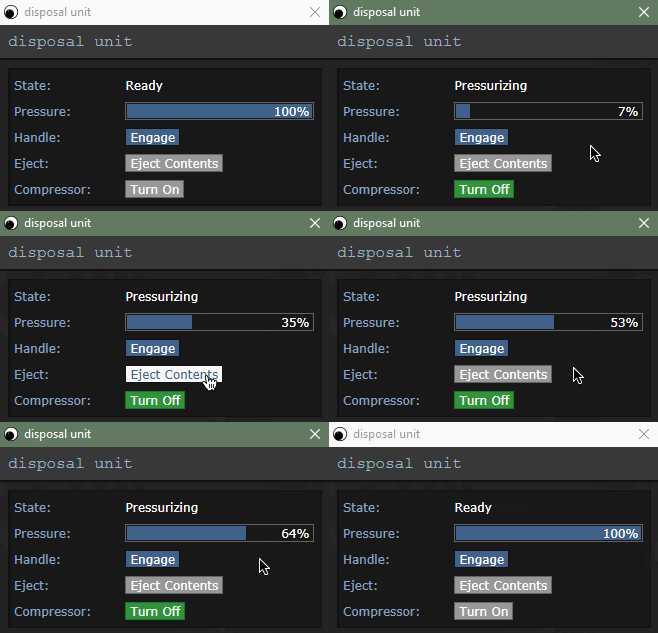
You should have a functional UI at this point. Some additional odds and ends can be discovered throughout `code/modules/recycling/disposal-unit.dm`. For a full diff of the changes made to it, refer to [the original pull request on GitHub](https://github.com/OracleStation/OracleStation/pull/702/files#diff-4b6c20ec7d37222630e7524d9577e230).
### API Reference
#### `/datum/oracle_ui`
The main datum which handles the UI.
##### `get_content(mob/target)`
Returns the HTML that should be displayed for a specified target mob. Calls `oui_getcontent` on the datasource to get the return value. *This proc is not used in the themed subclass.*
##### `can_view(mob/target)`
Returns whether the specified target mob can view the UI. Calls `oui_canview` on the datasource to get the return value.
##### `test_viewer(mob/target, updating)`
Tests whether the client is valid and can view the UI. If updating is TRUE, checks to see if they still have the UI window open.
##### `render(mob/target, updating = FALSE)`
Opens the UI for a target mob, sending HTML. If updating is TRUE, will only do it to clients which still have the window open.
##### `render_all()`
Does the above, but for all viewers and with updating set to TRUE.
##### `close(mob/target)`
Closes the UI for the specified target mob.
##### `close_all()`
Does the above, but for all viewers.
##### `check_view(mob/target)`
Checks if the specified target mob can view the UI, and if they can't closes their UI
##### `check_view_all()`
Does the above, but for all viewers.
##### `call_js(mob/target, js_func, list/parameters = list())`
Invokes `js_func` in the UI of the specified target mob with the specified parameters.
##### `call_js_all(js_func, list/parameters = list()))`
Does the above, but for all viewers.
##### `steal_focus(mob/target)`
Causes the UI to steal focus for the specified target mob.
##### `steal_focus_all()`
Does the above, but for all viewers.
##### `flash(mob/target, times = -1)`
Causes the UI to flash for the specified target mob the specified number of times, the default keeps the element flashing until focused.
##### `flash_all()`
Does the above, but for all viewers.
##### `href(mob/user, action, list/parameters = list())`
Generates a href for the specified user which will invoke `oui_act` on the datasource with the specified action and parameters.
#### `/datum/oracle_ui/themed`
A subclass which supports templating and theming.
##### `get_file(path)`
Loads a file from disk and returns the contents. Caches files loaded from disk for you.
##### `get_content_file(filename)`
Loads a file from the current content folder and returns the contents.
##### `get_themed_file(filename)`
Loads a file from the current theme folder and returns the contents.
##### `process_template(template, variables)`
Processes a template and populates it with the provided variables.
##### `get_inner_content(mob/target)`
Returns the templated content to be inserted into the main template for the specified target mob.
##### `soft_update_fields()`
For all viewers, updates the fields in the template via the `updateFields` javaScript function.
##### `soft_update_all()`
For all viewers, updates the content body in the template via the `replaceContent` javaScript function.
##### `change_page(var/newpage)`
Changes the template to use to draw the page and forces an update to all viewers
##### `act(label, mob/user, action, list/parameters = list(), class = "", disabled = FALSE`
Returns a fully formatted hyperlink for the specified user. `label` will be the hyperlink label, `action` and `parameters` are what will be passed to `oui_act`, `class` is any CSS classes to apply to the hyperlink and `disabled` will disable the hyperlink.
#### `/datum`
Functions built into all objects to support oracle_ui. There are default implementations for most major superclasses.
##### `oui_canview(mob/user)`
Returns whether the specified user view the UI at this time.
##### `oui_getcontent(mob/user)`
Returns the raw HTML to be sent to the specified user. *This proc is not used in the themed subclass of oracle_ui.*
##### `oui_data(mob/user)`
Returns templating data for the specified user. *This proc is only used in the themed subclass of oracle_ui.*
##### `oui_data_debug(mob/user)`
Returns the above, but JSON-encoded and escaped, for copy pasting into the web IDE. *This proc is only used for debugging purposes.*
##### `oui_act(mob/user, action, list/params)`
Called when a hyperlink is clicked in the UI.