 Poojawa
0bca862419
Poojawa
0bca862419
* map tweaks/shuttle engines

* helpers and defines

* global/onclick

* controllers and datums

* mapping

* game folder

* some other stuff

* some modules

* modules that aren't mobs

* some mob stuff

* new player stuff

* mob living

* silicon stuff

* simple animal things

* carbon/ayylmao

* update_icons

* carbon/human

* sounds and tools

* icons and stuff

* hippie grinder changes + tgui

* kitchen.dmi

* compile issues fixed

* mapfix

* Mapfixes 2.0

* mapedit2.0

* mapmerger pls

* Revert "mapedit2.0"

This reverts commit 74139a3cacea10df7aafca06c0a10bd3daf3a481.

* clean up vore folder + 2 hotfixes

* admin ticket refinement

* Blob tweaks and LAZYADD

* LAZYADD IS LAZY

* Magic strings purged

* DEFINES NEED HIGHER PRIORITIES

* Only a sleepless idiot deals in absolute TRUE|FALSE

* u h g

* progress bar fix

* reverts ticket logs

* there's always that one guy

* fixes and stuff

* 2/27 fixes

* game folder stuff

* stats

* some modules again

* clothing stuff

gets vg clothing out of the main files

* everything not mobs again

* mob stuff

* maps, tgui, sql stuff

* icons

* additional fixes and compile errors

* don't need this anymore

* Oh right this isn't needed anymore

* maint bar re-added

* that doesn't need to be here

* stupid events

* wtfeven

* probably makes Travis happy

* don't care to fix the grinder atm

* fixes vending sprites, changes turret

* lethal, not lethals

* overylays are finicky creatures

* lazy fix for bleeding edgy (#252)

* map tweaks/shuttle engines

* helpers and defines

* global/onclick

* controllers and datums

* mapping

* game folder

* some other stuff

* some modules

* modules that aren't mobs

* some mob stuff

* new player stuff

* mob living

* silicon stuff

* simple animal things

* carbon/ayylmao

* update_icons

* carbon/human

* sounds and tools

* icons and stuff

* hippie grinder changes + tgui

* kitchen.dmi

* compile issues fixed

* mapfix

* Mapfixes 2.0

* mapedit2.0

* mapmerger pls

* Revert "mapedit2.0"

This reverts commit 74139a3cacea10df7aafca06c0a10bd3daf3a481.

* clean up vore folder + 2 hotfixes

* admin ticket refinement

* Blob tweaks and LAZYADD

* LAZYADD IS LAZY

* Magic strings purged

* DEFINES NEED HIGHER PRIORITIES

* Only a sleepless idiot deals in absolute TRUE|FALSE

* u h g

* progress bar fix

* reverts ticket logs

* there's always that one guy

* fixes and stuff

* 2/27 fixes

* game folder stuff

* stats

* some modules again

* clothing stuff

gets vg clothing out of the main files

* everything not mobs again

* mob stuff

* maps, tgui, sql stuff

* icons

* additional fixes and compile errors

* don't need this anymore

* Oh right this isn't needed anymore

* maint bar re-added

* that doesn't need to be here

* stupid events

* wtfeven

* probably makes Travis happy

* don't care to fix the grinder atm

* fixes vending sprites, changes turret

* lethal, not lethals

* overylays are finicky creatures
#Map Merger# Before any change to a map, it is good to use the Map Merger tools. In a nutshell, it rewrites the map to minimize differences between different versions of the map (DreamMakers map editor rewrites a lot of the tile keys). This makes the git diff between different map changes much smaller. More recently a new way of laying out the map was invented by Remie, called TGM, this helps to further reduce conflicts in the map files.
This is good for a few reasons
-
Maintainers can actually verify the changes you are making are what you say they are by simply viewing the diff (For small changes at least)
-
The less changes there are in any given map diff, the easier it is for git to merge it without running into unexpected conflicts, which in most cases you have to either manually resolve or require you to remap your changes
However - to do all this is going to require you to put some elbow grease into understanding the map merger tool.
If you have difficulty using these tools, ask for help in #coderbus
#Using the tools#
##1. Install Python 3.5 or greater## If you don't have Python already installed it can be downloaded from: https://www.python.org/downloads/ - make sure you grab the latest python 3, again, it must be 3.5 or greater ##2. PATH Python## This step is mostly applicable to windows users, you must make sure you ask the windows installer to add python to your path, like shown in this example screenshot
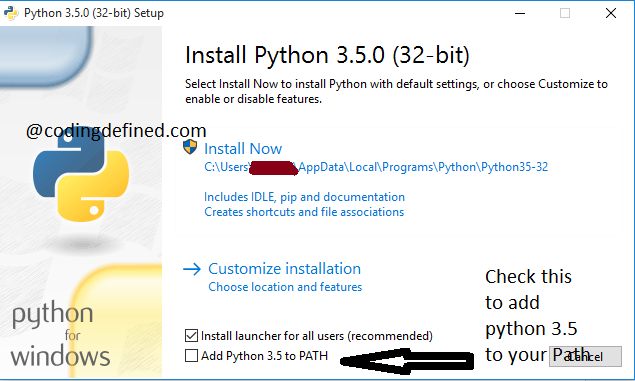
If you have already installed python you may need to manually add it to your path as indicated in this guide ##3. Prepare Maps## Run "Prepare Maps.bat" in the tools/mapmerge/ directory. ##4. Edit your map## Make your changes to the map here. Remember to save them! ##5. Clean map## Run "Run Map Merge - TGM.bat" in the tools/mapmerge/ directory. ##7. Check differences## Use your git application of choice to look at the differences between revisions of your code and commit the result. ##8. Commit## Your map is now ready to be committed, rejoice and wait for conflicts.
#Common pitfalls# Open the map in dreameditor before committing the results of the mapmerger - this can cause dreameditor to resave the map back to dmm, if you're having issues with your map getting stuck in dmm mode, try comitting and pushing the mapmerger changes before reopening in dreameditor.
#Map Conflict Fixer/Helper# The map conflict fixer is a script that can help you fix map conflicts easier and faster. Here's how it works:
###Before using### You need git for this, of course. Make sure your development branch is up to date before starting a map edit to ensure the script outputs a correct fix.
##Dictionary mode## Dictionary conflicts are the easiest to fix, you simply need to create more models to accommodate your changes and everyone elses.
When you run in this mode, if the script finishes successfuly the map should be ready to be commited.
If the script fails in dictionary mode, you can run it again in full fix mode.
##Full Fix mode## When you and someone else edit the same coordinate, there is no easy way to fix the conflict. You need to get your hands dirty.
The script will mark every tile with a marker type to help you identify what needs fixing in the map editor.
After you edit and fix a marked map, you should run it through the map merger. The .backup file should be the same you used before.
###Priorities### In Full Fix mode, the script needs to know which map version has higher priority, yours or someone elses. This important so tiles with multiple area and turf types aren't created.
Your version has priority - In each conflicted coordinate, your floor type and your area type will be used Their version has priority - In each conflicted coordinate, your floor type and your area type will not be used
##IMPORTANT## This script is in a testing phase and you should not consider any output to be safe. Always verify the maps this script produced to make sure nothing is out of place.