 EnterTheJake
a2c7c8e57b
EnterTheJake
a2c7c8e57b
## About The Pull Request

Heretic has received a complete overhaul. This PR touches nearly every
aspect of the antagonist. For readability's sake, not every change is
going to be listed in this pull request.

For the full list of changes please refer to the design doc:
https://hackmd.io/@BiST8PJVRjiwVPY86U3bLQ/B11HyChz1g.

Code by Me, @Xander3359 and @Arturlang

TGUI by @Arturlang

Sprites by OrcaCora and GregorDM

Writing bits by @necromanceranne

### Core changes

- Cross-pathing has been removed. Main knowledge spells are now
exclusive to their path (for the most part).

- For every main knowledge unlocked (save for the robes and the blade
upgrade), Heretics can choose one option from a draft of 3 random side
knowledges (this is a free point).

- Heretics can now purchase side knowledges from a new tab, the
"Knowledge Shop". Side-knowledges have been divided by tier (Stealth,
Defense, Summons, Combat and Main). Tiers are unlocked as you progress
toward your main path.

- Heretics now gain the grasp and mark upgrade immediately, but their
main knowledge choices cost twice as much (except for the first spell,
the robes and the blade upgrade).

- Path specific robes have been introduced! They come with their own set
of quirks.

- Each Path has received a passive ability. This passive is upgraded
when you first create your robes, and again when you complete the Ritual
of Knowledge.

- Paths have been rebalanced as a result of the removal of cross-path
progression. Cosmic and Moon paths have received soft reworks.

- Upon unlocking the path 2nd level or reaching a total of 8 points
worth of knowledge, Heretics will lose the ability to blade break (and
the limit on blades all together).

- Ascension now automatically calls the shuttle with no possibility of a
recall.

- Late join Heretic has been removed.

### New UI
<img width="750" height="635" alt="moon path ui"
src="https://github.com/user-attachments/assets/184ef783-5c9c-48a1-a2f7-4807ca93e990"
/>


### Knowledge shop

<img width="787" height="669" alt="Knowledge shop"
src="https://github.com/user-attachments/assets/3dc89b84-8c70-4d47-b612-54396e3ea6e7"
/>


### Quality of life //General balance changes

- Heretics will now gain X-ray vision for a few seconds when nearby an
eldritch essence (this effect has a cooldown).

- Ritual of knowledge now requires 1 uncommon item instead of 2. You may
now use a stunprod instead of a baton to complete the ritual. Beartraps
have been removed from the list of possible reagents.

- The maximum number of possible sacrifices required to ascend has been
reduced from 6 to 5 while the minimum has been upped to 4.

- Codex Cicatrix no longer requires a special pen to be made.

### Passive abilities

- Heretics now start with a passive ability. You can find what it does
on the path info tab after a path has been selected, and what they gain
when upgraded.

- Crafting your first set of Eldritch robes will bump your passive to
level 2.

- Unlocking the 2nd level will subsequently unlock your "Ritual Of
Knowledge"

- Completing the ritual of knowledge or ascending will net you the final
level.

### Path Specific Robes

- Armorer's Ritual is no longer a side knowledge. Each path will have
their own unique version of the ritual. This is placed after the 2nd
spell in the tree.

- Robes can no longer be destroyed by fire and acid, grant t4 flash
protection (Moth Heretics stay winning) and protection against basic
syringes, to bring them on par with other antagonist's armor sets.

- The recipe to craft the robes is now a set of armor/vest, a mask (any
mask will do now, not just gas masks), plus the unique reagent required
for the blades (Plasma for Cosmic, Trash For Rust, match for Ash and so
on)

- Wearing the robes as a non-heretic may yield some unfortunate
side-effects.

### Moon Path Rework

Moon path  rework.

Moon Heretics gain immunity to brain traumas and slowly regenerate brain
health. Equipping the moon amulette channels its effects through the
moon blade; making it unblockable and cause sanity damage instead of
brute. Ring leader's Rise now summons an army of harmless clones that
explode when attacked; the explosion briefly stuns non-heretics and
cause sanity and brain damage to them. Moon blade can also now be used
when pacified and Moon spells are no longer blocked by regular anti
magic, only mind magic protection.


**Cosmic Path Rework**

Cosmic path has received the biggest batch of changes alongside Moon.
The path has been dead last in ascension and pickrate (less than 5%) for
almost 2 years. It did gain some popularity over the last few months,
reaching the highest ascension rate in the game (12%) while mantaining a
relatively low pickrate.

Cosmic sits in a weird spot, where pretty much every knowledge
surrounding the path is either mediocre or, in the case of the
ascension, dysfunctional. Yet it has maintained a smidge of relevancy
due to how quickly Cosmic heretics can capture and sacrifice targets
thanks to Star Touch.

As a result, the best course of action would be to rebalance the
entirety of the kit; granting the heretic more tools to manipulate space
and dictate the flow of a fight, while lessening their ability to end a
confrontation by instantly sleeping their opponents.

lastly The Star Gazer is now ghost controlled ; And they shoot lazers!

<img width="636" height="451" alt="gazer gag 3"
src="https://github.com/user-attachments/assets/601d6881-c042-4e42-8ce6-ac90cd27848b"
/>


## Why It's Good For The Game


### Ok...but why do we want this?

Again, if you want my full reasoning, please check my doc
https://hackmd.io/@BiST8PJVRjiwVPY86U3bLQ/B11HyChz1g.

To keep it short and concise; Heretic is too complex and unintuitive for
its own good. Too impenetrable for new players and too abusable for
experienced players. This can be chalked up to a lot of poor design
decisions. But ultimately, what I believe being the biggest contributor
to the current status of Heretic is the ability to move into different
paths, also known as "Cross-Pathing".

### Cross Pathing my beloathed.

Cross-pathing, while cool in theory, overcomplicates the antagonist and
overloads them with power. Players dealing with the heretic are
incapable of working out what a given heretic can do. This also leads to
late game heretics having 3 rows Worth of action buttons and virtually
no weakness.

Over the last year, I've often received the understandable but also kind
of unfair accusations of making Heretic too powerful without a clear aim
or purpose.

My goal with the paths I've reworked over the last year (Rust,Void and
Blade) wasn't necessarily to just make them stronger (although that was
also part of the goal, as they were paths that were underperforming),
but for them to have more interactions with the sandbox and to better
live up to the fantasy presented to the player.

If an harbringer of frost gets countered by a cup of coffee, we probably
messed something up.


Unfortunately, the current incarnation of Heretic doesn't really allow
for surgical balance changes to specific paths. Every time a knowledge
gets buffed, we make every path that can easily tap onto that knowledge
stronger by default. It doesn't take a genius to understand why this
system is ultimately unsustainable.

### Blade Breaking

I feel that after a heretic has reached the near peak of their power,
they no longer need the ability to instantly escape any encounter. Check
my doc for my full reasoning.

## Less versatile, more specialized paths.

By removing cross-pathing, we remove a huge maintainability burden from
the antagonist. Paths can now be designed around clearer strengths and
weaknesses. They become easier to balance and less of an headache to
understand for everyone.

It also means we can give paths some needed quality of life quirks
without having to worry how such a change might have a knock-on effect
for other paths.

Ash heretics can finally let loose without dying by their own flames.
Cosmic Heretic can go to space without having to carry a modsuit. Moon
Heretic can use their abilities without fear of one random trauma
ruining their day, and so on.

### What a horrible night to have a curse...., wait how do I curse
people again?

As of right now the heretic tree has quite a hefty amount of trinkets
that pretty much never see use.

Partly because the tree itself is a nightmare to navigate. And partly
because why would anyone set up an elaborate plan or scheme when they
can unleash 2 rows of spell in the span of bunch of seconds.

Heretics mostly gravitate towards powers that push them towards greater,
more potent combat strength. If it doesn't contribute to killing people
quicker, it isn't worth doing for most. And given the opportunity cost
associated for taking those powers, they will remain that way so long as
there are better choices to be poached.

The new draft system encourages Heretics to play more with the tools at
their disposal. If you want to go for a specific combo from the side
path options, you may now do so by tapping into the knowledge shop.

Yes, the shop does include a few knowledges from the other paths. But
these are limited to 1 per path, are very expensive and can only be
unlocked very late into the shift.

## Drip Of the Mansus

The iconic heretic robe is actually sequestered to a side path that is
most easily access by only two paths at a time. Since heretic paths are
being made to be much more specialized, the most obvious way in which
this can be showcased is through an easily
identifiable outfit.

By using the robes, we can both telegraph WHAT heretic you are looking
at, and just how much power they've accumulated and when it is
reasonable to take the kid gloves off and treat them as a genuine
threat. If a heretic is in their
robes, that heretic is now a significantly more prominent danger to the
station.

It also serves as a useful means for gating some of the more powerful
effects of a heretic's path behind the robes, AND enable options for
disarming them of that power should they be captured without making it
something endemic to their mob.

A major problem with heretics is a lack of certainty as to how powerful
they have become. A heretics robes is one of the milestones to help
players dealing with heretics identify that.

### Will this be 100% fair and balanced?

This is a massive overhaul to a pretty complex and bloated antagonist.
I've done my best to show the changes to several maintainers and other
members of the community for their feedback. But at some point we'll
have to see how this behave in the environment to get a feel if
something is over or undertuned. (that's my way of saying, yes this is
likely gonna require a testmerge or two).

What I will say is that I'm not trying to change the core identity of
Heretic.

Heretics should have the upperhand in single encounters early on, be
able to joust a small group of players after they unlock their final
spell, and end the round when they ascend. They're a progression
antagonist. They should retain their payoff as well as pose a danger as
they grow stronger.

But if more players feel like they are more reliably able to play the
antagonist in more varied and interesting ways, rather than the
antagonist largely existing as a measuring stick for 'robustness' due to
its elitist design philosophy, then the rework has been a success. There
should be something for
everyone in the antagonist, as is true for all of our antagonist roles.
Preferences (by Mothblocks)
This does not contain all the information on specific values--you can find those as doc-comments in relevant paths, such as /datum/preference. Rather, this gives you an overview for creating most preferences, and getting your foot in the door to create more advanced ones.
Anatomy of a preference (A.K.A. how do I make one?)
Most preferences consist of two parts:
- A
/datum/preferencetype. - A tgui representation in a TypeScript file.
Every /datum/preference requires these three values be set:
category- See Categories.savefile_key- The value which will be saved in the savefile. This will also be the identifier for tgui.savefile_identifier- Whether or not this is a character specific preference (PREFERENCE_CHARACTER) or one that affects the player (PREFERENCE_PLAYER). As an example: hair color isPREFERENCE_CHARACTERwhile your UI settings arePREFERENCE_PLAYER, since they do not change between characters.
For the tgui representation, most preferences will create a .tsx file in tgui/packages/tgui/interfaces/PreferencesMenu/preferences/features/. If your preference is a character preference, make a new file in character_preferences. Otherwise, put it in game_preferences. The filename does not matter, and this file can hold multiple relevant preferences if you would like.
From here, you will want to write code resembling:
import { Feature } from "../base";

export const savefile_key_here: Feature<T> = {
	name: "Preference Name Here",
	component: Component,

	// Necessary for game preferences, unused for others
	category: "CATEGORY",

	// Optional, shown as a tooltip
	description: "This preference will blow your mind!",
};
T and Component depend on the type of preference you're making. Here are all common examples...
Numeric preferences
Examples include age and FPS.
A numeric preference derives from /datum/preference/numeric.
/datum/preference/numeric/legs
	category = PREFERENCE_CATEGORY_NON_CONTEXTUAL
	savefile_identifier = PREFERENCE_CHARACTER
	savefile_key = "legs"

	minimum = 1
	maximum = 8
You can optionally provide a step field. This value is 1 by default, meaning only integers are accepted.
Your .tsx file would look like:
import { Feature, FeatureNumberInput } from "../base";

export const legs: Feature<number> = {
	name: "Legs",
	component: FeatureNumberInput,
};
Toggle preferences
Examples include enabling tooltips.
/datum/preference/toggle/enable_breathing
	category = PREFERENCE_CATEGORY_NON_CONTEXTUAL
	savefile_identifier = PREFERENCE_CHARACTER
	savefile_key = "enable_breathing"

	// Optional, TRUE by default
	default_value = FALSE
Your .tsx file would look like:
import { CheckboxInput, FeatureToggle } from "../base";

export const enable_breathing: FeatureToggle = {
	name: "Enable breathing",
	component: CheckboxInput,
};
Choiced preferences
A choiced preference is one where the only options are in a distinct few amount of choices. Examples include skin tone, shirt, and UI style.
To create one, derive from /datum/preference/choiced.
/datum/preference/choiced/favorite_drink
	category = PREFERENCE_CATEGORY_NON_CONTEXTUAL
	savefile_identifier = PREFERENCE_CHARACTER
	savefile_key = "favorite_drink"
Now we need to tell the game what the choices are. We do this by overriding init_possible_values(). This will return a list of possible options.
/datum/preference/choiced/favorite_drink/init_possible_values()
	return list(
		"Milk",
		"Cola",
		"Water",
	)
Your .tsx file would then look like:
import { FeatureChoiced, FeatureDropdownInput } from "../base";

export const favorite_drink: FeatureChoiced = {
	name: "Favorite drink",
	component: FeatureDropdownInput,
};
This will create a dropdown input for your preference.
Choiced preferences - Icons
Choiced preferences can generate icons. This is how the clothing/species preferences work, for instance. However, if we just want a basic dropdown input with icons, it would look like this:
/datum/preference/choiced/favorite_drink
	category = PREFERENCE_CATEGORY_NON_CONTEXTUAL
	savefile_identifier = PREFERENCE_CHARACTER
	savefile_key = "favorite_drink"
	should_generate_icons = TRUE // NEW! This is necessary.

/datum/preference/choiced/favorite_drink/init_possible_values()
	return list("Milk", "Cola", "Water")

// New! This proc will get called for every value.
/datum/preference/choiced/favorite_drink/icon_for(value)
	switch (value)
		if ("Milk")
			return uni_icon('drinks.dmi', "milk")
		if ("Cola")
			return uni_icon('drinks.dmi', "cola")
		if ("Water")
			return uni_icon('drinks.dmi', "water")
Then, change your .tsx file to look like:
import { FeatureChoiced, FeatureIconnedDropdownInput } from "../base";

export const favorite_drink: FeatureChoiced = {
	name: "Favorite drink",
	component: FeatureIconnedDropdownInput,
};
Choiced preferences - Display names
Sometimes the values you want to save in code aren't the same as the ones you want to display. You can specify display names to change this.
The only thing you will add is "compiled data".
/datum/preference/choiced/favorite_drink/compile_constant_data()
	var/list/data = ..()

	// An assoc list of values to display names
	data[CHOICED_PREFERENCE_DISPLAY_NAMES] = list(
		"Milk" = "Delicious Milk",
		"Cola" = "Crisp Cola",
		"Water" = "Plain Ol' Water",
	)

	return data
Your .tsx file does not change. The UI will figure it out for you!
Color preferences
These refer to colors, such as your OOC color. When read, these values will be given as 6 hex digits, without the pound sign.
/datum/preference/color/eyeliner_color
	category = PREFERENCE_CATEGORY_NON_CONTEXTUAL
	savefile_identifier = PREFERENCE_CHARACTER
	savefile_key = "eyeliner_color"
Your .tsx file would look like:
import { FeatureColorInput, Feature } from "../base";

export const eyeliner_color: Feature<string> = {
	name: "Eyeliner color",
	component: FeatureColorInput,
};
Name preferences
These refer to an alternative name. Examples include AI names and backup human names.
These exist in code/modules/client/preferences/names.dm.
These do not need a .ts file, and will be created in the UI automatically.
/datum/preference/name/doctor
	savefile_key = "doctor_name"

	// The name on the UI
	explanation = "Doctor name"

	// This groups together with anything else with the same group
	group = "medicine"

	// Optional, if specified the UI will show this name actively
	// when the player is a medical doctor.
	relevant_job = /datum/job/medical_doctor
Making your preference do stuff
There are a handful of procs preferences can use to act on their own:
/// Apply this preference onto the given client.
/// Called when the savefile_identifier == PREFERENCE_PLAYER.
/datum/preference/proc/apply_to_client(client/client, value)

/// Fired when the preference is updated.
/// Calls apply_to_client by default, but can be overridden.
/datum/preference/proc/apply_to_client_updated(client/client, value)

/// Apply this preference onto the given human.
/// Must be overriden by subtypes.
/// Called when the savefile_identifier == PREFERENCE_CHARACTER.
/datum/preference/proc/apply_to_human(mob/living/carbon/human/target, value)
For example, /datum/preference/numeric/age contains:
/datum/preference/numeric/age/apply_to_human(mob/living/carbon/human/target, value)
	target.age = value
If your preference is PREFERENCE_CHARACTER, it MUST override apply_to_human, even if just to immediately return.
You can also read preferences directly with prefs.read_preference(/datum/preference/type/here), which will return the stored value.
Categories
Every preference needs to be in a category. These can be found in code/__DEFINES/preferences.dm.
/// These will be shown in the character sidebar, but at the bottom.
#define PREFERENCE_CATEGORY_FEATURES "features"

/// Any preferences that will show to the sides of the character in the setup menu.
#define PREFERENCE_CATEGORY_CLOTHING "clothing"

/// Preferences that will be put into the 3rd list, and are not contextual.
#define PREFERENCE_CATEGORY_NON_CONTEXTUAL "non_contextual"

/// Will be put under the game preferences window.
#define PREFERENCE_CATEGORY_GAME_PREFERENCES "game_preferences"

/// These will show in the list to the right of the character preview.
#define PREFERENCE_CATEGORY_SECONDARY_FEATURES "secondary_features"

/// These are preferences that are supplementary for main features,
/// such as hair color being affixed to hair.
#define PREFERENCE_CATEGORY_SUPPLEMENTAL_FEATURES "supplemental_features"
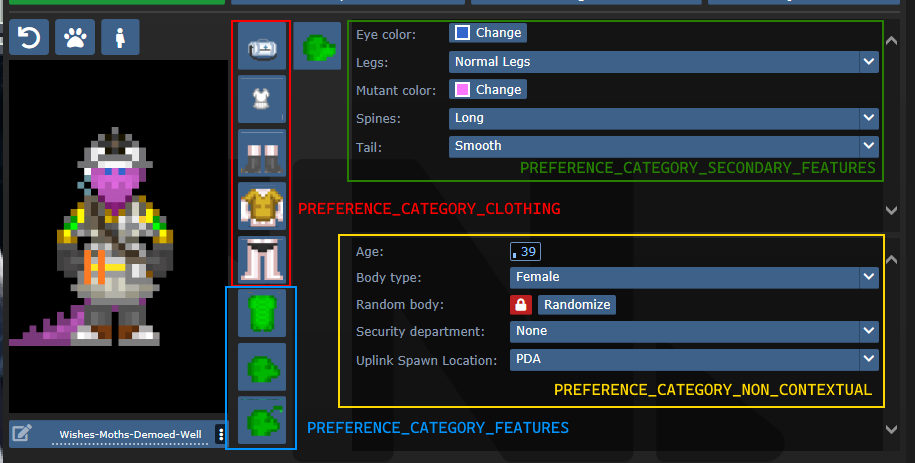
SECONDARY_FEATURES or NON_CONTEXTUAL?
Secondary features tend to be species specific. Non contextual features shouldn't change much from character to character.
Default values and randomization
There are three procs to be aware of in regards to this topic:
create_default_value(). This is used when a value deserializes improperly or when a new character is created.create_informed_default_value(datum/preferences/preferences)- Used for more complicated default values, like how names require the gender. Will callcreate_default_value()by default.create_random_value(datum/preferences/preferences)- Explicitly used for random values, such as when a character is being randomized.
create_default_value() in most preferences will create a random value. If this is a problem (like how default characters should always be human), you can override create_default_value(). By default (without overriding create_random_value), random values are just default values.
Advanced - Server data
As previewed in the display names implementation, there exists a compile_constant_data() proc you can override.
Compiled data is used wherever the server needs to give the client some value it can't figure out on its own. Skin tones use this to tell the client what colors they represent, for example.
Compiled data is sent to the serverData field in the FeatureValueProps.
Advanced - Creating your own tgui component
If you have good knowledge with tgui (especially TypeScript), you'll be able to create your own component to represent preferences.
The component field in a feature accepts any component that accepts FeatureValueProps<TReceiving, TSending = TReceiving, TServerData = undefined>.
This will give you the fields:
act: typeof sendAct,
featureId: string,
handleSetValue: (newValue: TSending) => void,
serverData: TServerData | undefined,
shrink?: boolean,
value: TReceiving,
act is the same as the one you get from useBackend.
featureId is the savefile_key of the feature.
handleSetValue is a function that, when called, will tell the server the new value, as well as changing the value immediately locally.
serverData is the server data, if it has been fetched yet (and exists).
shrink is whether or not the UI should appear smaller. This is only used for supplementary features.
value is the current value, could be predicted (meaning that the value was changed locally, but has not yet reached the server).
For a basic example of how this can look, observe CheckboxInput:
export const CheckboxInput = (
	props: FeatureValueProps<BooleanLike, boolean>,
) => {
	return (
		<Button.Checkbox
			checked={!!props.value}
			onClick={() => {
				props.handleSetValue(!props.value);
			}}
		/>
	);
};
Advanced - Middleware
A /datum/preference_middleware is a way to inject your own data at specific points, as well as hijack actions.
Middleware can hijack actions by specifying action_delegations:
/datum/preference_middleware/congratulations
	action_delegations = list(
		"congratulate_me" = PROC_REF(congratulate_me),
	)

/datum/preference_middleware/congratulations/proc/congratulate_me(list/params, mob/user)
	to_chat(user, span_notice("Wow, you did a great job learning about middleware!"))

	return TRUE
Middleware can inject its own data at several points, such as providing new UI assets, compiled data (used by middleware such as quirks to tell the client what quirks exist), etc. Look at code/modules/client/preferences/middleware/_middleware.dm for full information.
Antagonists
In order to make an antagonist selectable, you must do a few things:
- Your antagonist needs an icon.
- Your antagonist must be in a Dynamic ruleset. The ruleset must specify the antagonist as its
antag_flag. - Your antagonist needs a file in
tgui/packages/tgui/interfaces/PreferencesMenu/antagonists/antagonists/filename.ts. This file name MUST be theantag_flagof your ruleset, with nothing but letters remaining (e.g. "Nuclear Operative" ->nuclearoperative). - Add it to
special_roles.
Creating icons
If you are satisfied with your icon just being a dude with some clothes, then you can specify preview_outfit in your /datum/antagonist.
Space Ninja, for example, looks like:
/datum/antagonist/ninja
	preview_outift = /datum/outfit/ninja
However, if you want to get creative, you can override /get_preview_icon(). This proc should return an icon of size ANTAGONIST_PREVIEW_ICON_SIZExANTAGONIST_PREVIEW_ICON_SIZE.
There are some helper procs you can use as well. render_preview_outfit(outfit_type) will take an outfit and give you an icon of someone wearing those clothes. finish_preview_outfit will, given an icon, resize it appropriately and zoom in on the head. Note that this will look bad on anything that isn't a human, so if you have a non-human antagonist (such as sentient disease), just run icon.Scale(ANTAGONIST_PREVIEW_ICON_SIZE, ANTAGONIST_PREVIEW_ICON_SIZE).
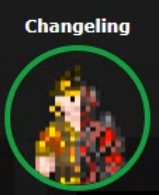
For inspiration, here is changeling's:
/datum/antagonist/changeling/get_preview_icon()
	var/icon/final_icon = render_preview_outfit(/datum/outfit/changeling)
	var/icon/split_icon = render_preview_outfit(/datum/outfit/job/engineer)

	final_icon.Shift(WEST, ICON_SIZE_X / 2)
	final_icon.Shift(EAST, ICON_SIZE_X / 2)

	split_icon.Shift(EAST, ICON_SIZE_X / 2)
	split_icon.Shift(WEST, ICON_SIZE_X / 2)

	final_icon.Blend(split_icon, ICON_OVERLAY)

	return finish_preview_icon(final_icon)
...which creates:
Creating the tgui representation
In the .ts file you created earlier, you must now give the information of your antagonist. For reference, this is the changeling's:
import { Antagonist, Category } from "../base";
import { multiline } from "common/string";

const Changeling: Antagonist = {
	key: "changeling", // This must be the same as your filename
	name: "Changeling",
	description: [
		multiline`
      A highly intelligent alien predator that is capable of altering their
      shape to flawlessly resemble a human.
    `,

		multiline`
      Transform yourself or others into different identities, and buy from an
      arsenal of biological weaponry with the DNA you collect.
    `,
	],
	category: Category.Roundstart, // Category.Roundstart, Category.Midround, or Category.Latejoin
};

export default Changeling;
Readying the Dynamic ruleset
You already need to create a Dynamic ruleset, so in order to get your antagonist recognized, you just need to specify antag_flag. This must be unique per ruleset.
Two other values to note are antag_flag_override and antag_preference.
antag_flag_override exists for cases where you want the banned antagonist to be separate from antag_flag. As an example: roundstart, midround, and latejoin traitors have separate antag_flag, but all have antag_flag_override = ROLE_TRAITOR. This is because admins want to ban a player from Traitor altogether, not specific rulesets.
If antag_preference is set, it will refer to that preference instead of antag_flag. This is used for clown operatives, which we want to be on the same preference as standard nuke ops, but must specify a unique antag_flag for.
Updating special_roles
In code/__DEFINES/role_preferences.dm (the same place you'll need to make your ROLE_* defined), simply add your antagonist to the special_roles assoc list. The key is your ROLE, the value is the number of days since your first game in order to play as that antagonist.