This adds throw_alert() and /obj/screen/alert, a system that allows you
to do custom hud alerts for any variety of things from "You're too
cold!" to mecha status indicators for the pilot.

There's quite a few things that actually got replaced; the
fire/oxy/tox/co2 alerts are all now just alerts, as is nutrition. The
xenochimera feral indicator would probably be a good candidate for
conversion, but I didn't touch it in this PR. There's also a number of
new alerts, such as blindness, highness, legcuffed, buckled, handcuffed,
and probably some more I missed; read code/_onclick/hud/alert.dm and see
for yourself!

Additionally, a number of tweaks have been done to resisting code, to
make it so that there's an indicator when you're buckled or handcuffed,
and can just click the alert to start resisting. This includes a
refactor that combines the logic for lockers, holders, micros
escaping from shoes, and struggling in a gut all into one proc, called
container_resist(). This means that vore bellies actually no longer need
the resist override, but it's been left in place just in case someone
finds something else they want to use it for.

Also, the health and internals indicator got moved down one tile each.
Needed room for the alerts. If we add the oxygen tank action buttons
from /tg/ and remove the internals indicator, the health indicator can
go back where it was originally.
There's no longer a weird horrible frame
Space now renders (at the cost of some kinda weird lookin stuff in the multicam room but w/e)
Fixed an exploit involving getting AI eyes qdel'd that disabled static for all other eyes - this would allow you to see into maintenance, for instance, completely bypassing all AI limitations. HUGE exploit.
Fixes the undefined icon resulting in this:
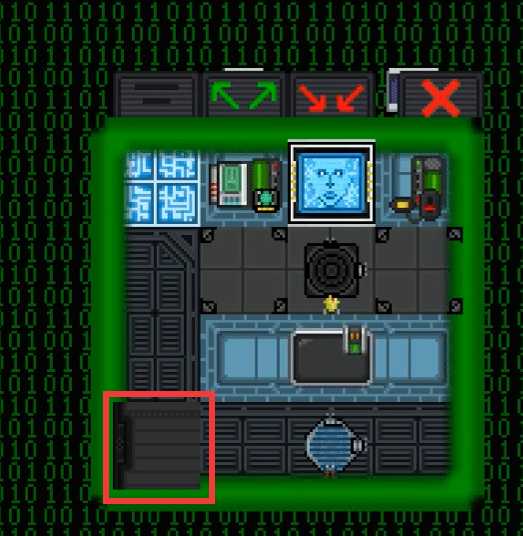
Fixes the two buttons being misaligned with the UI.
Fixes double-clicking inside the AI PiP room teleporting the AI Eye out to the room and completely breaking the view. Do note that double-clicking no longer works at all inside the multi-cam room, as a tradeoff for completely preventing UI breaks.
This adds a system for picture-in-picture UI windows using
vis_contents. Essentially, it allows you to make UI windows that show an area of turfs. It also refactors how cameranet visibility works.
Currently, this is implemented on AIs. They gain two new UI buttons - "Enter Multicam Mode", and "Create Multicam". When they go into Multicam Mode, they see a background of animated binary numbers, and they are allowed to create an infinite amount of these picture in picture windows, which subsequently creates an AI Eye for each one. They are able to control each AI eye individually, by first clicking on the PIP window to select it as "active" and then using the normal arrow key controls. The PIP windows can be freely resized and moved around the area.
You can control everything inside these PIP windows EXACTLY the same as you can using a traditional AI Eye, as demonstrated below.
For admins, there is a config option to disable PIP entirely - simply set `var/multicam_allowed = TRUE` to FALSE if you wish to disable it from being used. (Please be reasonable.) <3
You can see an example of how this works here:

AI Multicam functionality.
Do note that if the lightbulb in the AI core is busted, the multicam room is dark(er) than it would be, but you can still see your camera windows just fine. (I'll probably fix this later.) It only affects the "matrix" backdrop, the PIP windows are still fine.
This has been runtime-tested with the latest `master` revision and produces 0 runtimes, and has no noticeable impact on server CPU usage.
Chompstation port is here!
Port of https://github.com/VOREStation/VOREStation/pull/7752, YW port not incoming atm as they can fetch from upstream and frankly dog has done enuf ports for now x.x
The body zone selector now indicates which body part you are about to select when hovered over, and the hover inventory indicator basically shows where you are trying to put an item, and then shows an item ghost in red or green, giving visual feedback as to if that item will go in the slot or not.
Gifs of this in action:

Body Selection parts.

Inventory Icon Overlays!
Credit goes to @ShadowLarkens for original port to Paradise and assistance with port to Virgo. Downstream port of https://github.com/VOREStation/VOREStation/pull/7748
- A note on `code/game/objects/items/weapons/storage/internal.dm`, VSCode automatically corrected the line endings, hence the massive filediff. The only practical changes are the addition of `disable_warning = 0`
The body zone selector now indicates which body part you are about to select when hovered over, and the hover inventory indicator basically shows where you are trying to put an item, and then shows an item ghost in red or green, giving visual feedback as to if that item will go in the slot or not.
Gifs of this in action:
 Body Selection parts.

Inventory Icon Overlays!
Credit goes to @ShadowLarkens for original port to Paradise and assistance with port to Virgo. Sending to Polaris ASAP.
- A note on `code/game/objects/items/weapons/storage/internal.dm`, VSCode automatically corrected the line endings, hence the massive filediff. The only practical changes are the addition of `disable_warning = 0`
- Port based on Baystation's implementation and customized for our code and usages.
- Switched space icon_state permutation to a "dust" overlay that is permutated the same way. As an overlay, the dust can be *above* the parallax planes. Space turfs are now white to allow skybox to BLEND_MULTIPLY onto them.
- Added skybox hud effect that replaces background space turfs with an image moved to create a parallax effect.
- Added skybox subsystem to generate and manage skybox parallax images, and lots of images for it!




